Landscaping & Arborist Time Tracking: Crew Hours by Property, GPS Clock-Ins and Slow-Season PTO
How landscaping and arborist companies track crew hours by property, stop shared-phone clock-ins, log mileage between jobs, and keep slow-season PTO from looking like missing staff.

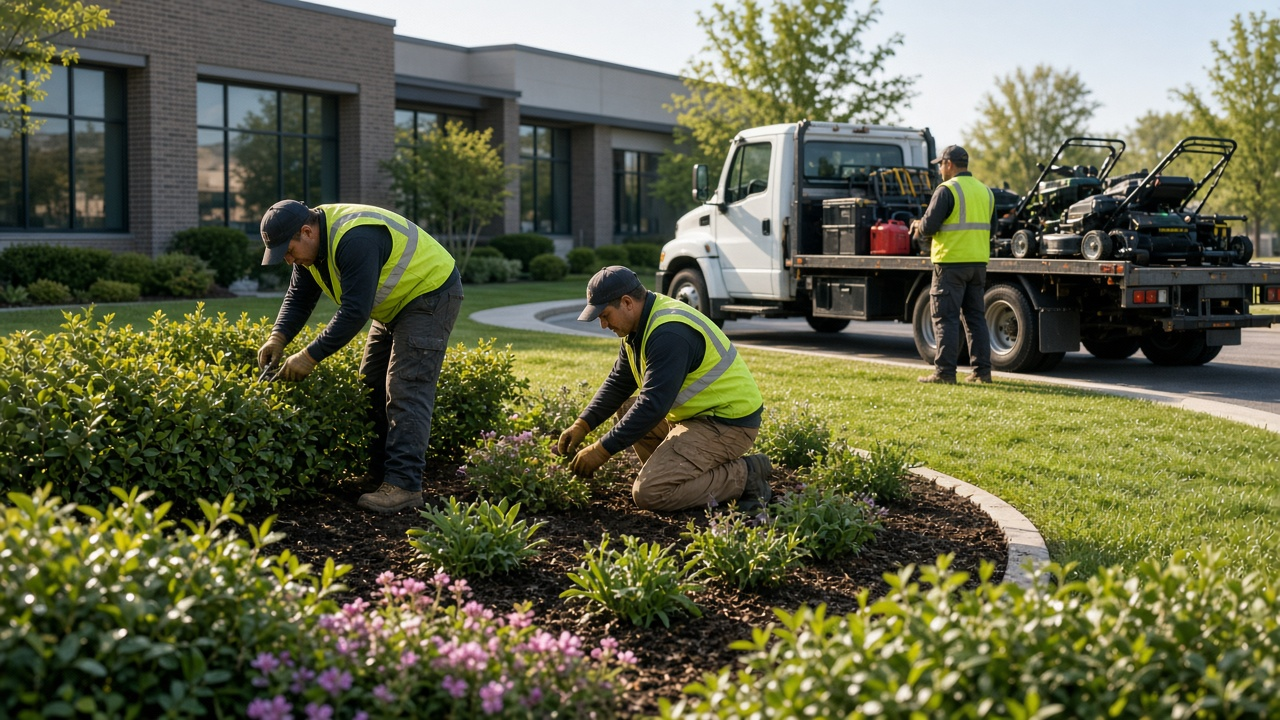
Clock in at the property, track hours by lawn, and keep slow-season PTO visible.
Monday morning at the yard and half your mowing crew is already in the trucks. Nobody clocked in. The foreman says they will "do it later." By Friday the later never happened, so you are reconstructing a week of lawns from texts, gate codes, and whoever remembered which property they finished. Payroll is guessing again — and the commercial account that pays for weekly mows looks identical to the residential stop that only needed edging.
That blur is expensive. Landscape and arborist companies bounce across dozens of properties in a day. Tree crews spend long blocks on one removal while mow crews hit eight lawns before lunch. If your timekeeping is a shared shop phone or a paper pad in the cab, you cannot tell which property ate the overtime, whether someone clocked in from the curb instead of the gate, or who is already on winter leave when spring bids land. You need hours by property, real per-person clock-ins, and a leave calendar that does not look like missing staff.
This guide is for landscaping companies, lawn-care crews, arborists, and grounds teams who need clean field hours without a corporate HR stack. We will cover multi-property clock-in, geofence expectations, mileage between stops, job codes for mow vs tree work, slow-season PTO, and how time tracking software fits a crew-based outdoor business. Product details match what TimeOff Manager ships — nothing invented. For industry context see also time tracking for landscaping crews.
Why landscaping and arborist time tracking breaks down
General construction apps assume one job site and a superintendent with a trailer. Your day is a route. A mow crew may hit a HOA, two commercial parking strips, and a handful of residential lawns before the trucks return. An arborist crew may spend the morning on a large removal, run chips to the dump, then finish a prune across town. The same office still has to approve vacation when the season slows and catch overtime when summer days stretch past dinner.
Common failure modes we hear from owners and ops managers:
- One shop phone clocks the whole crew in at the yard before anyone reaches the first lawn — then everyone looks "on the clock" while still in traffic.
- Paper or group-chat hours collapse commercial and residential properties into one blob.
- Crew leads clock in from the truck at the curb; GPS says they were close enough, so the property never gets a clean on-site start.
- Mileage between lawns and tree jobs lives in a notebook nobody trusts at month end.
- Mow vs prune vs tree removal vs install all look like the same "field" hours on the timesheet.
- Winter PTO requests show up as empty calendars that look like no-shows instead of approved leave.
- Long summer days create overtime you only notice after the checks are wrong.
If that sounds familiar, you do not need another spreadsheet. You need per-person clock-in at the property, work locations you can review, and leave that shows as leave.
What good looks like for a landscaping or arborist company
- Each crew member clocks in on their own signed-in phone at the property — not one shared yard clock for the whole truck.
- Optional face check plus GPS at clock-in so managers can trust who started where.
- Work locations for each commercial and residential property so hours do not blur across accounts.
- Optional geofence so curb or truck clock-ins are easy to spot against the property boundary.
- Mileage logged between lawns, tree jobs, and the dump — live GPS or a manual trip.
- Work activities for mow, edge, prune, tree removal, plant install, and chipper runs.
- Managers approve leave and missed clock-ins before payroll, with a team coverage calendar for slow season.
- Overtime is visible mid-week while you can still rebalance routes, not after payday.
- Exports go to your bookkeeper without retyping a week of property stops.
TimeOff Manager is built for that SMB pattern: mobile clock-in, optional kiosk clock-in at the yard, leave requests, overtime visibility, and payroll-friendly timesheets — not a 50-module ERP. Pair it with PTO software workflows so winter leave does not look like abandoned shifts.
Stop the shared shop-phone clock-in
The classic landscaping shortcut is one company phone that "clocks the crew in" before the trucks leave the yard. That creates two problems. First, everyone appears working while they are still commuting to the first property. Second, you lose who actually arrived, who rode along, and who stayed on a different stop.
Use TimeOff Manager Pro — the signed-in phone app — so each employee clocks in for themselves. At clock-in, Pro can capture a face check plus GPS. That is different from the Kiosk, which is a PIN on a shared tablet for a fixed spot like the yard office. Do not conflate them: field crews should use Pro on their phones; the yard can still keep a kiosk for office or shop staff who start at the same address every day. Read the employee mobile app help and the kiosk overview so your leads know which tool belongs where.
Managers can review location context on timesheets and, when needed, the live staff map (managers and admins only — employees do not see that map). See live map admin. GPS history retention is about 10 calendar days, so review promptly — do not assume forever.
If someone forgets to clock in at a property or forgets to clock out after a long tree job, they submit a fix request instead of quietly rewriting history. The flow is documented under forgot clock-in.
Hours by property: work locations and geofences
Landscaping payroll fights start when commercial HOA hours and residential one-offs look the same. Set up a work location for each property you care about — campus lawns, retail strips, HOA common areas, and the residential stops that justify the drive. Admins manage those under work locations; optional geofence settings help you see whether a clock-in happened at the property or from the street. Details: work locations admin.
Geofence is not magic. It will not replace a foreman who knows the route. It will make curb clock-ins and "I was basically there" stories harder to defend when you review the day. Pair work locations with clear crew rules: clock in at the gate or the property entrance, not at the previous stop, and clock out before you roll to the next lawn.
This is also how you stay distinct from general construction or janitorial trackers. Construction posts often focus on one site with trades; janitorial posts focus on client buildings after hours. Your angle is multi-property outdoor routes with tree jobs mixed in — related reading: construction crew time tracking and contractor and subcontractor crew time tracking.
Mileage between lawns, tree jobs and the dump
Your trucks burn miles between properties, nurseries, and chipper dumps. If you reimburse mileage or just need proof of route cost, have crew leads log trips in the app instead of dumping odometer photos on the office manager. Employees can run a live GPS trip on /mileage or enter a manual trip on /mileage/create. Managers approve from the same attention patterns they already use for leave. Help: my mileage, submit a trip, and mileage admin.
A coded work activity plus a mileage entry gives you both the hour and the drive without a second app. That matters when a "quick" chipper run ate half the afternoon.
Job codes: mow, prune, tree removal, install
Optional work activities let employees pick a code when they clock in or during the day. Typical set for a landscaping and arborist shop:
- Mow / edge / blow
- Bed maintenance / mulch
- Prune / hedge
- Tree removal
- Tree prune / cabling
- Plant install / hardscape assist
- Chipper / dump run
- Irrigation check / service
- Yard / equipment maintenance
Admins configure activities under work activities. Employees then allocate time without texting the office a novel after every stop. See work activities admin.
Arborist days rarely look like mow days. Tree removals run longer, need more equipment staging, and often include a dump loop. Mow crews stack short property stops. Job codes make those shapes visible so you can price commercial contracts and residential tree bids with real hours instead of hope.
Employee vs manager: who does what
Crew members and leads clock in and out on Pro at the property, pick a work activity when you require it, log mileage between stops, request vacation or sick leave, check their schedule, and fix a missed clock-in when it happens. Leave for employees is covered in my leave requests. Timesheets: employee timesheet overview. Schedules: my schedule.
Owners, ops managers, and office staff approve leave, review timesheets, watch overtime, confirm coverage before promising spring installs, and clear missed clock-ins before payroll. Leave approvals sit in the admin requests queue (manage leave requests). Timesheet review: manager timesheet overview. Overtime rules and visibility: overtime admin and the practical PTO, clocks, and overtime guide. Approvals also surface in the dashboard approval center at /dashboard#approval-center; leave-only work can stay on /admin/requests.
Keep payroll day adjustments separate from a simple forgotten clock-out — the product treats those as different flows on purpose. See payroll day adjustments when you need that path.
Practical setup steps for landscaping and arborist crews
- Create the company and invite the roster. Add mow crews, arborists, leads, and office staff. Use employees admin.
- Add work locations for the properties that matter. Start with commercial accounts and high-volume residential routes. Turn on geofence where you want curb vs on-property clarity — work locations.
- Decide Pro vs kiosk. Field crews use the signed-in mobile app. Keep kiosk for the yard office if people start there every day.
- Turn on work activities that match how you quote: mow, prune, tree removal, install, dump runs.
- Configure leave types you actually grant — vacation, sick, unpaid, weather day if you use one — in leave types admin. Do not invent accrual math the product does not show; track balances the way you already promise them, and use requests plus the calendar for coverage.
- Load holidays you observe via holidays admin.
- Train mileage on week one. Leads log trips between properties instead of saving receipts for Friday.
- Walk the first payroll week slowly. Managers review daily/weekly timesheets, clear missed clock-ins, then export for the bookkeeper. Accounting export patterns are covered in accounting sync — export to payroll or accounting; do not assume a named Gusto, ADP, or QuickBooks live sync.
- Use the team calendar before slow season and before spring surge. Open coverage so winter leave is approved leave, not empty mystery days. Help: team timeline calendar (coverage view also lives at /calendar?who=team&calendar_view=coverage).
Slow-season PTO vs looking like missing hours
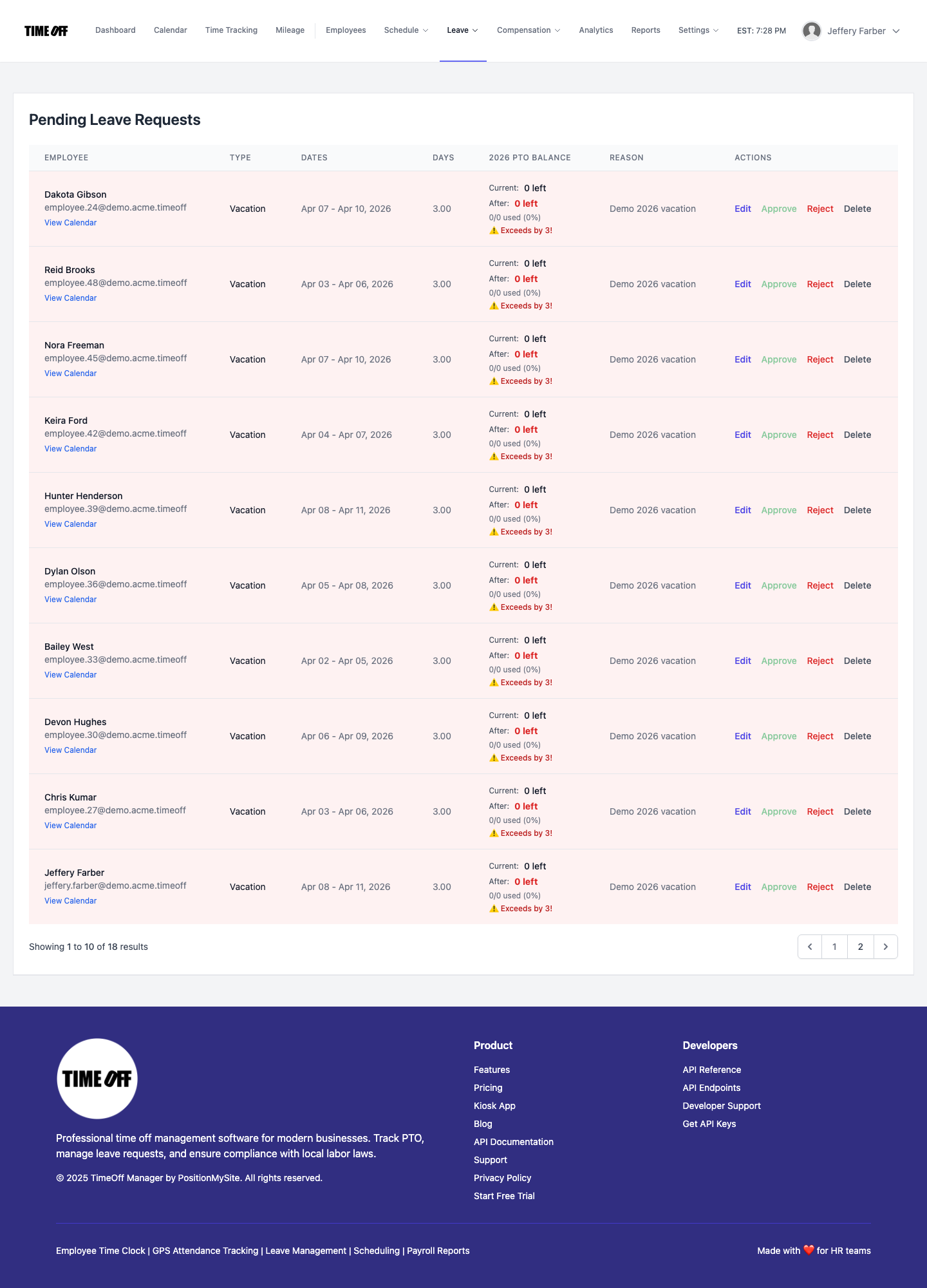
Landscape payroll looks "broken" every winter if leave is informal. Someone takes two weeks off, the calendar is blank, and a new office person thinks the crew ghosted. Require leave requests in the app. Managers approve against the coverage calendar. Employees see their own requests; admins see the company picture. That way slow-season PTO reads as approved time off — not missing hours.
Pair leave with simple staffing rules you already use: at least one climbing-qualified arborist available for emergency calls, mow leads staggered so commercial accounts stay covered when weather opens a window, and no entire install crew off the week a big plant install is booked. The software will not invent those rules, but it will show conflicts if people request time off in the system. Related product pages: PTO software and leave summary tools in leave summary admin.
Overtime after long summer days — not legal advice
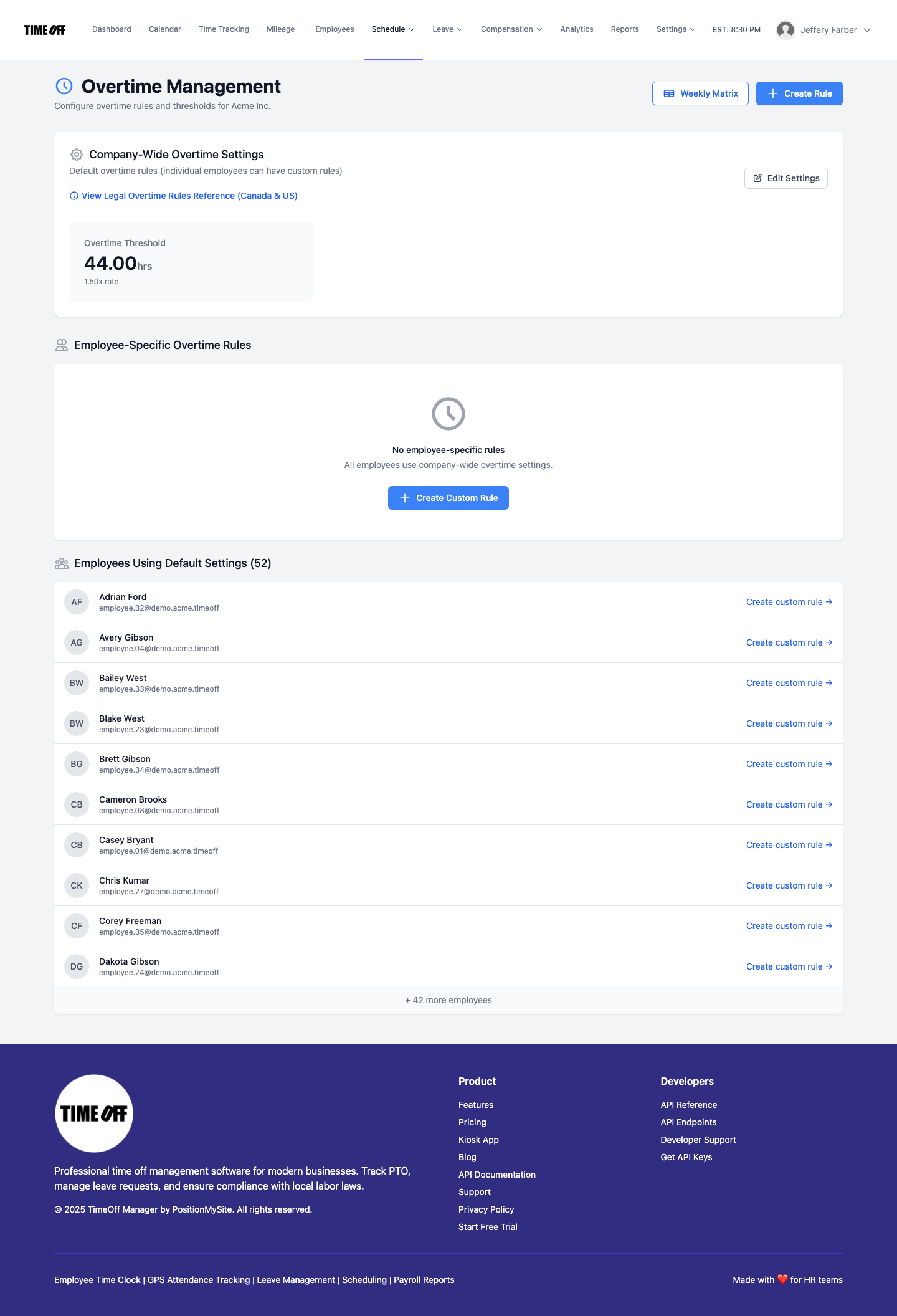
This is not legal advice. Landscaping and arborist crews in the US often run long daylight hours in peak season. Federal overtime under the Fair Labor Standards Act generally treats non-exempt employees as owing time-and-a-half after 40 hours in a workweek — see the US Department of Labor overview at dol.gov overtime. Some states add daily overtime rules. Canadian provinces set their own hours-of-work and overtime standards; check your provincial employment standards site for the company's location.
What the software should do for you:
- Show weekly hours clearly so overtime is visible before payday.
- Keep an audit trail when someone fixes a missed clock-in.
- Separate leave days from worked hours so PTO does not silently erase overtime context.
Crew leads sometimes think they are "salary" when they are not. If someone is non-exempt, track the hours — do not paper over a 12-hour removal day with a handshake. Use reports and analytics when you want a wider view: reports admin and analytics admin.
Try TimeOff Manager with your crews
New companies get 1 year free to run real property hours with your team. A full year to try it with your crew — get comfortable before you pay. A card is required to start; the yearly plan price is charged on the anniversary only if you continue. After the year: Starter (1–20 people) $180/yr, Growth (21–50) $300/yr, Scale (51–1,000) $479.90/yr or $49.99/mo.
Start your free year — register your company — or open the live demo if you want to click around first. Industry page: landscaping time tracking.
FAQ
Can each landscaper clock in on their own phone at the property?
Yes. Use TimeOff Manager Pro, the signed-in mobile app, so every crew member clocks in and out themselves with face check and GPS context. That replaces the shared shop-phone shortcut.
How do we keep commercial property hours separate from residential stops?
Create work locations for the properties you care about and have crews clock in against those locations. Optional geofence settings help you spot curb vs on-property starts.
Can we track mileage between lawns and tree jobs?
Yes. Employees can log a live GPS trip or a manual trip. Managers approve mileage the same way they review leave and timesheet fixes.
How do job codes work for mow vs tree removal?
Turn on work activities and create codes for mow, prune, tree removal, install, and dump runs. Employees select the activity so job costing is not a Friday guess.
What if someone forgets to clock in at a property?
They submit a forgot clock-in request. A manager reviews and approves it so the correction stays visible.
How do we handle winter PTO without empty mystery days on the calendar?
Require leave requests in the app and approve them against the team coverage calendar. Approved leave shows as leave — not as missing hours.
Does TimeOff Manager sync to Gusto, ADP, or QuickBooks automatically?
No claim of named live sync. Track time and leave in TimeOff Manager, then export clean hours for payroll or your bookkeeper.
Is the live map available to crew members?
No. The live map is for managers, HR, and admins. Crews clock in on mobile or kiosk; they do not get the map view.