See where they clocked in. See who's on the map.
Every clock-in stores GPS. A geofence can require them to be on site. While they are signed in and on shift, consented staff show on a live map — so you are not calling around to find the crew.
From $15/mo billed annually. Starter $15/mo · Growth $25/mo · Scale $49.99/mo.
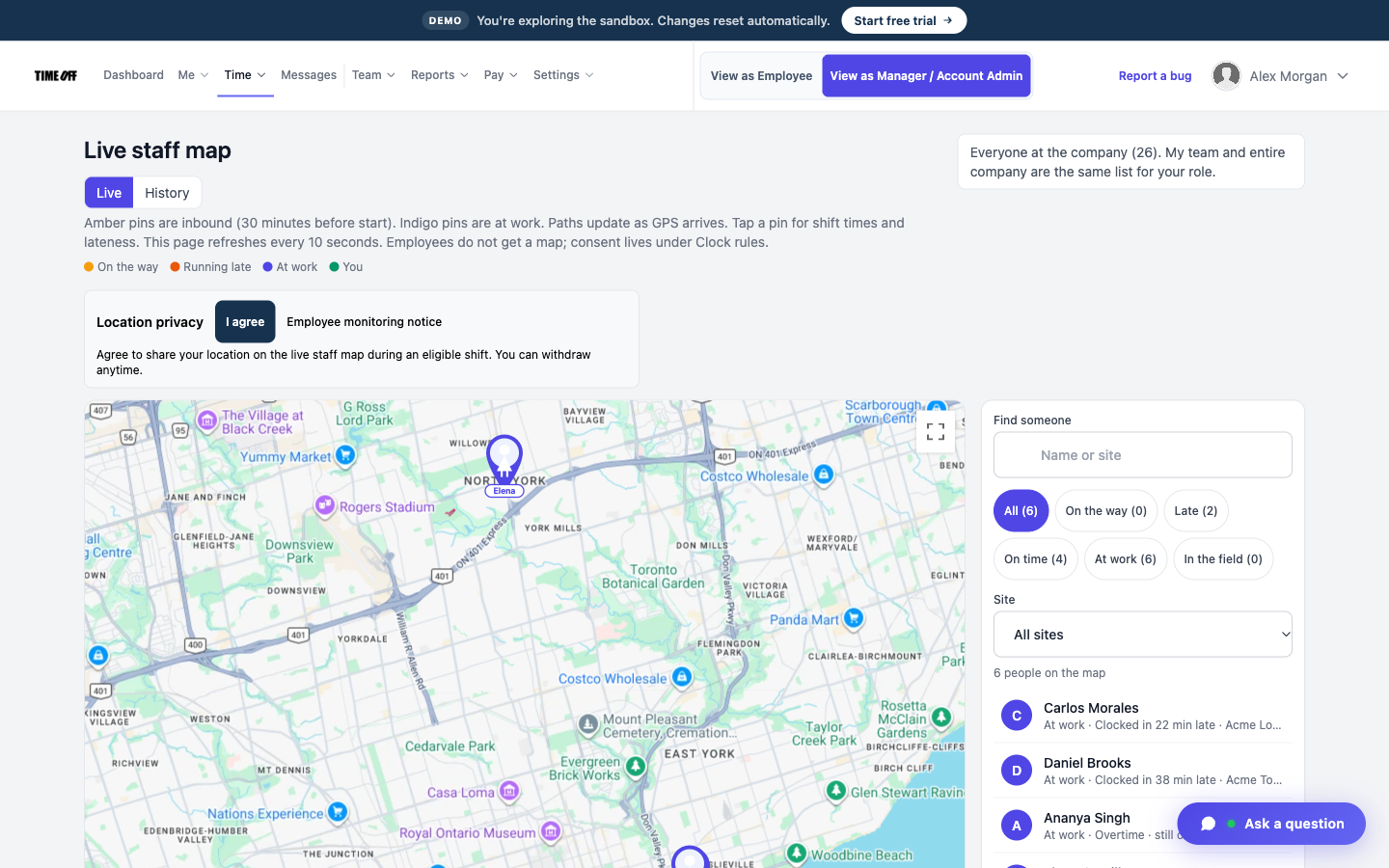
Who is signed in and still on the job
GPS on the clock-in
When someone clocks in or out, the app saves the GPS point with the time. Open that clock-in later and see where it happened.
This is the record for the timesheet — not a tracker that follows them home after they clock out. Field crews use the TimeOff Manager Pro app; shops can use the PIN kiosk. See clock in software for phone, tablet, and computer options.
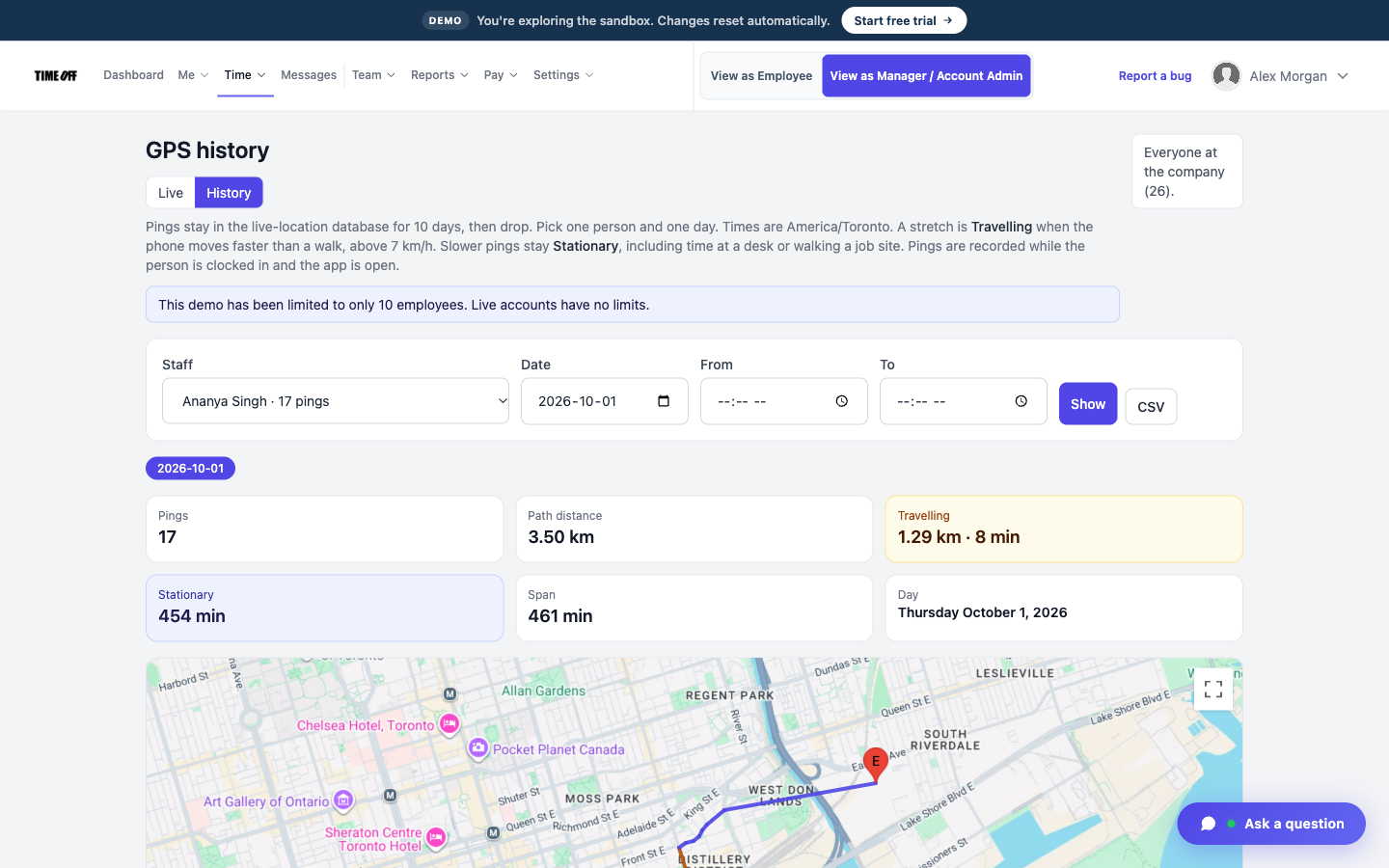
Where a clock-in happened
Geofence at the job site
Save each office or job as a work location and draw a circle around it. When the geofence is on, they can only clock in inside that circle.
Sales reps and drivers who start on the road can be allowed to clock in from anywhere. You pick the rule per location, not one setting for the whole company.
Typical setup
- Yard or shop — must be inside the fence to clock in.
- Active job — circle around the site; clock-in fails from the house.
- Traveling role — GPS is saved, geofence stays off.
Live map of signed-in staff
Managers see consented people who are on the way or at work during the live-location window. The pin stays at the last GPS point until they clock out.
Live map is a company toggle plus each person’s consent. It is not the same as GPS-on-clock-in. You can require a geofence and leave the live map off, or the other way around. Read the employee monitoring notice before you turn it on.
Signed in, still on shift
GPS clock-in vs live map
| GPS on clock-in | Live staff map | |
|---|---|---|
| When it runs | At clock-in and clock-out | While signed in / on shift |
| What you see | Where that event happened | Who is on the way or at work now |
| Geofence | Can block clock-in off site | Does not replace the geofence |
| Consent | Company clock rule | Company toggle plus in-app consent |
| Stops when | The event is saved | They clock out |
Built for crews that move
Same GPS clock-in and live map on every industry page. Time off stays in the same app — see PTO software.
Simple pricing
14-day free trial, then one price for your team size. GPS clock-in, geofence, live map, and time off are on every plan.
Starter
1–20 users
$15/mo
$180 billed annually after trial
Every plan includes
- PTO, sick, and personal leave with accruals
- Approvals inbox and a shared team calendar
- GPS clock-in, geofence, PIN kiosk, and offline clock-in that syncs later
- Timesheets, overtime, and hours you can send to payroll
- Mileage, schedules, and US / Canada holidays
- Mobile apps, REST API, and MCP for ChatGPT and Claude
- 14-day free trial — no charge until it ends
Most teams start here
Growth
21–50 users
$25/mo
$300 billed annually after trial
Every plan includes
- PTO, sick, and personal leave with accruals
- Approvals inbox and a shared team calendar
- GPS clock-in, geofence, PIN kiosk, and offline clock-in that syncs later
- Timesheets, overtime, and hours you can send to payroll
- Mileage, schedules, and US / Canada holidays
- Mobile apps, REST API, and MCP for ChatGPT and Claude
- 14-day free trial — no charge until it ends
Scale
51–1,000 users
$49.99
per month after trial
or $479.90/year (20% off $599.88)
US and Canada teams pay by headcount — not per location, and not per module.
Every plan includes
- PTO, sick, and personal leave with accruals
- Approvals inbox and a shared team calendar
- GPS clock-in, geofence, PIN kiosk, and offline clock-in that syncs later
- Timesheets, overtime, and hours you can send to payroll
- Mileage, schedules, and US / Canada holidays
- Mobile apps, REST API, and MCP for ChatGPT and Claude
- 14-day free trial — no charge until it ends
GPS time clock questions
What is a GPS time clock?
A GPS time clock saves the employee’s location with the clock-in and clock-out, not just the time. You can open any clock-in and see where it happened on a map, instead of hoping they were actually at the job.
How is that different from the live staff map?
The GPS on the clock-in is a point in time: where they were when they started or finished. The live map shows people who are signed in and still on shift, updating while the shift is open. You can use one, the other, or both. They are separate settings.
What is a geofence?
A geofence is a circle you draw around a work location. When it is on, people can only clock in once they are inside that circle — not from home, and not from a parking lot down the street. People who travel for work can be allowed to clock in from anywhere.
Do you track employees all day?
No. Live location is off unless the company turns it on, and each person also has to consent in the app. Sharing can start 30 minutes before a scheduled shift and stops when they clock out. Location is stored separately from hours you send to payroll.
Can field crews clock in without cell signal?
Yes, on TimeOff Manager Pro and TimeOff Kiosk. The clock-in is saved on the device with the time, GPS, and photo, then sent when the network returns. Company rules still apply to what was captured at tap time.
Does it run payroll?
No. TimeOff Manager tracks hours and time off. A manager approves the hours, then you download them as Excel or CSV, or send them to QuickBooks Online or FreshBooks, and run payroll the way you already do.
How much does it cost?
TimeOff Manager starts at $15/mo billed annually after a 14-day free trial. Starter is $15/mo for 1–20 people, Growth is $25/mo for 21–50, and Scale is $49.99/mo for larger teams. GPS clock-in, geofence, and the live map are on every plan.
Approved time off can sync to Google Calendar and Microsoft Outlook. Approved hours can go to QuickBooks Online or FreshBooks.


You can also ask ChatGPT, Claude, or Cursor questions about your account, like who is out next week, through Model Context Protocol.

See the crew on a map, not in a group text
From $15/mo billed annually after a 14-day trial. Starter $180/year (1–20 users), Growth $300/year (21–50), Scale $49.99/mo or $479.90/year (51–1,000).