Holiday management (admin)
Catalog at /admin/holidays: sync public holidays, add or hide company holidays. Staff self-service is /holidays. Line managers do not get this admin catalog.
/admin/holidays
Roles
Company admin · HR manager
Holiday Management at /admin/holidays is the public holiday library for your product region set: browse by year, filter by country code, sync dates from the external holidays feed (multi-country), and preload the following calendar year when you need it ahead of the automatic job.
/company/settings) but complements how employees see time off on calendars.
Overview
The screen is organized into Holiday Statistics (counts and types for the selected scope), Sync Holidays (POST to run the sync artisan command for the visible year and bundled country list), Next Year Preload (status + button to preload the next calendar year after the one you’re viewing), a Filter by Country control, then the main Public Holidays table (desktop) or cards (mobile). When viewing All Countries, a Holiday Summary by Country table may appear below.
Who can open it
Anyone passing the app’s admin-tier gate — typically company administrators, HR managers,. Line managers do not get this catalog; they use My holidays like everyone else.
Year, sync & preload
- Year — Previous year, Current Year, and Next year links change the
yearquery parameter. - Sync {year} Holidays — loads/updates public holidays for that year via the configured sync (multiple countries in one action on this form). Success and error flashes appear at the top after redirect.
- Preload — prepares the next calendar year’s data; the card shows whether that year is already preloaded and when. The UI notes an automatic run on December 15.
The blue Holiday Management Info panel at the bottom summarizes automation (e.g. January 1 sync), weekend exclusion rules for leave math, and which holiday types are eligible when syncing.
List & country filter
Use Filter by Country to narrow the list. You can add a company holiday or hide a public holiday so it no longer applies for payroll/calendars. Weekend rows are highlighted. If nothing is in the database for that year yet, run Sync first.
Calendars & leave
Holiday names feed employee and manager calendars. The product distinguishes weekday vs weekend observances — only Mon–Fri holidays count against typical leave allowance logic (see the on-page note when “All Countries” summary is shown).
Related
My holidays — staff list of days that apply to them · Work locations (admin) — physical sites, not public holidays · Custom leave types — when enabled · Calendar: Team timeline.
Product screenshot
Automated capture: full page after admin login (current year; demo DB with holiday rows).
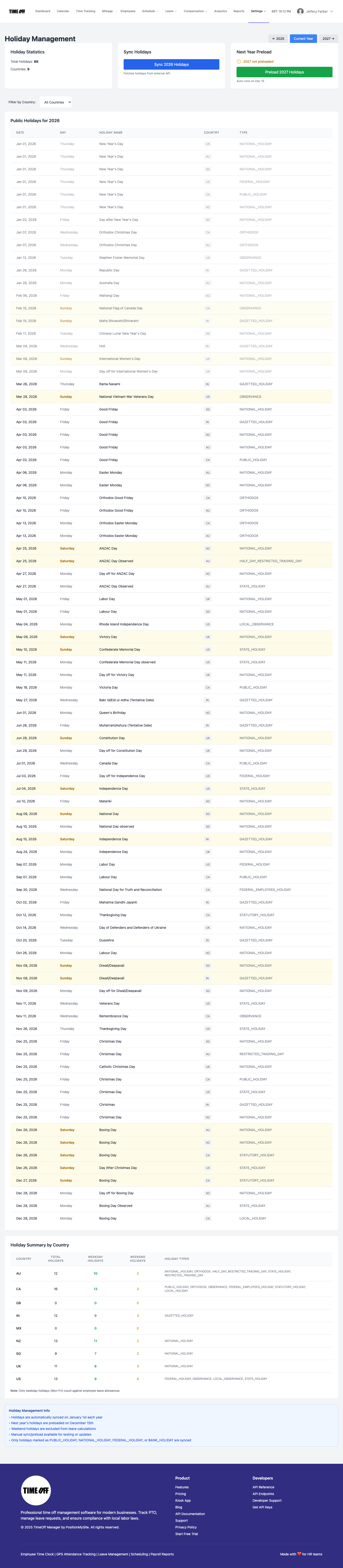
Holiday management — /admin/holidays