Physician Time Tracking: PTO, Staff Hours and Weekend Coverage for Practices (2026)
How physician practices and hospital departments track doctors' time off and CME days, hourly staff clock-ins and overtime, and holiday weekend coverage in one place.

Who's in, who's off and who's on call, before the first patient arrives.
It's Thursday afternoon and Dr. Patel asks for the Friday before Thanksgiving off. You say yes, because she asked first. Then you remember Dr. Kim already has that day blocked for a conference, your nurse practitioner is on vacation that week, and nobody wrote any of it in the same place. Now you're cancelling patients or begging a locum.
That's the real problem in a physician practice. It isn't only hours. It's knowing who is in, who is off, who is on call, and whether the people you pay by the hour got paid right. This guide shows how small practices and hospital departments track physician time off, staff hours and weekend coverage without three spreadsheets and a whiteboard.
Why physician practices lose track of time
Most practices run two kinds of people under one roof, and they need different tracking:
- Physicians. Under US federal rules, a licensed doctor who is actually practicing medicine is usually exempt from minimum wage and overtime, and the salary test doesn't apply to them. You rarely need their hours for payroll. You do need their time off, call nights and clinic days, because every missing doctor means a schedule full of patients with nobody to see them.
- Everyone else. Nurses, medical assistants, front desk, billing, techs. Most are hourly and non-exempt, so you need accurate clock-ins, overtime and breaks. That exemption for doctors does not stretch to nurses, therapists, technologists or other staff who support them.
When both groups live in a paper calendar and an hours spreadsheet, the same few things go wrong every month:
- Two physicians approved off on the same day because the requests went to different people.
- Holiday weekends that land on the same doctor every year, because no one can see last year's pattern.
- A medical assistant who forgot to clock out and now shows a 14-hour day.
- Overtime nobody noticed until payroll, after a nurse stayed late three nights for a busy flu clinic.
- Payroll typed by hand from a printout, and fixed again the next pay period.
What good physician time tracking looks like
You don't need hospital-sized software to fix this. You need a few things to be true:
- One place for every time off request. Doctors, nurses and front desk all ask the same way, and the request goes to the person who approves it.
- A coverage view before you say yes. One screen that shows everyone who is off on a given day, so you can see the gap before you create it.
- Leave types that match a practice. Vacation and sick, plus things like CME or conference days, so they don't all blur into "out."
- Hourly staff clock in, physicians don't have to. Track hours where pay depends on them, and keep time off for everyone.
- Repeating schedules. Clinic days, half days and weekend call set once and reused, not rebuilt every month.
- Overtime and break rules that flag problems early. Before the pay run, not after it.
- One approved hours file for payroll or your accountant. No retyping.
Physician PTO and coverage: how it works in TimeOff Manager
For doctors and staff
Everyone asks for time off from the same My requests page, on a computer or in the TimeOff Manager Pro phone app. They pick the type, the dates and add a note, such as "AAFP conference" or "kid's surgery, back Tuesday." They can see what's pending and what's approved without emailing the office manager.
If you want more than vacation and sick, turn on custom leave types and add labels like CME, conference, bereavement or unpaid. Vacation and sick always stay, and each type gets its own color so it's easy to read on the calendar.
For the practice manager or medical director
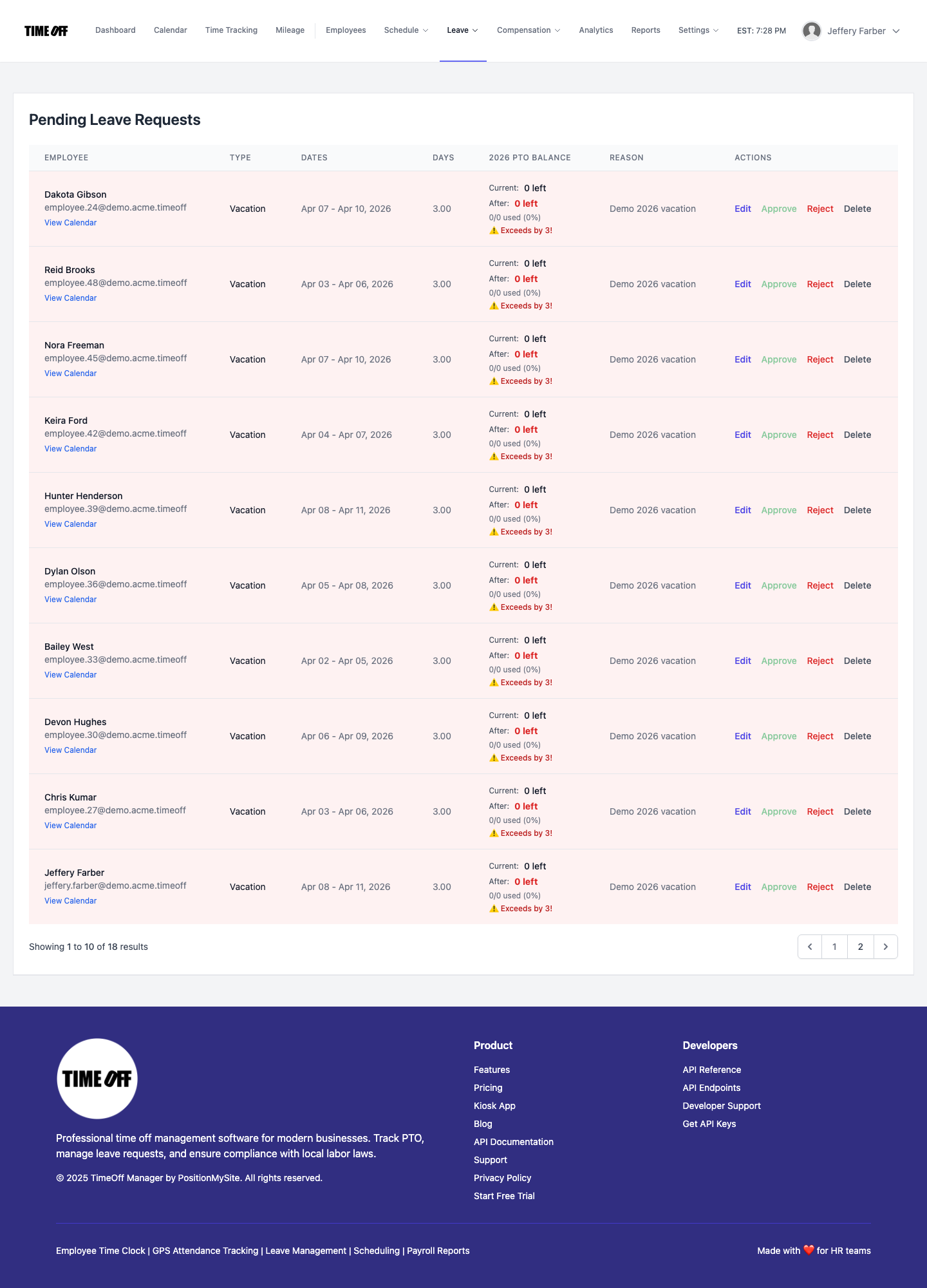
Requests land in the approvals inbox on the dashboard, next to missed clock-ins and other items waiting on you. If you only want the leave queue, Manage requests shows just time off. Before you approve, open the team calendar in coverage view. Each row is a person and each column is a day, so you can scan down the Friday before Thanksgiving and see exactly who is already off.
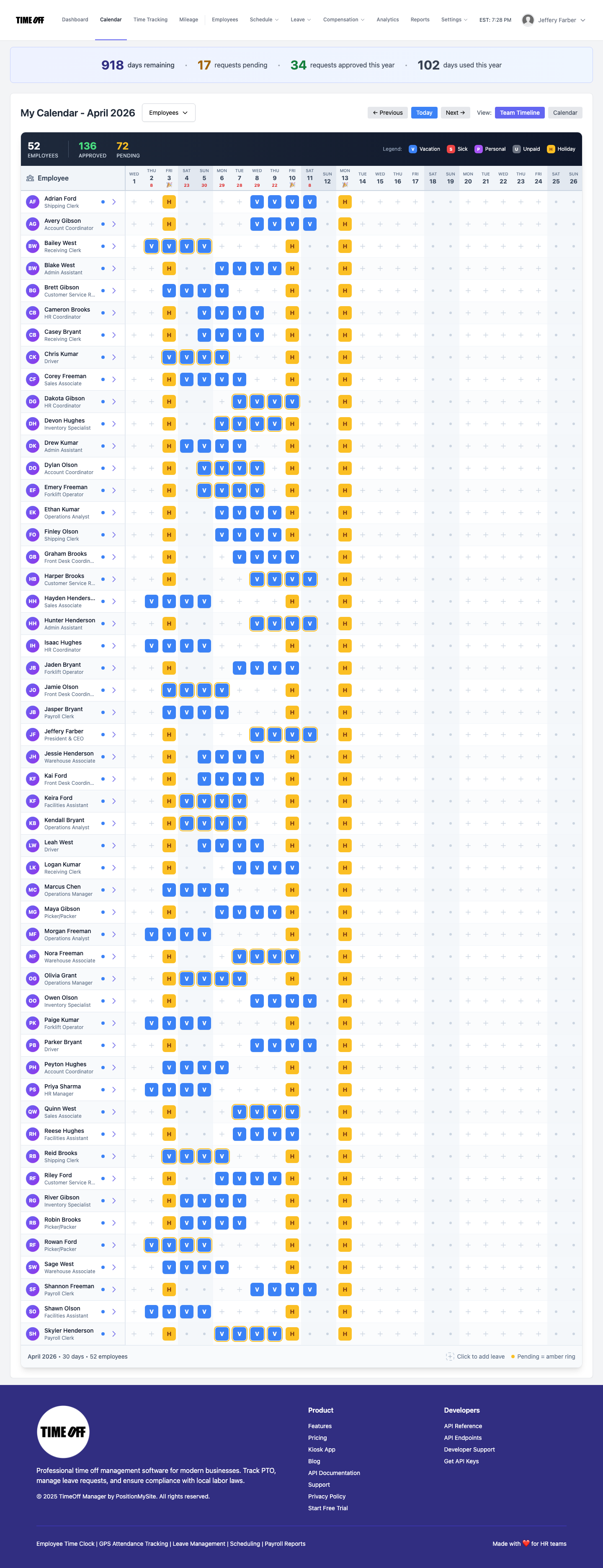
That view is for seeing coverage. It won't pick who works the holiday for you or balance weekends on its own. What it does is put the facts in front of you, so the fair choice is easy to make and easy to explain.
Hours for nurses, MAs and front desk
Your hourly team clocks in on their own phone with the Pro app, or on a shared tablet at the front desk with the TimeOff Kiosk app and a personal PIN. The kiosk is handy in a clinic where staff don't carry work phones and you don't want anyone signing in to someone else's account. The kiosk setup guide walks through it.
When someone forgets to clock out after a late clinic, they send a missed clock-in or clock-out request with the real time and a note. It goes to the approvals inbox and nothing changes on the timesheet until a manager approves it. That's cleaner than someone editing hours by hand on Friday afternoon.
Managers review the day, week or month on the manager timesheet, and staff see their own hours on their timesheet, so questions get settled before payroll instead of after.
Clinic days, call nights and weekend coverage
Most practices repeat the same week over and over: Dr. Kim does Monday, Wednesday and Friday clinic, Dr. Patel does Tuesday and Thursday plus Saturday morning, the nurse practitioner covers walk-ins. Set those patterns once as shift templates and apply them in schedule management. Each person sees their week in My Schedule.
For weekend and holiday coverage, a simple habit works well:
- Load your company holidays in Holidays at the start of the year, so they show on everyone's calendar.
- Write down who covered each holiday weekend last year. Rotate from there.
- Ask doctors to request holiday-adjacent days early, and approve in the order they come in, after you check the coverage view.
- Use scheduling rules to flag too many days in a row, long shifts and missed breaks for the staff who work them.
If you're a hospital department with rotating 12-hour shifts, the same pieces apply. Shift templates hold the pattern, the coverage view shows the holes, and the rules catch the shift that runs too long.
Overtime for hospital and clinic staff
Set company-wide daily and weekly overtime thresholds, then add a rule for any one person who needs something different, in Overtime settings. Overtime shows on the timesheet as it builds up, so you see the nurse at 38 hours on Thursday, not after she hits 46.
Hospitals and residential care facilities can use a different federal method, often called "8 and 80": overtime after 8 hours in a day and after 80 hours in a fixed 14-day period, with an agreement in place before the work is done. A regular physician office generally uses the standard 40-hour week. If you use 8 and 80, confirm your payroll provider calculates the 14-day part, and use your approved hours export as the source.
Getting hours to payroll
At the end of the period, approve the timesheets, then pull hours, overtime and time off from Reports. If an outside bookkeeper runs payroll, give them accountant access so they can download what they need without your login. If you use QuickBooks Online or FreshBooks, you can send approved hours to your accounting software.
The guide to accountant access and Excel exports goes deeper on the file your bookkeeper actually wants.
A 30-minute setup for a small practice
- Add your people: physicians, NPs and PAs, nurses, MAs, front desk.
- Turn on custom leave types and add CME or conference.
- Load this year's and next year's holidays.
- Build two or three shift templates for your usual week and weekend call.
- Set daily and weekly overtime for hourly staff.
- Put a tablet with the kiosk app at the front desk, or have staff install the Pro app.
- Tell everyone: all time off goes through the app from today. No more sticky notes.
Rules worth knowing
This is not legal advice. Check with your employment lawyer or payroll provider for your state or province.
- Licensed physicians who are practicing medicine are generally exempt from FLSA overtime, and the salary test doesn't apply to them. Nurses and other staff who support physicians don't get that same exception. See the DOL's Fact Sheet 17D on professional employees.
- Hospitals and residential care facilities may use the 8 and 80 overtime system. See Fact Sheet 54 on health care overtime.
- Employers have to keep accurate hours records for non-exempt staff. See the DOL recordkeeping fact sheet.
- In Canada, hours of work and overtime follow provincial rules. Ontario's Employment Standards Act guide to hours of work is a good place to start.
- Keep patient details out of time off notes and timesheet notes. "Conference" is enough. Clinical information belongs in your clinical records.
If you place clinicians with other facilities, the medical staffing timesheet guide covers agency timesheets. If you run a dental or small clinic front desk, see the dental office time clock guide.
Try it with your practice
A full year to try it with your team. Get comfortable before you pay. Start your free year: you pay $0 for 12 months. A card is required to start, and the yearly price is charged on your anniversary unless you cancel first. After the year, Starter (1 to 20 people) is $180 per year, Growth (21 to 50) is $300 per year, and Scale (51 to 1,000) is $479.90 per year or $49.99 per month.
Want the bigger picture first? See the PTO software page, the time tracking software overview and our health practice page.
FAQ
What is the best time tracking software for a physician practice?
Look for one place where doctors and staff request time off, a coverage view that shows who is already off before you approve, leave types such as CME or conference, clock-ins for hourly staff, overtime rules and one approved hours file for payroll. TimeOff Manager covers that for small practices and hospital departments.
Do physicians need to clock in?
Usually not for pay. Under US federal rules, licensed physicians who are practicing medicine are generally exempt from overtime, and the salary test does not apply to them. Many practices track physician time off and schedules only, and have hourly staff such as nurses, medical assistants and front desk clock in. This is not legal advice.
How do you track physician PTO and CME days?
Have every doctor request time off the same way, in the app, and add custom leave types like CME or conference next to vacation and sick. Approvers see each request with its dates and type, and the team calendar shows approved days in color.
How do you make weekend and holiday coverage fair for doctors?
Load holidays at the start of the year, keep a simple record of who covered each holiday weekend, rotate from there and check the team coverage view before approving holiday-adjacent days. TimeOff Manager shows the coverage; it does not assign holiday shifts automatically.
Do hospitals pay overtime differently?
They can. Hospitals and residential care facilities may use the 8 and 80 system: overtime after 8 hours in a day and 80 hours in a fixed 14-day period, with an agreement in place before the work is done. A regular physician office generally uses the 40-hour week. Check with your payroll provider. This is not legal advice.
Can nurses and medical assistants fix a missed clock-out?
Yes. They send a missed clock-in or clock-out request with the real time and a note, from the phone app or the kiosk. It goes to the manager's approvals inbox and nothing changes on the timesheet until someone approves it.
How does the 1 year free offer work?
A full year to try it with your team. New companies pay $0 for 12 months. A card is required to start, and the yearly price is charged on your anniversary unless you cancel first. After the year, Starter (1 to 20 people) is $180 per year, Growth (21 to 50) is $300 per year, and Scale (51 to 1,000) is $479.90 per year or $49.99 per month.