Leave: My requests
Your leave hub: list pending and past requests, create a new request, open an item to edit, or cancel when policy allows.
/leave-requests
Roles
Employee · Manager · Company admin · HR manager
Leave requests live under /leave-requests. Employees see My Leave Requests; company admins, HR managers, and similar roles see a team-wide list and summary on the same route (title: Team Time Off).
Purpose
Submit new PTO, check approval status, and review history without opening Calendar. Use + New Request (or your mobile equivalent) to start a booking; open a row to adjust dates or details where your company allows edits.
What’s on the page
- Header — My Leave Requests or Team Time Off plus a primary action to add leave.
- Team summary (managers) — counts such as pending approvals, who’s off today, and year-to-date usage.
- Table — dates, type, status (pending / approved / rejected / cancelled), and links to view or edit.
Create, edit, cancel
- Create —
/leave-requests/create— pick type, range, and any required notes; submit for approval if your workflow requires it. Available types list comes from your company (including custom leave types when enabled). - Edit —
/leave-requests/{id}/edit— available when the request is still editable under your policy. - Cancel — from the request detail/list action when allowed; cancelled rows stay in history for transparency.
Approving or rejecting other people’s requests is covered under admin / manage-requests flows (separate article).
Product screenshot
Automated capture: full page after login (demo user; team vs. personal title depends on role).
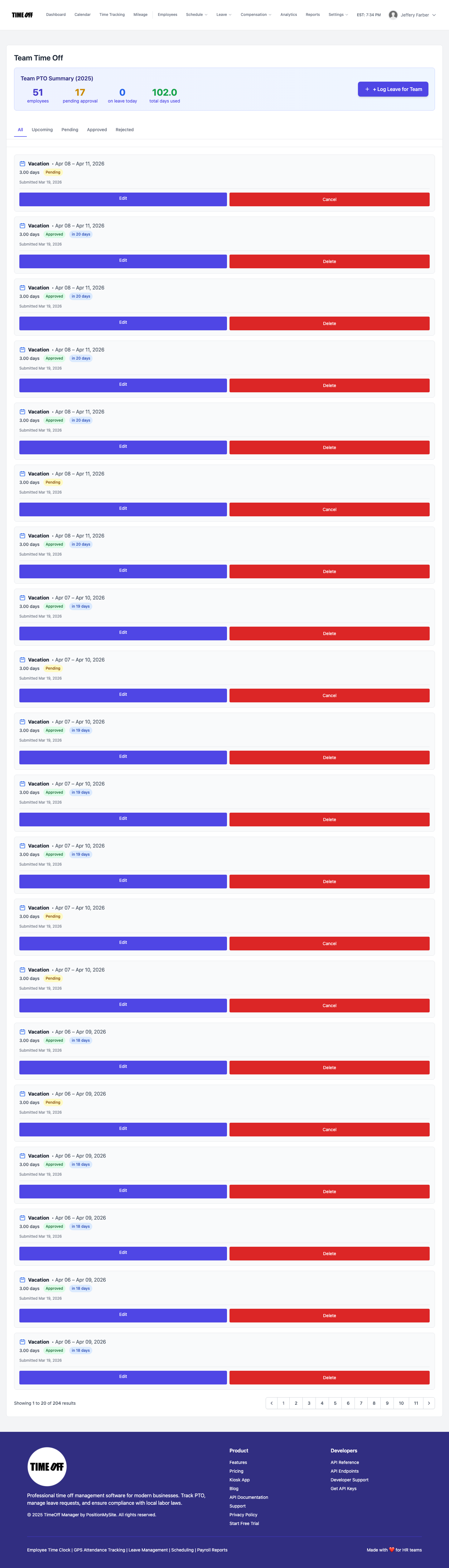
Leave requests — list view (Acme demo).