Clock in software for employees
Your team clocks in and out on their phone, on a shared tablet by the door, or on a computer. Every clock-in saves the time and the GPS location. The hours add up on the timesheet by themselves, next to everyone’s time off.
From $15/mo billed annually. Starter $15/mo · Growth $25/mo · Scale $49.99/mo.
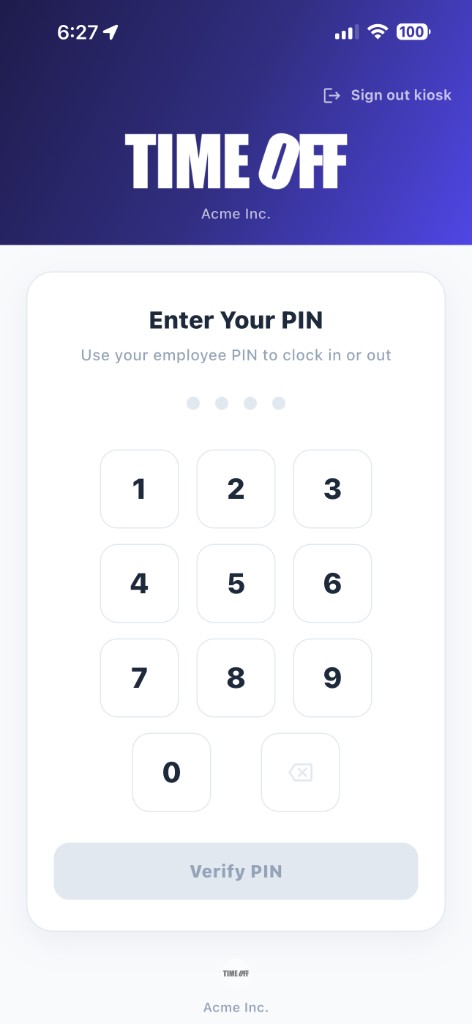

Three ways your team can clock in
Pick one for everyone, or mix them. All clock-ins land on the same timesheet.
On their own phone
Employees install the free TimeOff Manager Pro app on iPhone or Android and tap Clock In. This works well for field crews, drivers, and anyone who starts the day at a job site instead of the office.
On a shared tablet
Mount a tablet by the door and install the free TimeOff Kiosk app. A manager signs in once. Each employee clocks in and out with their own PIN. This works well for shops, restaurants, clinics, and warehouses.
On a computer
Office staff can clock in from the TimeOff Manager website in any browser. There is nothing to install, and their hours land on the same timesheet as everyone else’s.
Know where people clocked in
Every clock-in saves the employee’s GPS location along with the time. You can open any clock-in and see where it happened on a map.
You can also save each job site or office as a work location and draw a circle around it, called a geofence. When the geofence is on, people can only clock in once they are actually inside that circle, not from the parking lot down the street or from home.
People who travel for work, like sales reps or drivers, can be allowed to clock in from anywhere.
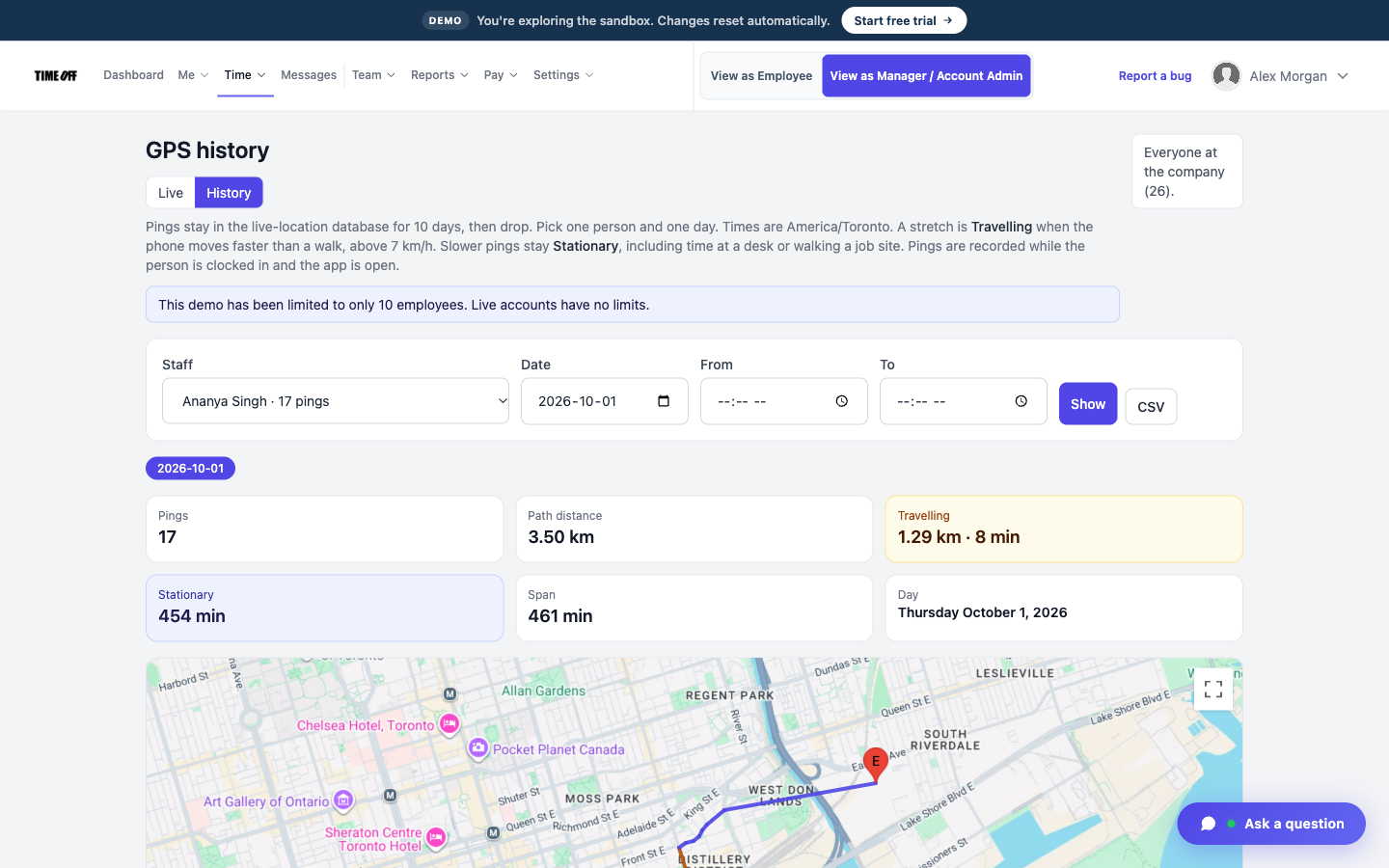
The GPS location saved with a clock-in
See who is working right now
The live map shows everyone who is clocked in at this moment. You don’t have to call around to find out if a crew has started or is still on the job. GPS on the clock-in, geofence, and the live map are covered on the GPS time clock page.
Each employee can have a regular schedule. When someone clocks in after their start time, they show up as late, so you see it the same morning instead of on payday.
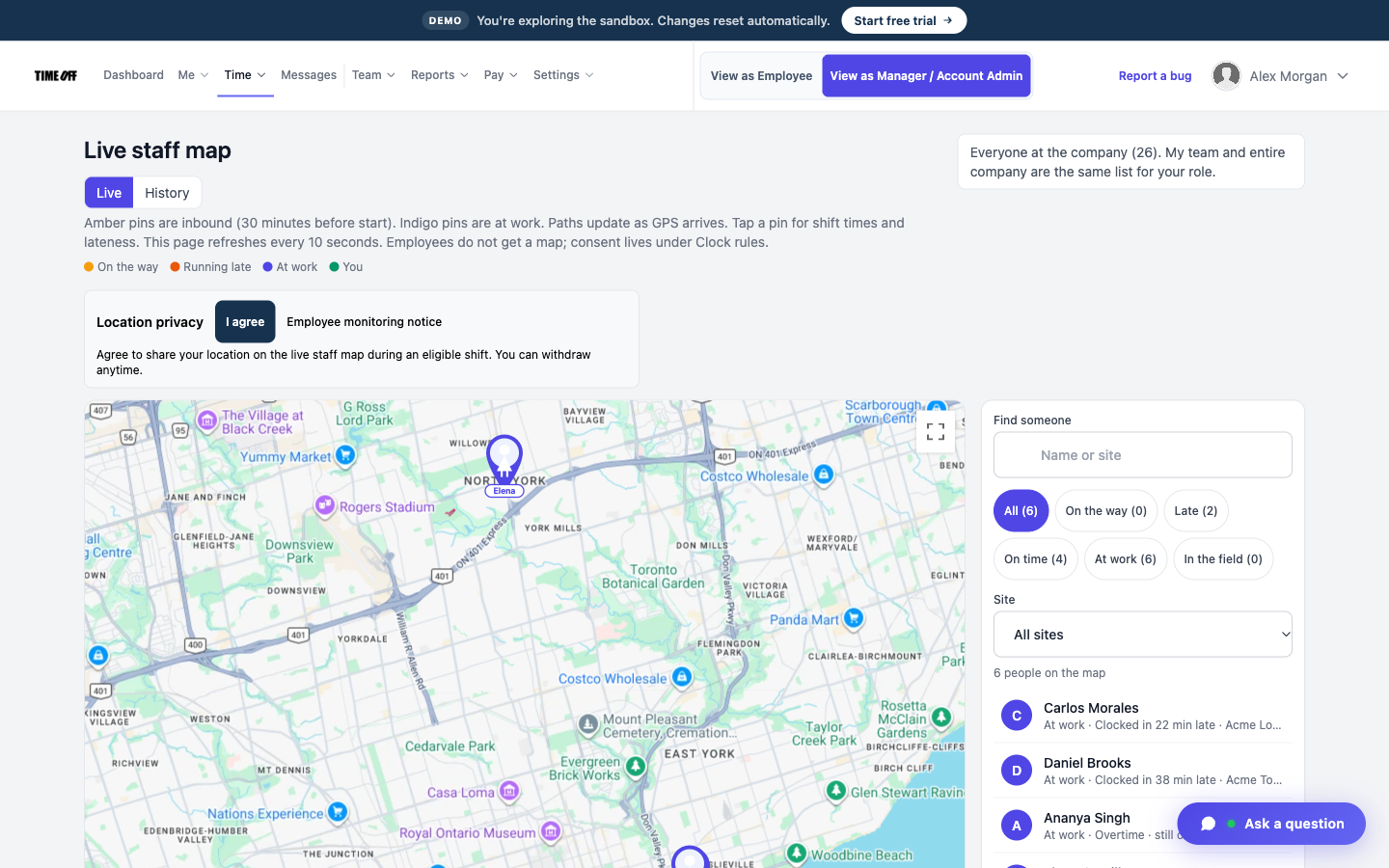
Who is clocked in right now
Fewer mistakes, less cleanup
Paper time cards and group texts leave you fixing hours by hand. These features stop most of that before it starts.
No clocking in for a coworker
Each person uses their own login or PIN. You can also require a photo at clock-in, so you can see who was standing at the tablet.
Forgot to clock out?
The employee sends a correction with the right time. A manager approves it, and the timesheet updates.
Breaks are recorded
Turn on break tracking and employees start and end their breaks in the app, so lunch is part of the record.
Overtime is flagged
Hours past the limit show as overtime on the timesheet, so you see it before you pay it.
From clock-ins to payroll
Clock-ins build each person’s weekly timesheet by themselves. At the end of the pay period, a manager reviews and approves the hours.
Then you download the approved hours as an Excel or CSV file for your bookkeeper or payroll software, or send them to QuickBooks Online or FreshBooks. TimeOff Manager does not calculate pay, print checks, or file taxes. It gets you correct hours, so payroll is quick.
Time off lives in the same app. Vacation, sick days, and holidays show next to worked hours, so a day off and a shift never get mixed up. See our PTO software page for how leave requests and balances work.
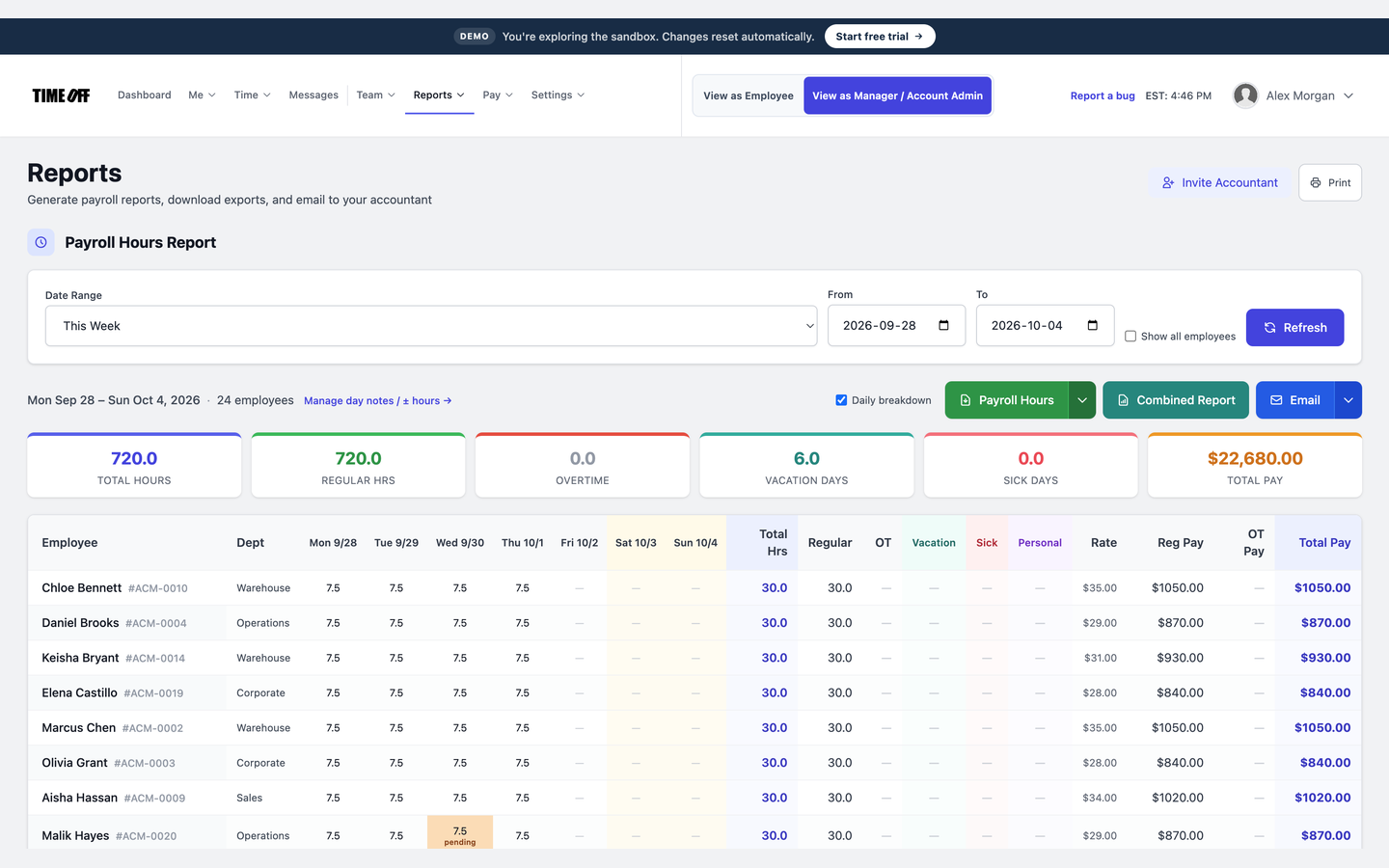
Approved hours, ready to download
Paper time cards vs. clock in software
| Paper time cards | TimeOff Manager | |
|---|---|---|
| Adding up hours | By hand, every pay period | Done for you on the timesheet |
| Where someone clocked in | Unknown | GPS location saved with every clock-in |
| Clocking in for a coworker | Easy to do | Personal login or PIN, plus an optional photo |
| Who is working right now | Call and ask | Live map |
| Forgotten clock-outs | Guess and fix by hand | Employee sends a correction, manager approves |
| Time off | A separate spreadsheet | In the same app, next to the hours |
| Sending hours to payroll | Retype them | Excel or CSV download, QuickBooks, or FreshBooks |
Clock in software for your industry
See how teams like yours use clock-ins, GPS, and time off. Or read the full time tracking software overview.
Simple pricing
14-day free trial, then one price for your team size. Clock-in, GPS, the kiosk, timesheets, and time off are on every plan.
Starter
1–20 users
$15/mo
$180 billed annually after trial
Every plan includes
- PTO, sick, and personal leave with accruals
- Approvals inbox and a shared team calendar
- GPS clock-in, geofence, PIN kiosk, and offline clock-in that syncs later
- Timesheets, overtime, and hours you can send to payroll
- Mileage, schedules, and US / Canada holidays
- Mobile apps, REST API, and MCP for ChatGPT and Claude
- 14-day free trial — no charge until it ends
Most teams start here
Growth
21–50 users
$25/mo
$300 billed annually after trial
Every plan includes
- PTO, sick, and personal leave with accruals
- Approvals inbox and a shared team calendar
- GPS clock-in, geofence, PIN kiosk, and offline clock-in that syncs later
- Timesheets, overtime, and hours you can send to payroll
- Mileage, schedules, and US / Canada holidays
- Mobile apps, REST API, and MCP for ChatGPT and Claude
- 14-day free trial — no charge until it ends
Scale
51–1,000 users
$49.99
per month after trial
or $479.90/year (20% off $599.88)
US and Canada teams pay by headcount — not per location, and not per module.
Every plan includes
- PTO, sick, and personal leave with accruals
- Approvals inbox and a shared team calendar
- GPS clock-in, geofence, PIN kiosk, and offline clock-in that syncs later
- Timesheets, overtime, and hours you can send to payroll
- Mileage, schedules, and US / Canada holidays
- Mobile apps, REST API, and MCP for ChatGPT and Claude
- 14-day free trial — no charge until it ends
Clock in software questions
What is clock in software?
Clock in software replaces paper time cards and wall-mounted time clocks with an app. Employees tap Clock In when they start work and Clock Out when they finish. The app records the time, and the hours add up on a timesheet by themselves, so nobody has to type them in at the end of the week.
Can employees clock in from their own phone?
Yes. Employees install the free TimeOff Manager Pro app on iPhone or Android, sign in, and tap Clock In. You decide who is allowed to clock in from a phone and who has to use the shared tablet at work.
Can we use one tablet for the whole team?
Yes. Install the free TimeOff Kiosk app on a tablet and mount it by the door. A manager signs in once. After that, each employee clocks in and out with their own PIN, so nobody needs their own phone or login.
How does GPS clock-in work?
When someone clocks in, the app saves their GPS location with the time. You can also draw a circle around each work location, called a geofence. If you turn it on, people can only clock in when they are inside that circle.
Can people clock in without a cell signal?
Yes, on TimeOff Manager Pro and TimeOff Kiosk. Clock in or out is saved on the device with the time, GPS, and photo, then sent when the network returns. Company rules still apply to what was captured at tap time. The website clock-in page needs a live connection. On the kiosk, looking up a PIN still needs a network.
How do I stop employees from clocking in for each other?
Each person clocks in with their own login or their own PIN, and the GPS location is saved with every clock-in. You can also require a photo at clock-in, so you can see who was actually standing at the tablet.
What happens if someone forgets to clock out?
The employee sends a correction from the app with the right time. A manager approves or declines it, and the timesheet updates. You do not need to edit a spreadsheet or chase anyone by text.
Does it run payroll?
No. TimeOff Manager tracks hours and time off. A manager approves the hours, then you download them as an Excel or CSV file, or send them to QuickBooks Online or FreshBooks, and run payroll the way you already do.
How much does clock in software cost?
TimeOff Manager starts at $15/mo billed annually after a 14-day free trial. Starter is $15/mo for 1–20 people, Growth is $25/mo for 21–50, and Scale is $49.99/mo for larger teams. You pay for the team size, not per employee, and every plan includes clock-in, GPS, the kiosk, and time off.
Approved time off can sync to Google Calendar and Microsoft Outlook. Approved hours can go to QuickBooks Online or FreshBooks.


You can also ask ChatGPT, Claude, or Cursor questions about your account, like who is out next week, through Model Context Protocol.

Stop adding up time cards by hand
From $15/mo billed annually after a 14-day trial. Starter $180/year (1–20 users), Growth $300/year (21–50), Scale $49.99/mo or $479.90/year (51–1,000).