Time Clock for Dental Offices and Small Clinics: Staff Hours, Schedules and Time Off (2026)
A practical guide to time tracking for dental offices and small clinics: a PIN time clock off the front desk, hygienist schedules, time off in hours, lunch breaks and payroll hours.

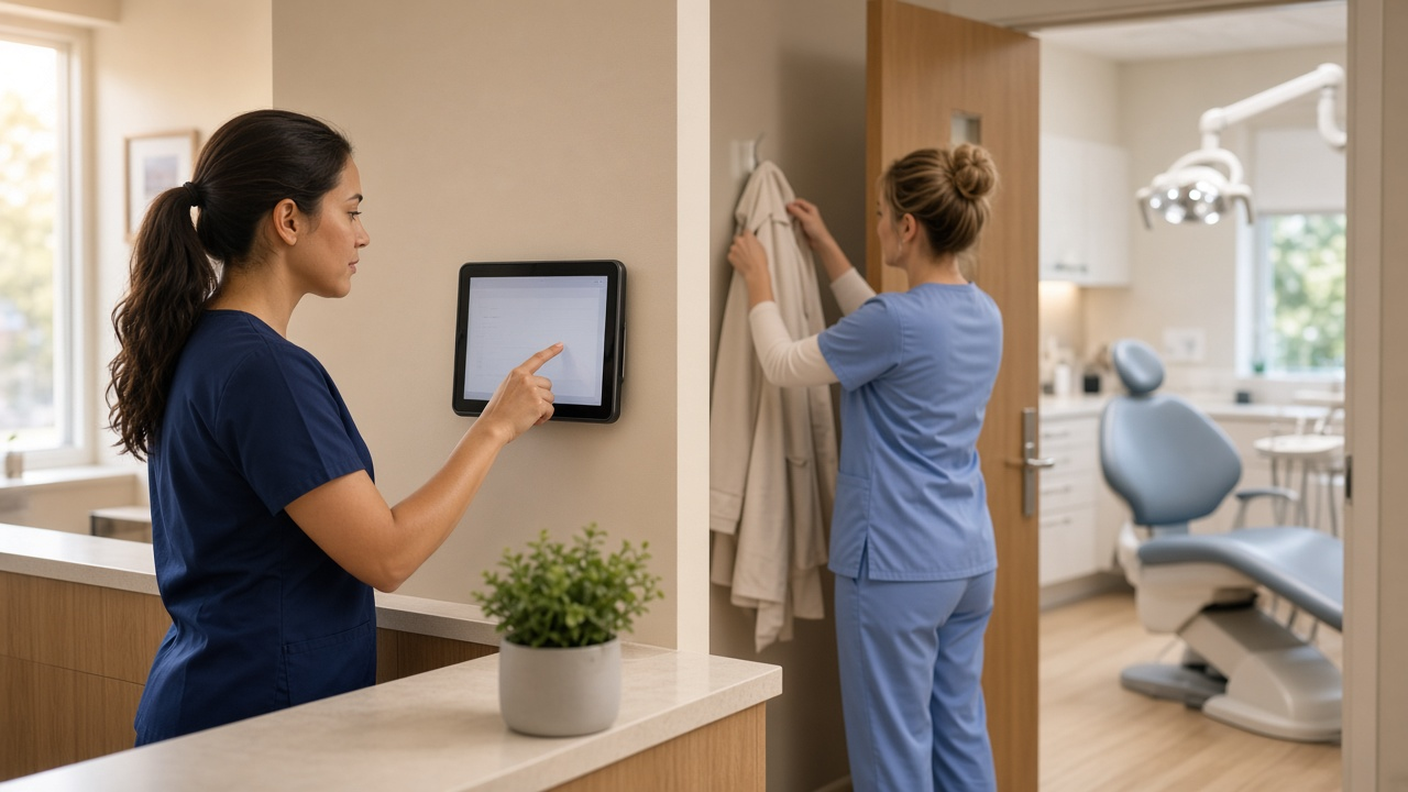
A PIN time clock by the staff door keeps each person's hours separate from the front desk login.
It's 7:40 on a Tuesday. The first patient is at 8, the hygienist who usually opens just texted that she's stuck in traffic, and the front desk login says someone clocked in at 7:05, but nobody remembers who. Your other hygienist asked for Friday off two weeks ago in a hallway conversation, and it isn't written anywhere. On payroll day, the hours are a mix of the practice software, a paper sheet by the sterilization room and a few texts.
Dental offices and small clinics run on tight schedules, small teams and chairs that can't sit empty. This guide is for practice owners and office managers who want honest staff hours without adding work at the front desk: a time clock that isn't the practice software, schedules your team can see, time off that shows up before the appointment book fills, lunches recorded between patients, and clean hours for payroll. It applies to dental practices, and most of it applies to veterinary clinics, physiotherapy and chiropractic offices, and other small healthcare practices too.
Why staff hours get messy in a dental office
- Shared logins. The front desk computer often has one login for everyone. If that's also how people clock in, you can't tell who actually opened.
- Days that change with the book. A hygienist works Monday, Wednesday and Friday this month, and Tuesday and Thursday next month. The paper schedule on the fridge is out of date by the second week.
- Lunch whenever a chair is empty. Breaks don't happen at noon. They happen when a patient cancels, and nobody writes them down.
- Time off asked in passing. Requests arrive in the hallway, by text or on a sticky note, and the office manager finds out on Monday morning that two assistants are out the same day.
- Short appointments. Staff need two hours for their own doctor or a kid's school event. A system that only counts whole days forces someone to round it or keep a side spreadsheet.
- Two offices, one owner. When the same assistant works at both locations, it's hard to say which office her hours belong to.
What good time tracking looks like for a practice
- A personal clock-in. Each person has their own PIN or their own login. No shared passwords.
- A clock that isn't the practice software. Patients, charts and claims stay where they are. Staff hours live in their own system.
- Schedules everyone can see. Hygienist, assistant and front desk days on one calendar, with approved time off on the same view.
- Time off in hours or days. So a two-hour appointment is two hours, not a full day.
- Breaks on the record. Lunch between patients saved with that day's hours.
- Corrections with a trail. A missed clock-out fixed through a request and an approval, not by retyping the timesheet.
- One download for payroll. Approved regular and overtime hours in Excel or CSV.
Clock-in: a tablet by the staff door, not the front desk login
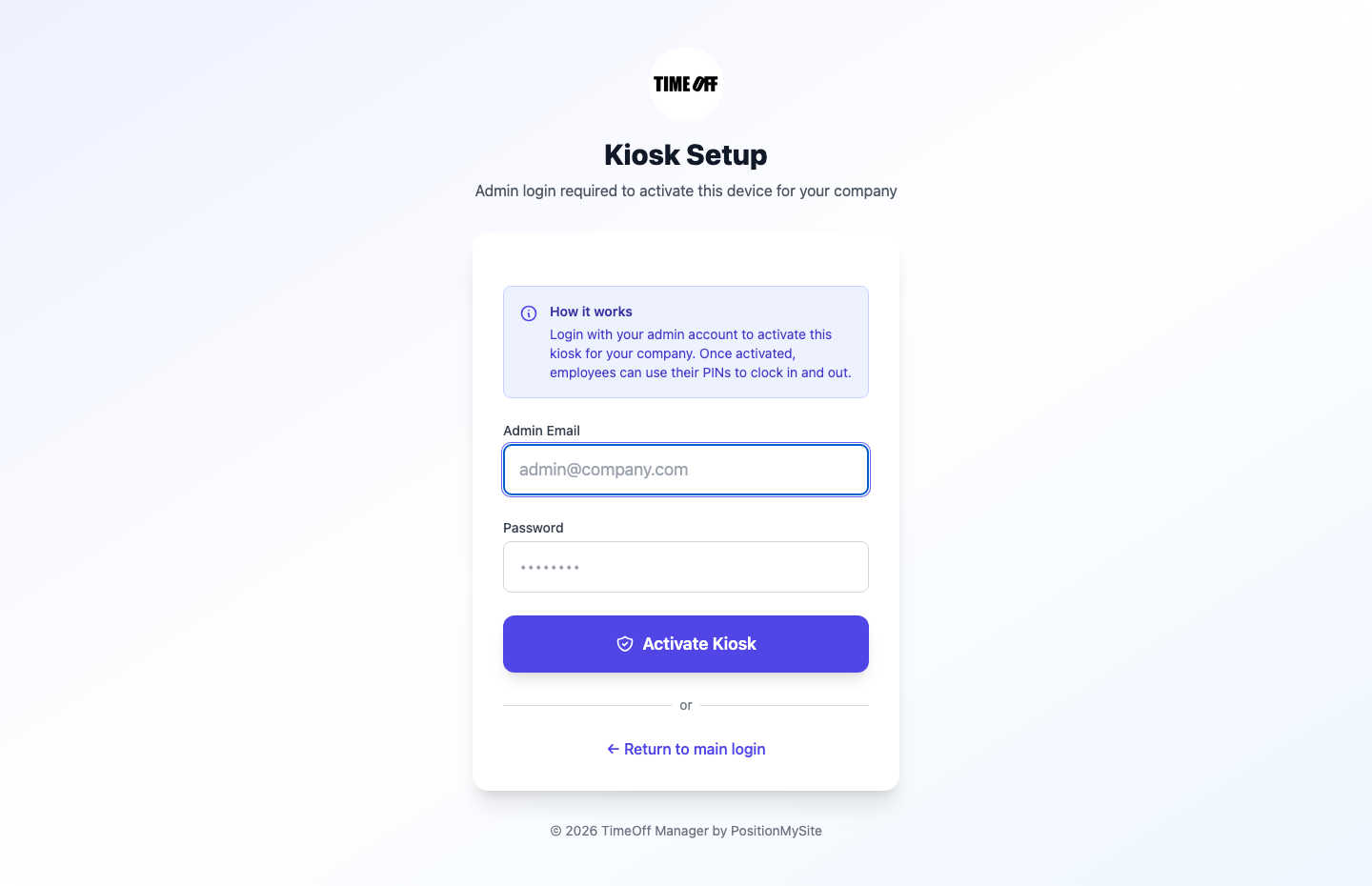
The simplest setup for most practices is a tablet mounted near the staff entrance or in the break room running TimeOff Kiosk. An admin or HR manager activates the tablet once for your company. After that, each person types their own PIN to clock in and out. The front desk computer can stay busy checking patients in, and the hygienist who opens can't be confused with the assistant who arrives ten minutes later. The kiosk setup guide walks through activation.
A few settings are worth a look in a clinic:
- Photo at clock-in. Your clock rules can ask for a photo when someone clocks in, which makes sure each PIN belongs to the person using it.
- Require a schedule to clock in. If this is on in Company settings, Clock rules, people can only clock in on days they're scheduled. That suits a practice where hygienists work set days, as long as the schedule is kept up to date. If your days change often, leave it off.
- Breaks. Turn on break tracking so lunch between patients is recorded with the hours. Your schedule validation rules can also flag shifts that run long or skip a break.
- Keep the tablet in a staff area. Anyone with a PIN can clock in on it, so it belongs behind the front desk or in the break room, not in the waiting room.
The dentist, the office manager and anyone who works between two offices can use the TimeOff Manager Pro app on their own phone instead. That's the signed-in app for clock-in, schedules and time-off requests. The kiosk is the PIN tablet. They're two separate apps, and many practices use both.
Hygienist and assistant days on one schedule
Dental teams often work fixed days that shift from month to month. Build a few reusable shift templates, such as Hygiene Day, Early Open and Late Evening, and assign them to people in schedule management. Staff see their own days on My Schedule in the app or on the web, and approved time off shows on the same calendar. You still decide who works which day. The app keeps it where the team and the time clock can see it.
When the schedule changes, tell everyone once with a staff message. It's a one-way announcement, not a chat, and you can see who tapped Got it. For more on building the week, read our shift scheduling guide.
Time off before the appointment book fills
A missing hygienist means a column of patients to reschedule, so time off needs to be known early. Staff submit requests from their requests page or the app and can see whether each one is pending, approved or rejected. The office manager approves them from one approval inbox, which also holds missed clock-in fixes.
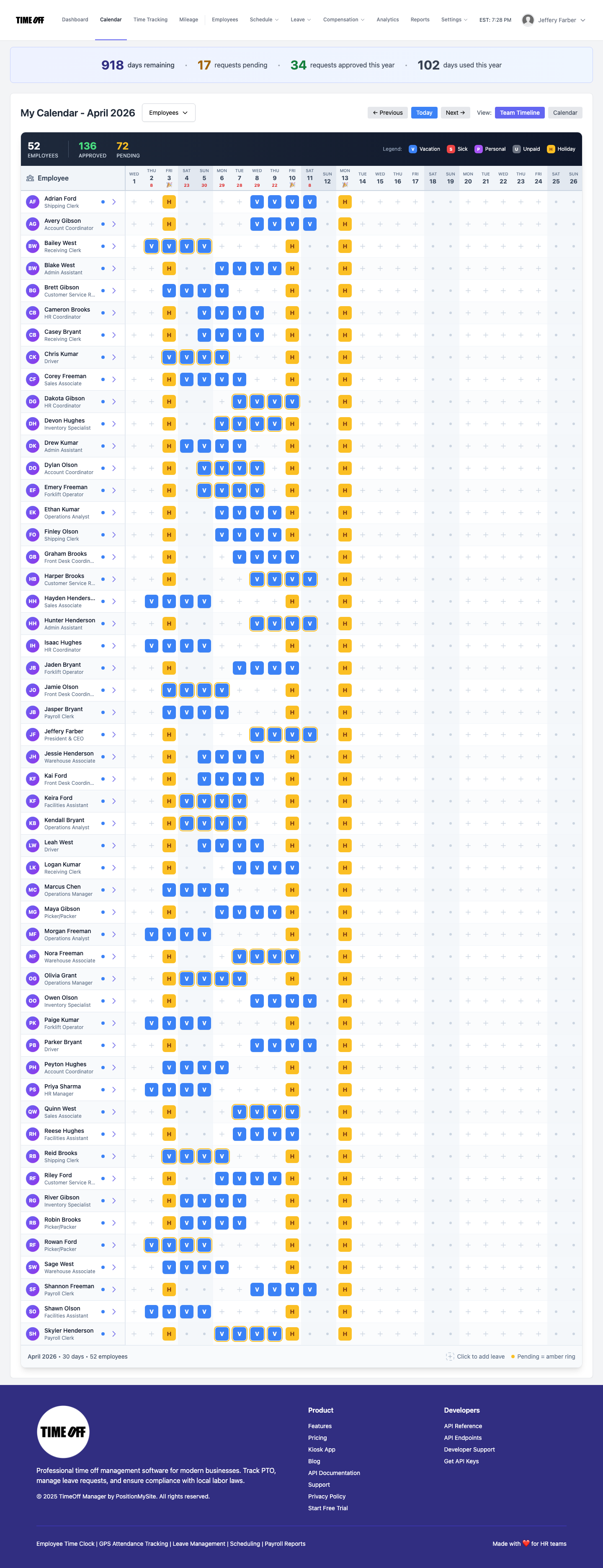
Before you approve, check the team coverage calendar. It shows every person as a row and every day as a column, with vacation, sick and holiday days marked, so you can see that one assistant is already off on the 14th before you approve a second.
Short appointments count in hours. Your company can track leave in hours, days or both, with a workday length that matches your office, so two hours for a doctor's visit comes off the balance as two hours. Our guide to hourly and partial-day PTO explains the setup. If your policy separates appointments, continuing education or unpaid days from vacation, add them as custom leave types.
Set your closed days once. Add the days the office is closed to your company holiday calendar so everyone sees them. Our 2027 US and Canada holiday calendar lists next year's dates.
Overtime and missed clock-outs
Overtime in a small practice usually comes from late patients and long evening clinics, not from one big day. Company admins set thresholds and multipliers in overtime rules. The manager timesheet shows today's clock-ins and a weekly grid with regular and overtime hours split by person, so you can see on Wednesday that someone is close to 40 and adjust Thursday's book.
When someone forgets to clock out after the last patient, don't edit the record by hand. They open Forgot to clock out from their timesheet, the app or the office tablet with their PIN, enter the real times and a reason, and submit. The office manager accepts it or edits the times, and the approved request becomes the time entry, with a record of who changed what. Our guide to fixing missed clock-ins covers it step by step.
Two offices: split hours by location
If you run a second office, or a hygienist covers a satellite clinic one day a week, save each office under work locations. Shift templates can carry a default location, clock-ins record where they happened, and you can require a GPS point on phone clock-ins if you want that proof. The approved week then shows which office each hour belongs to. See how this fits a practice on our dental offices page, or the veterinary clinics page if you run an animal hospital.
Payroll: approved hours, nothing else
Once the week is approved, the office manager downloads the hours as Excel or CSV for the payroll company or bookkeeper you already use. TimeOff Manager doesn't calculate pay, print checks, file taxes, or touch patient records or insurance claims. If your accountant needs to pull reports, give them accountant access instead of emailing files. For the full picture of clocks, timesheets and exports, see time tracking software, and for leave balances, PTO software.
Rules worth checking
This is not legal advice. Rules depend on where your office is and change over time.
- Overtime (U.S.). Non-exempt employees, which usually includes hourly hygienists, assistants and front desk staff, get time and a half for hours over 40 in a workweek under federal law. Some states, like California, also have daily overtime. See the U.S. Department of Labor's overtime fact sheet.
- Meal breaks (U.S.). Federal law doesn't require breaks. A meal period of about 30 minutes or more generally doesn't have to be paid if the employee is completely relieved from duty, so a lunch interrupted to help with a patient is work time. Many states set their own rules. See the DOL page on breaks and meal periods.
- Records (U.S.). Employers must keep accurate records of hours worked each day and each workweek. See the recordkeeping fact sheet.
- Eating periods (Ontario). Employees generally can't work more than five hours in a row without a 30-minute eating period, which is usually unpaid. See Ontario's guide to hours of work and eating periods.
Try it with your team
A full year to try it with your team. Get comfortable before you pay. Start your free year: you pay $0 for 12 months. A card is required to start, and the yearly price is charged on your anniversary unless you cancel first. After the year, Starter (1 to 20 people) is $180 per year, Growth (21 to 50) is $300 per year, and Scale (51 to 1,000) is $479.90 per year or $49.99 per month.
A quiet afternoon is enough to set it up: add your team, put a tablet by the staff door, build two or three shift templates and set your time-off rules. If you also manage clinicians placed by an agency, our medical staffing timesheet guide covers that side.
FAQ
What is the best time clock for a dental office?
For most practices, a tablet near the staff entrance running a PIN time clock works best. Each hygienist, assistant and front desk person types their own PIN, so you know who opened and who closed, and the clock keeps working when the practice software or the front desk computer is busy. Staff who prefer their phones can clock in from a signed-in app instead.
Should dental staff clock in on the practice management software?
It's usually better to keep the time clock separate. The practice software is built for patients, charts and claims, and its logins are often shared at the front desk. A separate PIN clock gives each person their own record of hours, and the approved week downloads as a file for payroll.
How do I track lunch breaks between patients?
Turn on break tracking so a lunch taken whenever a chair opens up is recorded with that day's hours. In the U.S., a meal break of about 30 minutes or more generally doesn't have to be paid if the employee is completely relieved from duty, but a lunch interrupted by patient work counts as work time. State and provincial rules vary. This is not legal advice.
Can staff take time off in hours for appointments?
Yes. TimeOff Manager can track leave in hours, days or both, with a workday length you set, so a two-hour appointment comes off the balance as two hours instead of a whole day. Custom leave types let you add labels such as appointments or continuing education if your policy treats them separately.
How do I handle a practice with two locations?
Save each office as a work location. Shifts can carry a location, clock-ins record where they happened, and you can require a GPS point on phone clock-ins if you want that proof. The approved week then splits hours by office.
Does TimeOff Manager handle patient scheduling or payroll?
No. Patients, charts, claims and the appointment book stay in the practice software you already use. TimeOff Manager tracks staff clock-ins, staff schedules, time off and approved hours, and managers download those hours as Excel or CSV for the payroll company or bookkeeper you already use. It doesn't calculate pay, print checks or file taxes.
How does the 1 year free offer work?
A full year to try it with your team. New companies pay $0 for 12 months. A card is required to start, and the yearly price is charged on your anniversary unless you cancel first. After the year, Starter (1 to 20 people) is $180 per year, Growth (21 to 50) is $300 per year, and Scale (51 to 1,000) is $479.90 per year or $49.99 per month.