Canadian vs US HR Law & Compliance: A Complete SMB Guide (April 2026)
Managing HR across the US and Canadian border? Different laws for PTO, overtime, and scheduling can create a compliance nightmare. Learn how TimeOff Manager centralizes your HR data to simplify cross-border operations and ensure HR compliance 2026.


Managing HR across the US and Canadian border? Different laws for PTO, overtime, and scheduling can create a compliance nightmare. Learn how TimeOff Manager centralizes your HR data to simplify cross-border operations and ensure HR compliance 2026.
Canadian vs. US HR Law: Your SMB Guide to Cross-Border Compliance (April 2026)
You’re running a business with teams in both the US and Canada, or maybe you're planning to expand. Suddenly, HR isn't just about managing people; it's about navigating a maze of federal, state, and provincial laws. Vacation, sick leave, public holidays, overtime rules – they all shift as soon as you cross that border. What feels like a minor detail in one country can become a major compliance headache in the other.
The pain is real: employees in Toronto, others in Buffalo, and your current system is a patchwork of spreadsheets, manual approvals, and a prayer that payroll figures it out. You're losing sleep over accidentally violating a provincial labor standard or an obscure state wage law. You need to manage your team consistently while respecting local laws across these distinct legal landscapes.
At TimeOff Manager, we understand this challenge. We built our system to simplify your HR operations, no matter where your team is located. We help you centralize employee data, customize leave policies, track time accurately, and apply the right overtime rules—all within one workflow. This guide will walk you through the key differences in Canadian and US HR compliance and show you how TimeOff Manager helps you manage these complexities.
Why Overtime Math Breaks When PTO, Clock-ins, and Rules Live in Silos
Let's be direct: when leave requests, employee clock-ins, and local labor laws are managed in separate systems, you're setting yourself up for trouble. It's not just about inconvenience; it's about risk. Imagine this:
- An employee in Ontario takes a statutory holiday, but your US-centric time clock software doesn't recognize it as a paid day off. This leads to incorrect pay and potential fines.
- A US employee works 45 hours in a week, but their manager approved 8 hours of PTO without seeing the full clock-in record. Your payroll provider gets the raw clock-ins and the PTO, but the system doesn't automatically calculate if those PTO hours count towards overtime eligibility in their specific state.
- You have employees in California and British Columbia. Both have daily overtime rules, but the thresholds and multipliers differ. Your manual system can't keep track of these nuances, leading to miscalculations every pay period.
- An employee requests a long parental leave. In Canada, this might be covered by Employment Insurance and provincial top-ups. In the US, it might fall under FMLA, state-specific paid family leave, or be unpaid. Tracking these complex, varying entitlements manually is a nightmare.
These scenarios create conflicting records about an employee's time. Your HR team thinks one thing, your payroll system another, and your employees just want to get paid correctly. This disconnect means constant manual reconciliation, wasted time, and the looming threat of audits and penalties. An integrated approach isn't just nice-to-have; it's essential, especially for businesses operating across borders.
What "Integrated" Actually Means for Cross-Border HR
When we talk about an integrated system like TimeOff Manager, we're not just syncing data. We're talking about a unified operational workflow that respects the unique legal requirements of different regions, whether that's a US state or a Canadian province. Here’s what that looks like in practice:
- One Employee Record: Every employee, regardless of location, lives in a single system. Their personal data, compensation, leave balances, and work history are all in one place. You're not bouncing between multiple databases or spreadsheets to find a complete picture. This is the core of effective workforce management.
- One Time Clock Surface: Whether your team clocks in via web, mobile, or a shared PIN kiosk at /clockin, all clock-ins flow into the same centralized system. This means real-time attendance data, no matter where the employee is physically working. Our GPS time clock features (where enabled) can even help confirm locations for remote or field teams.
- One Weekly/Pay-Period View for Managers: Your managers see all scheduled shifts, actual clock-ins, and approved leave for their team in one comprehensive grid. This unified view, available in the Manager & HR hub at `/timesheet`, is critical for identifying potential overtime issues before payroll runs. You can't approve PTO blindly when you see the full picture.
- Local Rules Applied Automatically: This is the game-changer for cross-border operations. TimeOff Manager allows you to configure specific overtime rules, leave accrual policies, and holiday schedules based on an employee's location. A Canadian employee's hours are calculated against provincial standards, while a US employee's hours adhere to state and federal FLSA rules. This means accurate overtime tracking without manual intervention.
- Reports That Match Approvals: When it's time for payroll, the reports you generate reflect the actual time worked, approved leave, and correctly calculated overtime, all based on the specific rules applied to each employee's jurisdiction. This drastically reduces payroll errors and ensures you have a clear audit trail.
Employee vs. Manager: A Consistent Experience, Localized Rules
One of the biggest hurdles in cross-border HR is maintaining a consistent, user-friendly experience for employees while ensuring managers can apply complex local rules. TimeOff Manager bridges this gap.
For Employees: Simple Self-Service, Wherever They Are
Employees, whether they're in Vancouver or Virginia, interact with a familiar interface. From their `/dashboard`, they can easily:
- Submit new leave requests, checking their available balances for various custom leave types (e.g., vacation, sick time, personal days, parental leave).
- View the status of their submitted requests under My requests.
- Clock in and out using the web interface, mobile app, or a shared kiosk.
- Review their own timesheet at /timesheet/employee to confirm hours worked, breaks, and applied leave.
- If enabled, submit mileage reimbursement requests via My Mileage, which is crucial for employees on the road, regardless of country.
The beauty here is consistency. An employee doesn't need to know the intricacies of US vs. Canadian labor law to use the system. They just follow the straightforward workflow, and TimeOff Manager handles the underlying rules based on their assigned location.
For Managers & HR: Comprehensive Oversight, Granular Control
Managers and HR leads get the robust tools they need for operational efficiency and compliance for their specific teams. The Manager & HR hub at `/timesheet` is your command center.
- Daily Roster: See who's scheduled, who's clocked in, and who's on leave at a glance.
- Weekly Grid: Review the full week's activity for each employee. This is where you spot potential overtime issues before they become payroll problems. It's where approved PTO sits right next to actual clock-ins, giving you the complete picture.
- Monthly Rollups: Get a higher-level view for long-term planning and attendance trends.
- Leave Approvals: At /admin/requests, managers can approve or deny leave requests with full context, seeing current coverage on the team timeline calendar to prevent staffing shortages.
- Scheduling: Create and manage shifts, apply shift templates, and ensure proper coverage for all locations using /admin/schedule. This is critical for avoiding violations of predictive scheduling laws in some US jurisdictions or ensuring adequate rest periods as per provincial labor standards.

From Clock-in to Overtime: Navigating US vs. Canadian Rules
The differences in how the US and Canada handle overtime are significant and can easily lead to compliance breaches if not managed carefully. TimeOff Manager simplifies this by allowing you to configure rules at a granular level.
Company Settings: Your Foundation for Compliance
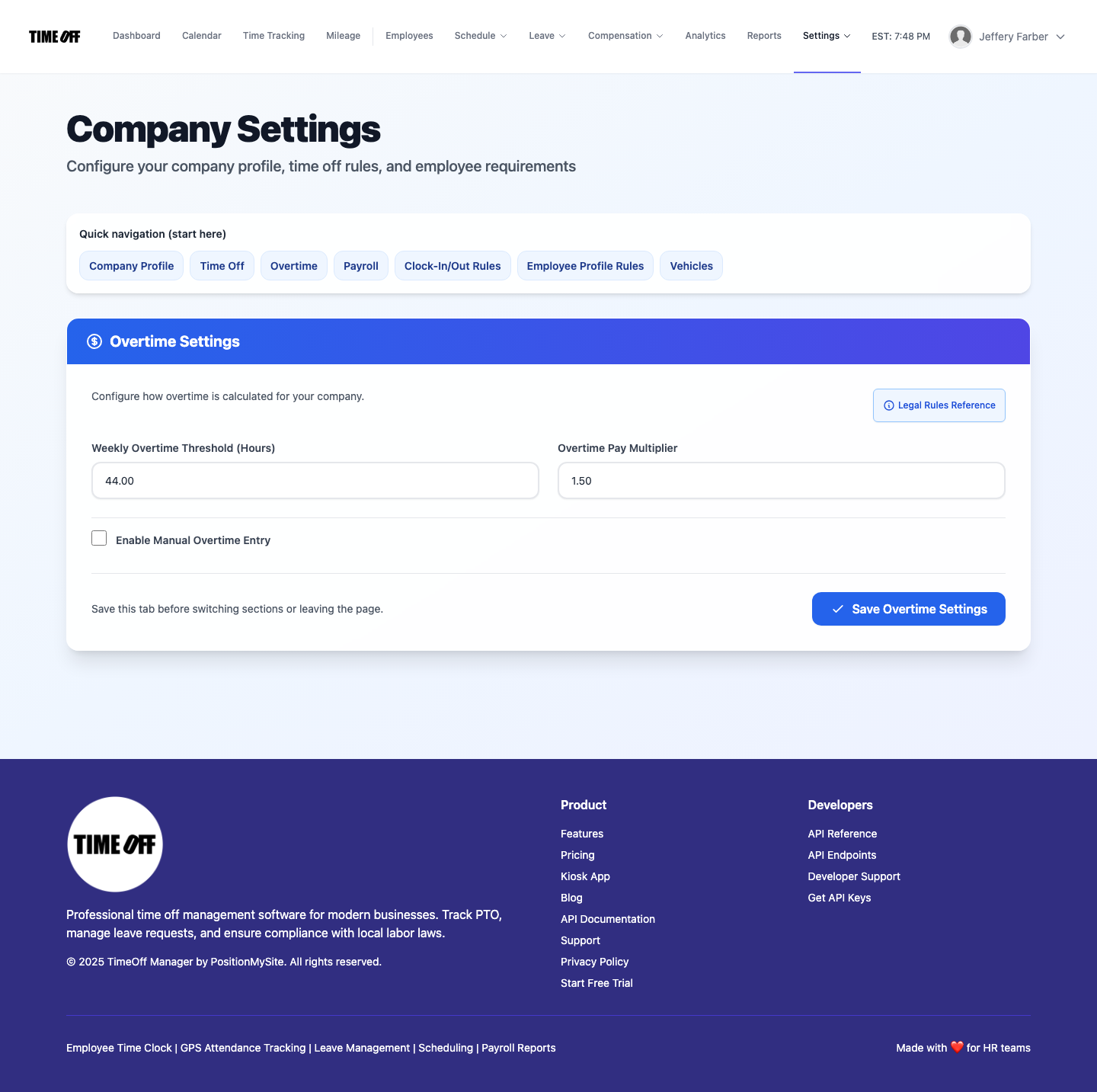
Start by setting up your company's general parameters. Under Company Settings, you define your standard work week and default overtime rules. This is your baseline.
Recording Clock-ins: The Source of Truth
Whether it's a web clock-in, mobile app, or a shared PIN kiosk at /clockin, every clock-in is recorded accurately. This raw data is the foundation upon which all compliance calculations are built. The system automatically captures start/end times and breaks, ensuring you have an auditable record.
Labeling Overtime: Admin Rules for US States and Canadian Provinces
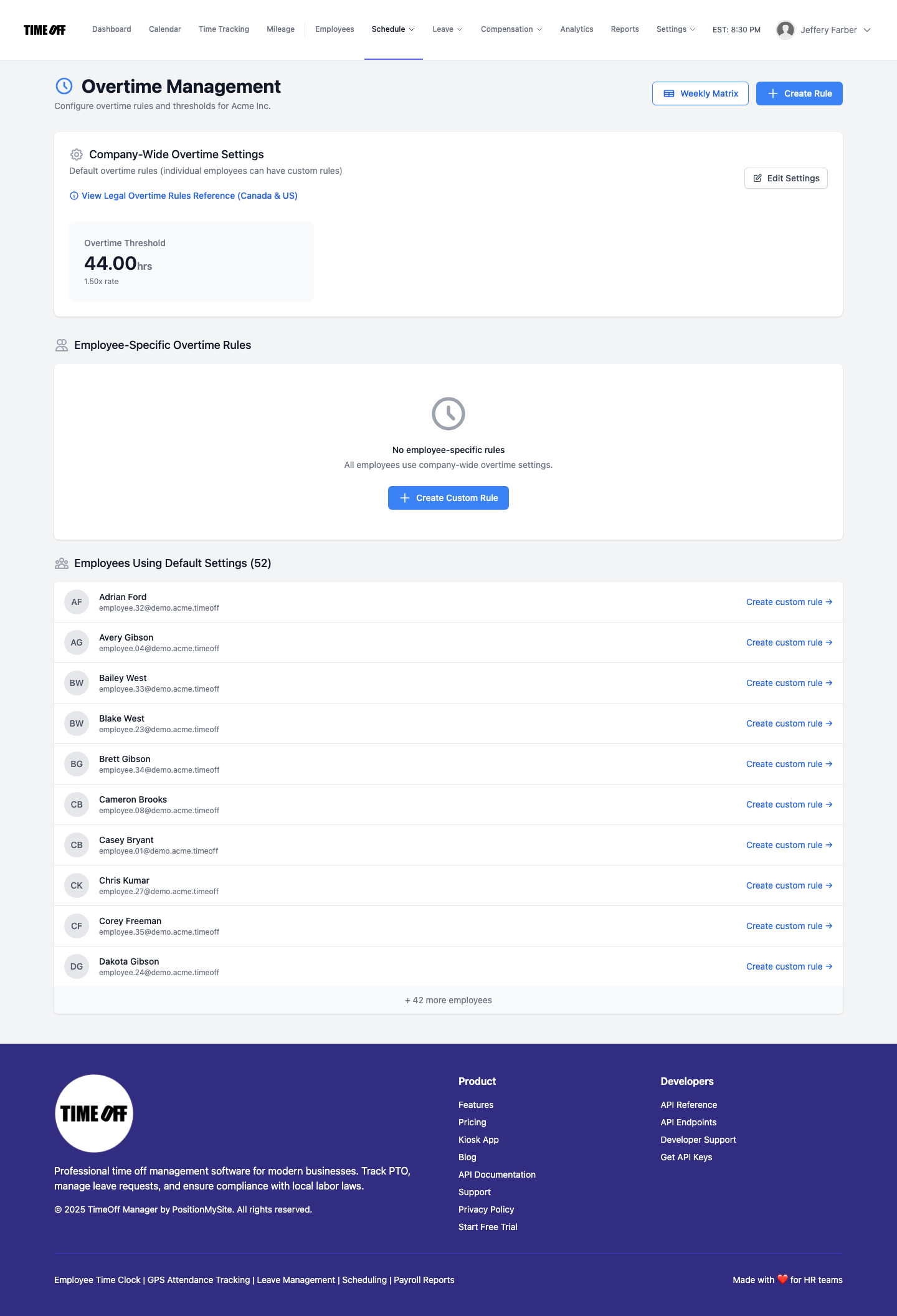
This is where TimeOff Manager truly shines for cross-border operations. Under Overtime admin at /admin/overtime, you can define specific overtime rules that apply to different employee groups or locations. This is crucial for maintaining compliance.
- US Overtime: The Fair Labor Standards Act (FLSA) mandates overtime pay at 1.5x an employee's regular rate for hours worked over 40 in a workweek. However, many states have their own daily overtime rules (e.g., California requires overtime after 8 hours in a day, and double-time after 12 hours). Some states also have specific rules for the 7th consecutive day worked. You can configure these variations within TimeOff Manager.
- Canadian Overtime: Canada's federal labor code sets 1.5x pay after 40 hours per week, but most employees fall under provincial jurisdiction. Each province has its own thresholds. For example, in Ontario, it's 1.5x pay after 44 hours per week. In British Columbia, it's 1.5x after 8 hours in a day and 40 hours in a week, and 2x after 12 hours in a day. TimeOff Manager allows you to create distinct rule sets for each province where you have employees.
- Public Holidays: US federal holidays are recognized, but most private employers aren't legally required to provide paid time off. In Canada, statutory holidays (federal and provincial) generally require paid time off, and working on these days often comes with premium pay. You can manage holiday schedules and their pay implications directly in the system.
Payroll Handoff: Seamless and Accurate
Once hours are tracked and overtime is correctly calculated based on location-specific rules, the data is ready for payroll. TimeOff Manager’s integrated approach means that when you run payroll, all the complex calculations for regular hours, overtime, and leave are already handled. This significantly reduces errors and streamlines the process with your outside payroll provider, ensuring payroll runs are accurate and compliant.
CFO / Owner Story: Peace of Mind Across Borders
As an owner or CFO, your primary concern is the bottom line and avoiding costly compliance penalties. Here's how TimeOff Manager provides peace of mind when operating in both the US and Canada:
- Define Local Leave & Holidays: First, you set up custom leave types for specific requirements, like provincial sick leave in Canada or state-mandated paid family leave in the US. You also input all relevant federal and provincial/state holidays. This ensures employees accrue and request leave according to their local laws.
- Configure Location-Specific Overtime: In Overtime admin, you create distinct rule sets. For your California team, you set daily and weekly overtime thresholds. For your Quebec team, you apply Quebec's specific weekly overtime rules. This means the system automatically calculates overtime correctly, no matter the employee's location.
- Schedule with Compliance in Mind: When creating schedules at /admin/schedule, you can use validation rules to ensure compliance with local break laws or predictive scheduling requirements. For instance, you can set a rule that prevents scheduling an employee for less than 11 hours between shifts, a common requirement in some Canadian provinces.
- Employees Clock In, System Tracks: Your employees use the web, mobile, or kiosk time clock to record their actual hours. TimeOff Manager captures every clock-in, ensuring an accurate record for both US and Canadian employees, including specific break policies.
- Managers Review and Approve: Supervisors review the weekly grid in the Manager & HR hub. They see actual hours, approved leave, and automatically calculated overtime, all before it hits payroll. This pre-payroll review is a critical step to catch and correct any discrepancies.
- Payroll Integration with Confidence: When it's time to pay, you export accurate, compliant data. The system has already applied the correct US state or Canadian provincial overtime and leave rules, so your payroll provider receives clean, pre-calculated figures. This reduces errors, saves time, and significantly lowers your risk of non-compliance.
- Audit Trails and Reporting: Need to demonstrate compliance for an audit? TimeOff Manager provides comprehensive reports and analytics, detailing all clock-ins, leave, and overtime calculations, all tied back to the specific rules applied.

Questions to Ask Any Vendor: Separate Products vs. One Workflow
When you're evaluating solutions for your business, especially with cross-border operations, you'll inevitably face a choice: stitch together multiple specialized products or invest in one integrated workflow. Here's why the latter is almost always the better choice:
- The "Best-of-Breed" Myth: Some vendors will tell you to pick the "best" PTO software, the "best" time clock software, and the "best" scheduling tool, then integrate them. Sounds good on paper, right? In reality, these integrations are often fragile, expensive to maintain, and rarely achieve true synchronization of complex rules like overtime or leave accrual that differ between US and Canadian law. You end up with data silos and manual reconciliation anyway.
- Single Source of Truth: With TimeOff Manager, you have one definitive record for each employee's time and leave. This eliminates discrepancies that arise when data is passed between disparate systems. There's no debate about whether PTO counts towards overtime, because the system that tracks both knows the rules for that specific employee's location.
- Reduced Administrative Burden: Think about the time your HR team spends logging into multiple systems, exporting CSVs, merging data in Excel, and then trying to figure out if Canadian holiday pay was correctly applied to an employee in Alberta, while a US employee in Arizona got their overtime for over 40 hours. An integrated system cuts this down dramatically.
- Consistent Employee Experience: Your employees don't care about your backend integrations. They just want a simple way to manage their time and leave. A single system provides that consistency, reducing confusion and support requests.
- Simplified Compliance: This is perhaps the most critical point for businesses straddling the US-Canada border. When your time tracking, leave management system, and overtime rules are all in one place, configured for specific jurisdictions, you're building compliance directly into your operations. You're not hoping an integration passes the right flag for "daily overtime after 8 hours" vs. "weekly overtime after 44 hours." The system knows.
Don't settle for a patchwork solution. The choice is clear: separate products vs. one workflow.
Compliance: Important Considerations for US and Canada
Navigating HR compliance in both the US and Canada is a complex undertaking, and the information provided here is for general guidance only. It is not legal advice. Always consult with qualified legal counsel and HR professionals familiar with the specific jurisdictions where you operate.
Key Areas of Difference & What to Watch For:
- Vacation/PTO Entitlements:
- US: No federal law mandates paid vacation or sick leave. Laws vary by state and city (e.g., California, New York, Seattle have robust paid sick leave laws). Often, vacation payout upon termination is not federally required, but state laws vary.
- Canada: Federal and provincial laws mandate minimum paid vacation (e.g., typically 2 weeks after 1 year, often increasing to 3 weeks after 5+ years). All provinces have statutory holidays that require paid time off. Many provinces also have paid sick leave mandates. Vacation pay upon termination is generally required by law. TimeOff Manager's custom leave types and accrual settings are essential here. See: Canada Labour Code (federal) and consult provincial labor ministries like Ontario's Employment Standards Act or WorkSafeBC on Paid Sick Leave.
- Overtime Rules:
- US: Federal Fair Labor Standards Act (FLSA) requires 1.5x pay after 40 hours in a workweek for non-exempt employees. Many states have stricter daily (e.g., after 8 hours) or weekly (e.g., after 40 hours, but different calculation) rules. State laws often dictate how PTO, holidays, or sick time count towards overtime eligibility. Your Overtime admin settings are critical for this. Refer to the U.S. Department of Labor (DOL) FLSA Fact Sheet.
- Canada: Federal Labour Code sets 1.5x after 40 hours/week. Provincial standards vary widely (e.g., 44 hours/week in Ontario, 8 hours/day and 40 hours/week in BC). Overtime is generally calculated on actual hours worked. Different provinces may have specific rules for averaging hours over longer periods.
- Breaks & Rest Periods:
- US: Federal law doesn't mandate meal or rest breaks, but many states do (e.g., California requires non-exempt employees to receive a 30-minute unpaid meal break for shifts over 5 hours, and paid 10-minute rest breaks for every 4 hours worked).
- Canada: Most provinces mandate unpaid meal breaks (e.g., 30 minutes after 5 consecutive hours of work in Ontario). Some provinces also mandate shorter paid rest periods. TimeOff Manager's schedule validation rules can help enforce these.
- Parental Leave:
- US: Family and Medical Leave Act (FMLA) provides up to 12 weeks of *unpaid*, job-protected leave for eligible employees. Some states offer paid family leave programs.
- Canada: Employment Insurance (EI) provides paid maternity and parental benefits. Provinces may offer additional top-ups or specific job-protected leaves. This is a significant difference in social safety nets.
- Scheduling & Predictability:
- US: Some cities and states (e.g., Seattle, New York City, Oregon) have "predictive scheduling" or "fair workweek" laws requiring advance notice of schedules, compensation for schedule changes, and limits on "clopening" shifts.
- Canada: While not as widespread as in the US, some provinces have rules around minimum notice for shifts or rest periods between shifts. TimeOff Manager's employee scheduling software and validation rules can help you adhere to these.
Staying compliant requires diligence and the right tools. TimeOff Manager helps you configure your system to reflect these regional differences, but always ensure you have expert legal and HR advice.
Want to See TimeOff Manager in Action?
The best way to understand how TimeOff Manager can simplify your cross-border HR compliance is to experience it yourself. We offer a fully resettable demo environment where you can explore every feature without commitment. Set up employees in different locations, configure various leave types, and see how overtime rules are applied automatically. It's the perfect way to visualize how your specific challenges can be solved.
Visit our Demo logins page to get started. No credit card, no sales calls, just immediate access.
FAQ: Canadian vs. US HR Compliance for SMBs
Q: Can TimeOff Manager handle different public holidays for US states and Canadian provinces?
A: Yes. In Holiday management at /admin/holidays, you can define specific holiday calendars and assign them to different employee groups or locations. This ensures that employees are only credited for holidays applicable to their region.
Q: How does TimeOff Manager ensure accurate PTO accrual for both US and Canadian employees, given the different laws?
A: Our system allows you to create custom leave types and configure specific accrual rules (e.g., per pay period, annual lump sum, hourly) and carryover limits. You can assign these rules based on an employee's location, ensuring that a US employee's vacation accrual follows state law, while a Canadian employee's follows provincial standards.
Q: Does TimeOff Manager support different overtime calculation methods, like daily vs. weekly, for various jurisdictions?
A: Absolutely. Under Overtime admin, you can set up multiple overtime rule sets. This means you can have a rule for California's daily overtime after 8 hours, another for federal FLSA 40-hour weekly overtime, and yet another for Ontario's 44-hour weekly threshold. These rules are then applied automatically based on an employee's assigned location.
Q: Can I track employee mileage for reimbursement in both countries?
A: Yes, if the mileage module is enabled. Employees can submit trips via My Mileage, and administrators can manage and approve these reimbursements at /admin/mileage. While reimbursement rates may differ between countries (e.g., IRS rates for US, CRA rates for Canada), the tracking process is consistent.