Overtime Tracking And Payroll Integration Software (2026): What SMB Teams Need to Know
Finding affordable overtime tracking and payroll integration software in 2026 means looking for a unified platform that combines time tracking, PTO, and scheduling into one seamless workflow.


Finding affordable overtime tracking and payroll integration software in 2026 means looking for a unified platform that combines time tracking, PTO, and scheduling into one seamless workflow.
To find affordable overtime tracking and payroll integration software in 2026, focus on platforms offering **three core features**: 1) unified time tracking with customizable overtime rules, 2) integrated PTO and leave management, and 3) seamless payroll export. This approach eliminates manual spreadsheets, reduces errors, and ensures compliance, saving SMBs significant time and money.
At TimeOff Manager, we built our platform specifically for SMBs like yours. We bring together your employee time, leave requests, and schedules, ensuring that when it's time to run payroll, all overtime calculations are accurate, compliant, and ready to go. You see the weekly grid, complete with calculated overtime, before anything hits your payroll provider.
Why Disconnected Overtime Tracking Fails SMBs Today
You already know the headache: payroll asks for overtime hours, and three different people give three different answers. Perhaps one manager uses a personal spreadsheet, another relies on email approvals, and HR struggles to reconcile both with official PTO records. Or worse, your manager approves a PTO request without seeing that the employee already worked 50 hours that week, pushing them into double-time territory you didn't budget for. This isn't just inefficient; it's a huge compliance risk that can lead to costly re-runs of payroll, employee disputes, and potential legal fees.
Many SMBs still rely on a patchwork of systems: one spreadsheet for time, another for PTO requests, and maybe a third for schedules. When you try to combine these for payroll, you're looking at hours of manual data entry, cross-referencing, and correcting errors. An employee's clock-in might not account for a half-day of sick leave approved last minute. A timezone mismatch between a remote employee's clock and your central office can throw off daily overtime calculations. These small discrepancies add up, leading to incorrect pay, employee frustration, and potential fines if you fall out of compliance with federal or state labor laws.
This disconnected approach means you spend valuable time trying to manually reconcile data for audits, instead of having a system that's always compliant. It's not sustainable, especially as your team grows and regulations evolve. Data silos prevent a clear, unified view of your workforce, making it nearly impossible to proactively manage costs and ensure fair pay.
Affordable PTO Software with Overtime Rules in 2026
When you're searching for PTO management software, "affordable" doesn't just mean a low monthly fee. It means saving money on wasted admin time, reducing payroll errors, and avoiding costly compliance penalties. The best solutions in 2026 are those that don't just track PTO, but deeply integrate it with time tracking and your specific overtime rules.
In TimeOff Manager, you set up your custom leave types and accrual policies, then define your overtime rules once. Go to Company Settings and navigate to the Overtime tab. Here, you define your standard work week, daily and weekly overtime thresholds, and applicable multipliers. This isn't just a generic setting; you can customize these rules further in the Overtime admin hub at /admin/overtime.
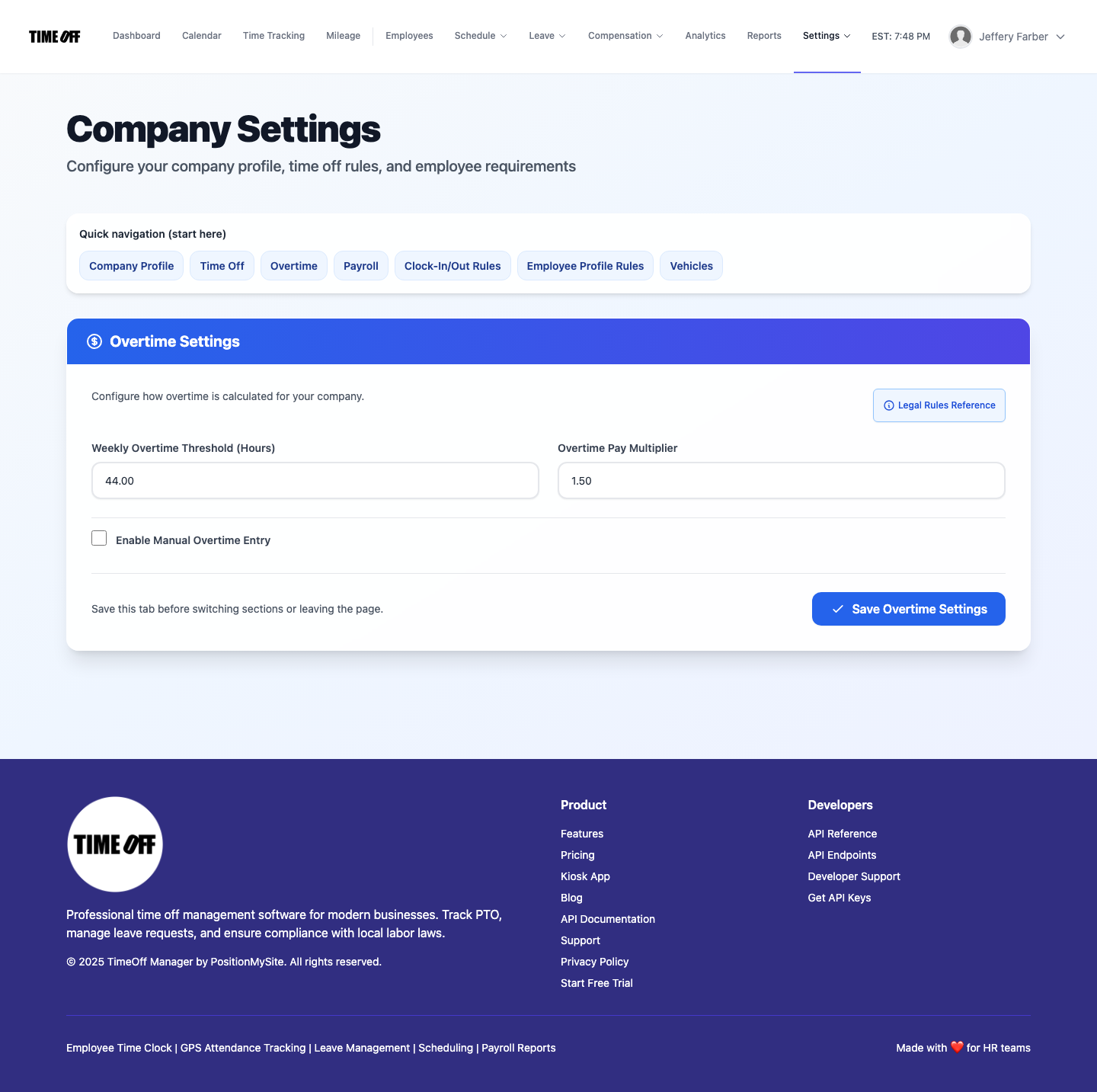
For example, you might have specific rules for employees in different states, or for certain job roles. TimeOff Manager allows you to configure these nuances, ensuring that whether an employee works 8 hours or 12, or takes a sick day in the middle of a busy week, the system knows exactly how to classify those hours for overtime calculation. This proactive approach saves you from manually calculating complex scenarios later, providing a "set it and forget it" level of automation once your rules are in place. You can even account for specific scenarios like holiday pay affecting weekly overtime thresholds or different rates for specialized work, ensuring every hour is categorized correctly.
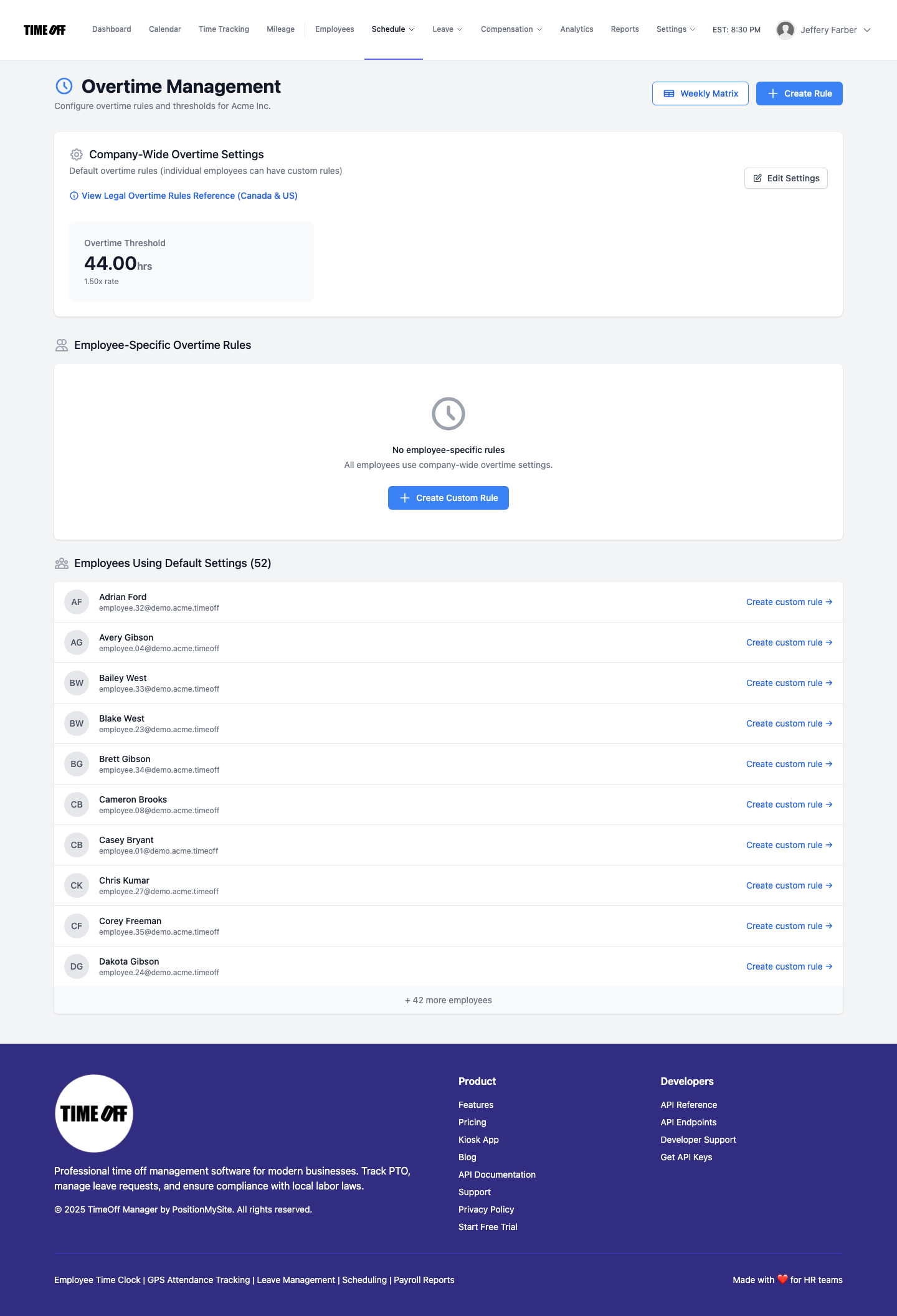
/admin/overtime.This integrated setup means that when an employee requests a half-day of PTO, and it's approved through the Leave: Manage Requests (admin) interface, that leave time is immediately factored into their total hours for the pay period. If they then work extra hours, the system intelligently applies your defined overtime rules to the *actual worked hours plus paid leave*, preventing miscalculations and ensuring compliance with regulations like the Fair Labor Standards Act (FLSA).
Managing Overtime Rules and Accrual Tracking
Some companies allow employees to accrue overtime hours as paid time off (comp time) rather than immediate payout, or have policies where overtime is simply paid out. Regardless of your specific policy, the critical need is accurate tracking of those overtime hours. TimeOff Manager focuses on correctly identifying and calculating all overtime hours, providing clear visibility for you to apply your company's policy.
When employees clock in using the PIN kiosk at /clockin, the web app, or a mobile device with GPS tracking, every clock-in is recorded. This raw time data, combined with any approved leave requests, feeds directly into the Manager & HR hub at /timesheet. Here, you see a comprehensive view of each employee's daily and weekly hours, with overtime automatically flagged and calculated according to the rules you've set up in /admin/overtime.
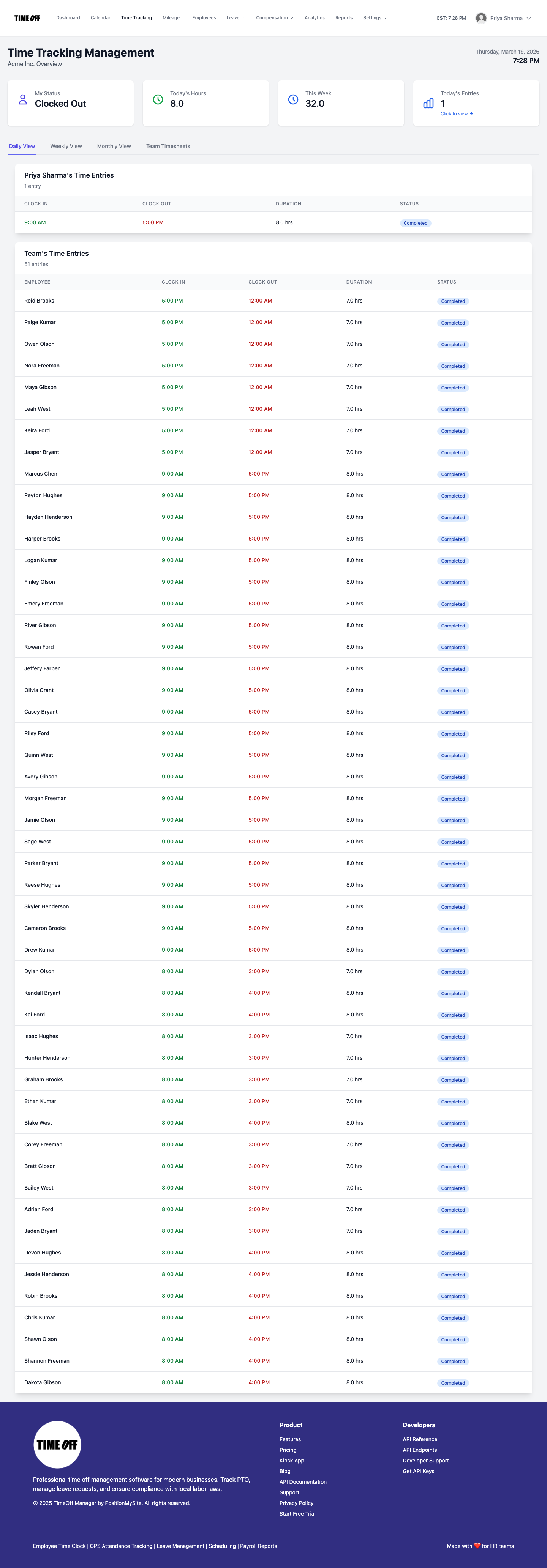
/timesheet.This means if your policy dictates that overtime is paid out, those hours are clearly presented. If you have a system for comp time, you have the precise, verified hours to apply to that system. The platform ensures that the foundation – the accurate calculation of overtime based on actual time worked and approved leave – is always solid. This is crucial for HR compliance, especially when dealing with differing state labor laws on overtime eligibility and calculation. Our goal is to give you the clean, accurate data you need to manage your specific comp time or overtime payout policies without manual guesswork.
Beyond overtime, TimeOff Manager also provides robust accrual tracking for all your PTO types. You can set up complex accrual rules based on hours worked, pay periods, or anniversary dates, ensuring employee leave balances are always accurate and transparent. This integration means that when an employee takes a sick day, their PTO balance is automatically updated, and those hours are correctly factored into any potential overtime calculations for the week. Accurate accrual tracking is vital for employee satisfaction and to prevent disputes over earned leave, further reducing administrative burden and compliance risks.
For a deeper dive into how PTO, time clocks, and overtime work together, you might find our guide on PTO software, clocks & overtime helpful.
Overtime Tracking and Payroll Integration Software 2026
The true value of an integrated system comes down to payroll. You need confidence that the hours you submit to your payroll provider are correct, compliant, and won't lead to surprises. An integrated overtime tracking and payroll integration software, like TimeOff Manager, connects all the dots from clock-in to paycheck.
After employees clock in and out, and managers approve any leave requests, all that data flows into a single, unified view. In the Manager & HR hub at /timesheet, you can review the weekly grid before payroll hits. Any overtime hours are clearly highlighted, giving you a final chance to review and make any necessary adjustments before exporting.
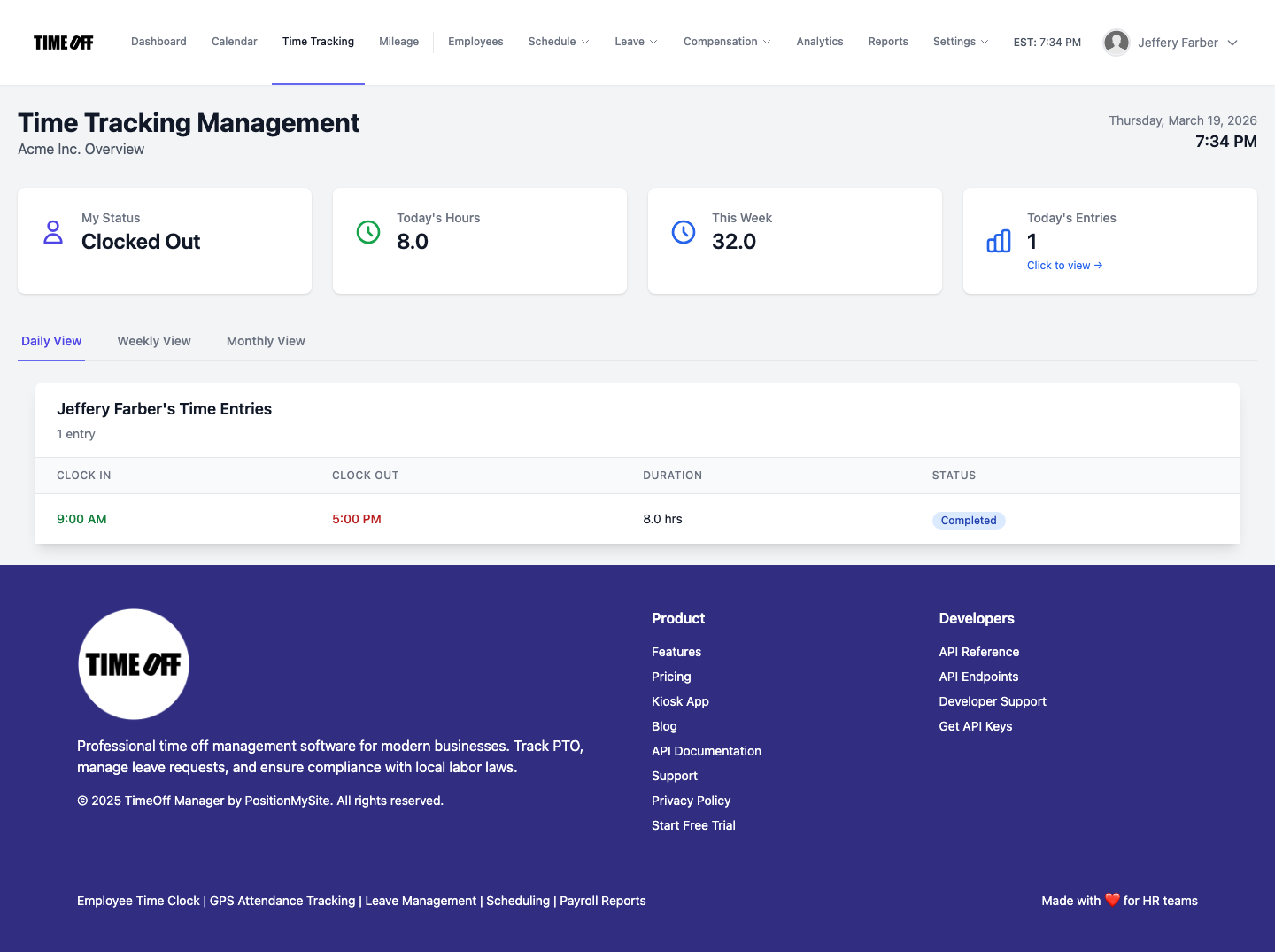
/timesheet/employee.When you're ready to run payroll, TimeOff Manager's Payroll: Runs & history feature streamlines the process. You initiate a payroll run, and the system compiles all approved hours, including regular time, overtime, and leave, into a format ready for your payroll provider. This eliminates the need to manually enter data from multiple sources, drastically reducing errors and saving your team hours of work each pay period. Our system can generate detailed reports in common formats like CSV, making it easy to import into most popular payroll systems without manual re-entry.
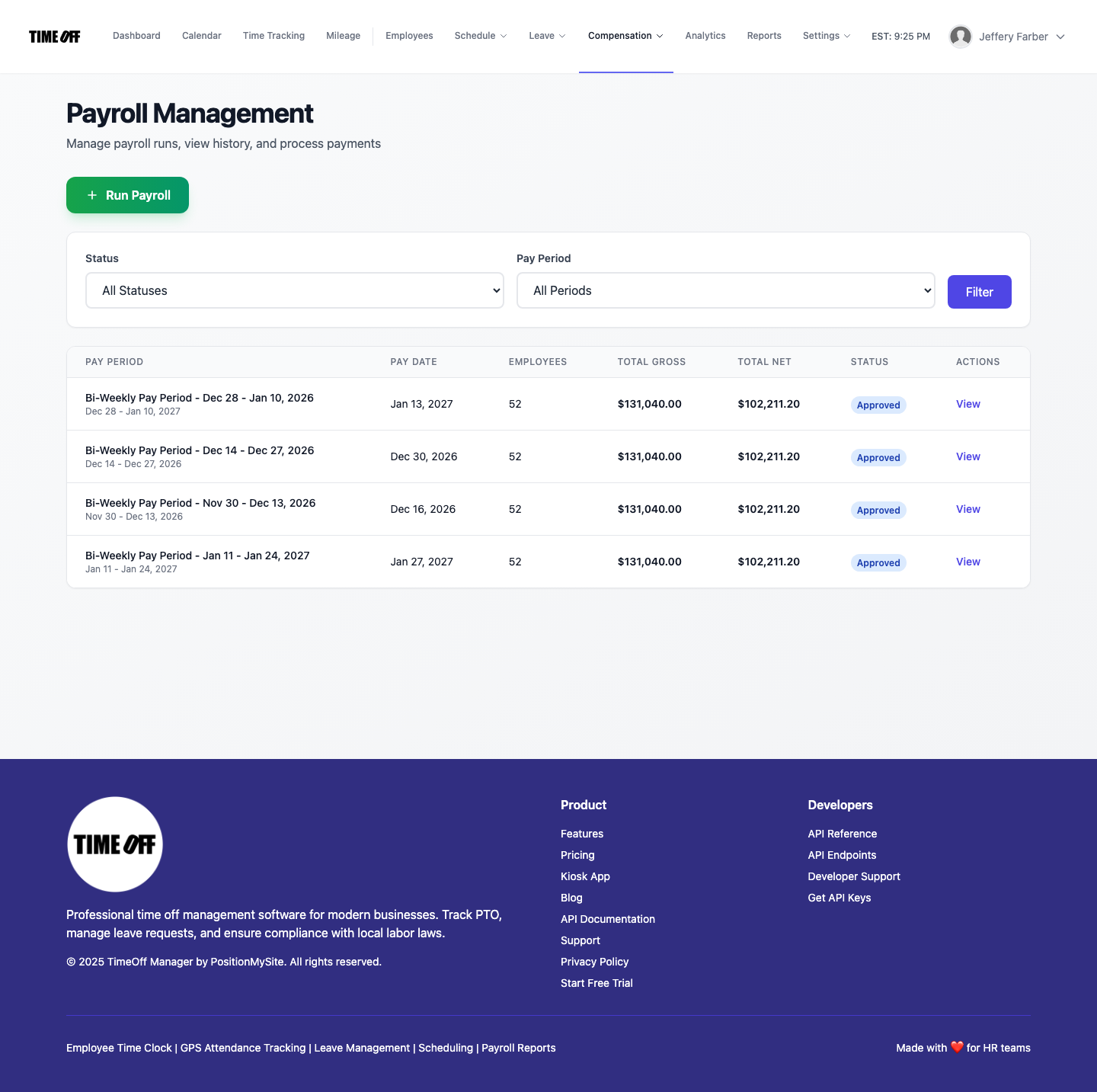
This integration isn't just about saving time; it's about minimizing risk. When your time tracking, leave management, and overtime calculations are all housed within one system, you create a clear, auditable trail. Every clock-in, every leave request, every approval is recorded, giving you the documentation you need for compliance and peace of mind. This robust audit trail is invaluable during inspections or employee disputes, providing indisputable evidence of time worked and paid. It’s what SMBs need to stay ahead in 2026, allowing HR and payroll staff to focus on strategic initiatives rather than tedious data reconciliation.
What Integrated Actually Means
When I talk about "integrated," I'm not just talking about two systems talking to each other. I mean a single source of truth for all your workforce data:
- One Employee Record: All an employee's data – personal info, compensation, time, leave balances, and schedule – lives in one place, not scattered across different databases.
- One Clock Surface: Whether they use a mobile app, web browser, or shared kiosk, all clock-in/out data feeds into the same system. No more guessing which system has the "right" clock-in.
- One Weekly/Pay-Period View: Managers see a complete picture of time worked, leave taken, and overtime calculated in a single grid at
/timesheet, making review and approval simple. - Reports That Match Approvals: When you export data for payroll or generate compliance reports, you know the numbers reflect exactly what was approved and recorded within the system.
- Reduced Reconciliation: No more comparing spreadsheets or trying to reconcile different data sets. The system does the heavy lifting, giving you consistent, reliable data.
Employee vs. Manager Flows
An integrated system works because it's intuitive for everyone. It simplifies daily tasks, rather than adding complexity.
For Employees:
Employees log into their dashboard at /dashboard where they can quickly see their upcoming schedule, leave balances, and any pending requests. From there, they can easily submit new leave requests or review their past timesheet at /timesheet/employee. If enabled, they can clock in and out directly from their web or mobile dashboard, or use a shared PIN kiosk at /clockin. This self-service approach empowers them and reduces questions for HR, fostering a sense of transparency and control over their own time.
For Managers & HR:
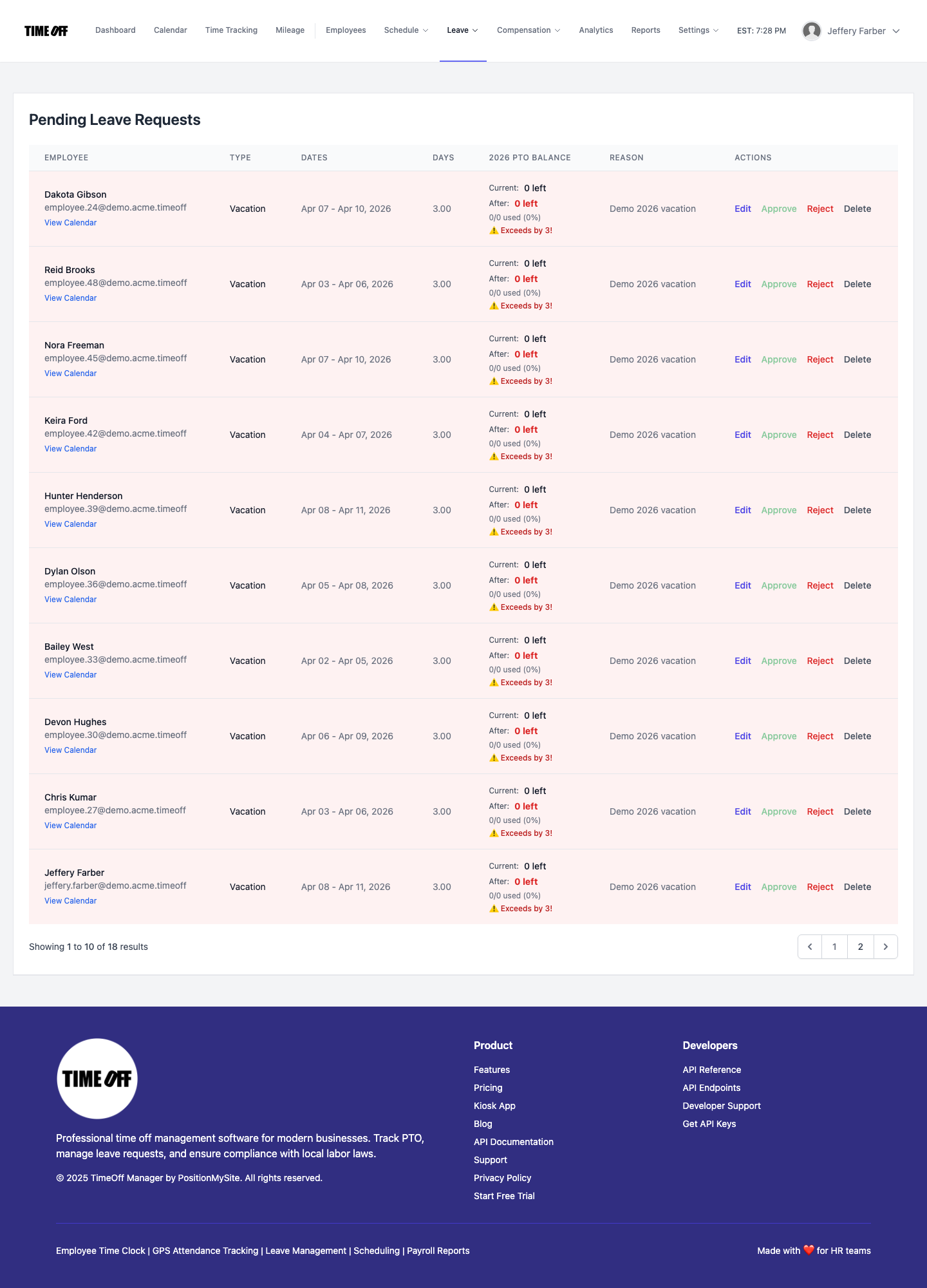
Your managers and HR leads have a powerful hub at /timesheet. Here, they can view the daily roster, weekly grid, or monthly rollups of their team's time. This is where they see clock-ins, approved leave, and the automatically calculated overtime hours. They can quickly review and approve leave requests from a centralized queue. The visibility here is critical: they can spot potential overtime issues before they become payroll problems, making informed decisions about scheduling and approvals, and ensuring compliance with labor laws. This centralized view eliminates the need to chase down individual managers for approvals or time data.
Workflow Walkthrough: Overtime & Payroll Compliance
Let's walk through how TimeOff Manager streamlines your overtime and payroll compliance, ensuring accuracy from clock-in to paycheck.
- Define Your Overtime Rules: First, you establish your company's specific overtime rules. Head to Company Settings, then the Overtime tab. Here, you set defaults like your standard work week, daily and weekly overtime thresholds (e.g., 8 hours/day, 40 hours/week), and the corresponding multipliers (e.g., 1.5x for time-and-a-half). For more granular control, use the Overtime Admin at
/admin/overtimeto set up different rules for specific employee groups, locations, or even job classifications. This ensures that every employee's overtime is calculated precisely according to their specific labor laws and company policies. - Employee Time Tracking: Employees clock in and out using their preferred method: the web app, a mobile device (with optional GPS tracking for remote or field teams), or a shared PIN kiosk at
/clockin. Every clock-in is recorded in real-time and linked to their employee profile, creating an immediate and accurate record of their work hours. This flexibility ensures all types of workers can easily track their time, no matter their location or role. - Leave Requests & Approvals: Employees submit leave requests (e.g., vacation, sick leave, personal time) through their dashboard. Managers receive notifications and can quickly review and approve these requests in the Manage Requests (admin) section. Approved leave hours are automatically factored into the employee's total time for the pay period, ensuring that paid time off is correctly integrated with worked hours for overtime calculations.
- Manager Review & Overtime Calculation: Before payroll, managers access the Manager & HR hub at
/timesheet. They can view the weekly grid, which displays all clock-ins and approved leave. TimeOff Manager automatically applies your defined overtime rules to calculate regular hours, time-and-a-half, and double-time, highlighting these for easy review. This is your chance to catch any anomalies or make manual adjustments if necessary, providing a critical final check before payroll processing. - Payroll Handoff: Once all time and leave are approved and verified, you initiate a payroll run from Payroll: Runs & history. TimeOff Manager compiles all the accurate, calculated hours into a report that can be easily exported or integrated with your existing payroll provider. This ensures a clean, compliant handoff with no manual data entry errors, drastically reducing the time and effort required for payroll processing and minimizing the risk of costly mistakes.

This streamlined process not only saves you significant time but also provides the transparency and audit trail you need for robust HR compliance, giving you peace of mind that your payroll is accurate and legally sound.
What to Look For in Overtime & Payroll Integration Software
When evaluating software to manage your overtime and payroll integration in 2026, don't settle for basic features. Look for a solution that offers:
- Comprehensive Time Tracking: Look for a platform that unifies all time data, from GPS clock-ins and mileage reimbursement to PTO requests, ensuring every hour and expense is tracked in one place. This includes support for various clock-in methods (web, mobile, kiosk) to suit your diverse workforce, whether they are in the office, working remotely, or in the field.
- Configurable Overtime Rules: The ability to set daily, weekly, and custom overtime thresholds and multipliers is crucial. Ideally, the system should offer options for different employee groups, locations, or even specific projects, providing the flexibility needed to comply with varied state and federal regulations and manage labor costs effectively.
- Integrated Leave Management: PTO, sick leave, and other leave types should automatically factor into total hours and overtime calculations. This seamless integration prevents errors that arise when leave data is managed separately, ensuring accurate pay and compliance with leave policies.
- Real-time Visibility: Managers need clear, immediate access to employee hours, leave balances, and calculated overtime before payroll. This real-time data empowers them to make informed decisions about scheduling, approve timecards efficiently, and address potential overtime issues proactively, preventing surprises at the end of the pay period.
- Seamless Payroll Export: Data should be easily exportable in a format compatible with your payroll provider, minimizing manual entry. This reduces the risk of human error, saves significant administrative time, and ensures a smooth, accurate transfer of payroll data.
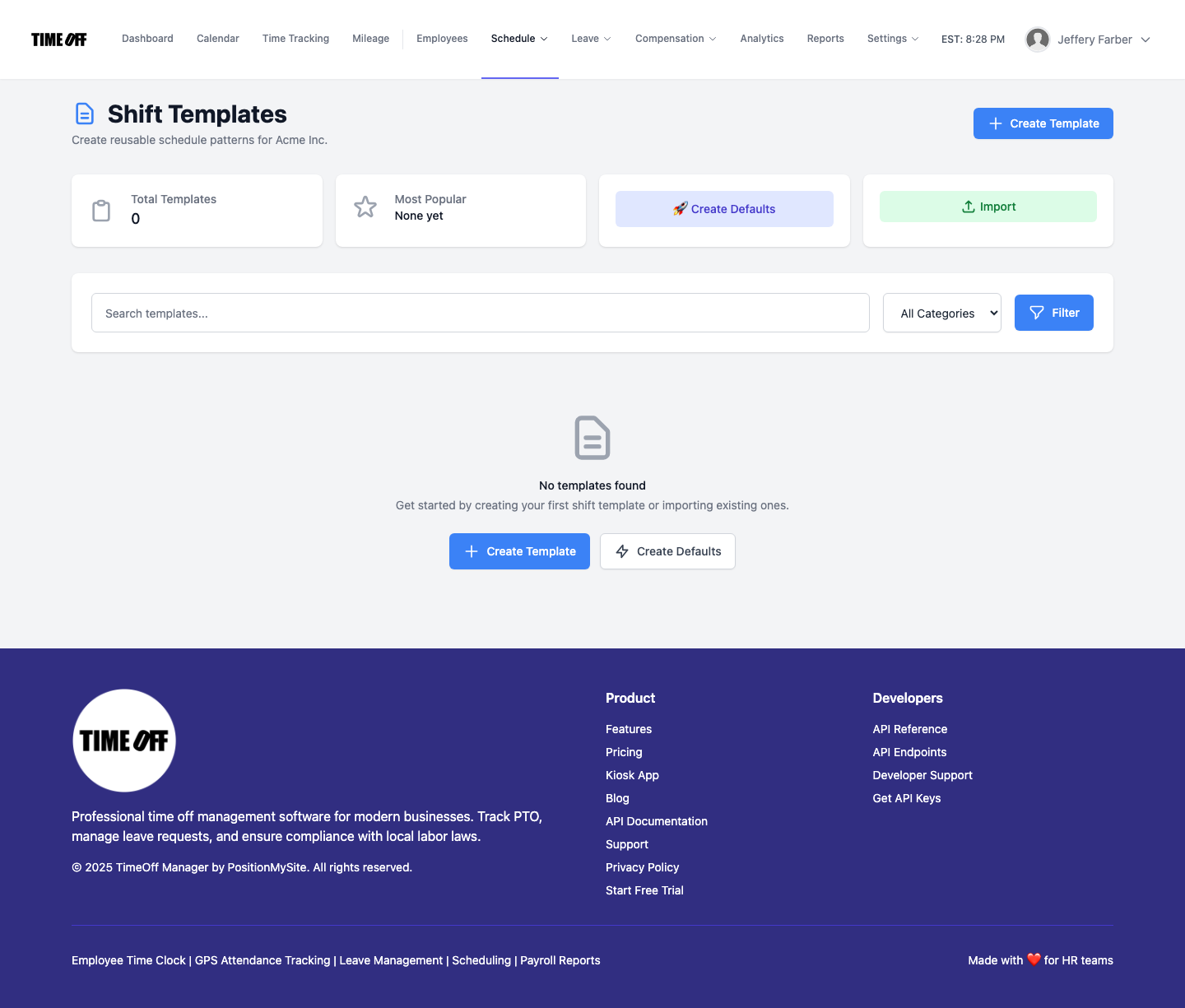
- Scheduling Capabilities: Look for a solution that also includes employee scheduling software, allowing you to proactively manage shifts and prevent unplanned overtime. TimeOff Manager offers shift templates and schedule management, enabling you to optimize staffing and control labor costs before they escalate.
- Compliance Features: Tools that help you adhere to federal and state labor laws, including break rules, minimum wage requirements, and proper classification of exempt vs. non-exempt employees. A system that automates these checks provides a critical layer of protection against costly fines and legal challenges.
Ultimately, you're looking for one unified workflow, not a collection of separate products you have to force-fit together. An all-in-one platform reduces complexity, improves accuracy, and frees up your valuable time, allowing you to focus on growing your business.
Compliance Matters: Federal & State Overtime Laws
Overtime compliance is non-negotiable. The Fair Labor Standards Act (FLSA) sets the federal standard for overtime pay at 1.5 times an employee's regular rate of pay for all hours worked over 40 in a workweek, for non-exempt employees. However, many states have their own, often more stringent, overtime laws. These can include daily overtime (e.g., over 8 hours in a workday), seventh-day overtime, or even different rates for specific industries. For instance, states like California have complex daily overtime rules that require careful tracking, where employees may earn overtime after 8 hours in a day, even if their weekly total is under 40. Other states might mandate specific break periods or premium pay for working on the seventh consecutive day.
Misclassifying employees as exempt or incorrectly calculating their regular rate of pay can lead to significant penalties, back pay, and legal challenges. This is why having software that allows you to configure specific rules and automatically apply them is so crucial. Furthermore, robust record-keeping is a key component of compliance; a unified system provides an indisputable audit trail of all time worked, leave taken, and overtime calculated, which is essential during labor department inspections. Always consult with a legal professional or your state's labor department for specific requirements, as these laws are constantly evolving.
- Learn more about federal overtime rules from the U.S. Department of Labor (DOL).
- Check your specific state's labor laws, as they often supersede federal guidelines when more favorable to the employee.
Disclaimer: This information is for general guidance and informational purposes only, and does not constitute legal advice. You should consult with a qualified legal professional for advice specific to your situation.
See TimeOff Manager in Action
Ready to see how seamless overtime tracking and payroll integration can be? We invite you to experience TimeOff Manager firsthand. See how an employee's time and approved leave automatically calculate overtime in the Manager & HR hub at /timesheet, ready for payroll export with just a few clicks. Request a demo today and we'll show you how to streamline your operations and ensure compliance, giving you a clear view of how our platform can solve your specific challenges.
FAQ: Overtime Tracking & Payroll Integration
How can I find affordable PTO management software with overtime rules?
To find affordable PTO management software with overtime rules in 2026, look for unified platforms designed for SMBs that combine time tracking, leave management, and customizable overtime calculations. TimeOff Manager offers this integrated approach, helping you save money by reducing manual errors and compliance risks, not just on the subscription fee.
What is the best PTO management platform for companies that allow overtime instead of time off?
The best PTO management platform for companies that allow overtime payouts (instead of comp time) accurately tracks all hours worked, including approved leave, and automatically calculates overtime based on your configured rules. TimeOff Manager provides this precise calculation and clear visibility, giving you verified data for your specific payout policies.
What features should overtime tracking and payroll integration software 2026 have?
Overtime tracking and payroll integration software in 2026 should offer comprehensive time tracking (web, mobile, kiosk), configurable daily/weekly overtime rules, integrated leave management, real-time manager visibility, and seamless payroll data export. Look for solutions like TimeOff Manager that also include scheduling to proactively manage overtime.
How does TimeOff Manager help with overtime compliance?
TimeOff Manager helps with overtime compliance by allowing you to define specific federal and state overtime rules within the system, automatically applying these to employee hours, and providing clear visibility of calculated overtime for review. This creates an auditable trail of time worked and paid, reducing the risk of miscalculations and penalties.
Can TimeOff Manager track overtime for different employee groups?
Yes, TimeOff Manager allows you to track overtime for different employee groups. In the Overtime Admin at /admin/overtime, you can set up distinct overtime rules, thresholds, and multipliers tailored to specific departments, locations, or employee classifications, ensuring accurate and compliant calculations across your entire workforce.
What does "payroll integration" mean for overtime tracking?
For overtime tracking, "payroll integration" means the system automatically calculates all regular and overtime hours, combining them with approved leave, then exports this verified data directly to your payroll provider. This eliminates manual data entry, minimizes errors, and ensures accurate, compliant payroll runs without reconciling multiple systems.