Best Clock In/Out App With GPS for Small Business (2026)
A GPS-enabled clock in and out app helps small businesses accurately track time for remote or field teams, verifying where and when employees punch in and out.
A GPS-enabled clock in and out app can reduce time theft by **10-15%** for small businesses, especially those with remote or field teams. This accuracy, crucial for payroll and overtime calculations, verifies employee location at clock-in, ensuring your team is precisely where they need to be, when they need to be there.
Why Manual Time Tracking Breaks Your Business Today
You've probably felt the headache. Your field team calls in their hours, or worse, emails you a spreadsheet at the end of the week. Maybe they're using a generic clock-in app that doesn't talk to your PTO system or scheduling software. This disconnect creates chaos:
- Spreadsheet Fatigue: Imagine spending every Friday evening wrestling with multiple Excel sheets, trying to consolidate hours from different team members. You're not just entering numbers; you're correcting typos, chasing down missing entries, and trying to decipher handwritten notes. This isn't just a time sink; it's a breeding ground for errors that can lead to incorrect payroll, frustrated employees, and even legal disputes.
- Blind Approvals: A manager approves an employee's PTO request for next Tuesday, but they don't realize that same employee has been clocking in late all week, pushing them close to overtime. Without a unified view, PTO approvals become blind guesses, leading to unexpected overtime costs, understaffed shifts, or even compliance violations when employees aren't getting required breaks.
- Timezone Drift: If your team spans multiple timezones, calculating overtime can become a complex puzzle. Does the 40-hour work week reset based on local time or headquarters time? Manual reconciliation of different time zones for payroll, especially when applying specific state or federal overtime rules, is a constant source of errors and compliance risk. It's easy to miscalculate and either overpay or underpay, both of which are problematic.
- Payroll Surprises: The worst feeling is when your payroll provider flags discrepancies, forcing you into a manual, painstaking effort to piece together hours. You have one set of hours from a punch card, another from an email, and a third from approved leave. This isn't just inefficient; it's a significant compliance risk that can result in fines, back pay, and damage to your reputation.
- Lack of Verification: Without GPS, you're relying purely on trust. Is your construction crew truly clocking in at the job site, or from their home office? Are your delivery drivers starting their shifts from the client's warehouse or their driveway? This lack of verifiable location data impacts project billing accuracy, client trust, and directly affects your bottom line by paying for unworked time or incorrect project allocation.
These issues cost money, erode trust, and prevent you from focusing on growing your business. What you need is a unified system where punches, leave, and schedules are all visible in one place, providing a single, reliable source of truth.
What to Look For in a GPS Clock-In App with Verification
When you're looking for the best employee time clock app with GPS verification in 2026, you need more than just a pin drop. You need a solution that truly integrates attendance with your broader HR and payroll needs. Here’s what to prioritize:
- Accurate Geofencing: Beyond just a simple pin drop, a robust system allows you to define precise virtual boundaries (geofences) around all your work locations – be it a main office, a client site, or a temporary construction zone. Employees must be within this specific radius to clock in or out. This feature is non-negotiable for field service, construction, or any remote team visiting client sites, ensuring you pay for time worked at the correct location. You should be able to define multiple locations, assign them to specific employees, or link them to scheduled shifts for granular control.
- Mobile & Kiosk Options: Flexibility is key. A top-tier GPS time clock offers multiple ways to punch in. Employees should effortlessly clock in/out from their own mobile device (with GPS enabled and verified) when on the go. For in-office teams or shared work environments, a dedicated tablet can serve as a secure PIN kiosk, allowing quick, central clock-ins. This dual functionality ensures all your employees, regardless of their work setting, have an easy and accurate way to record their time.
- Seamless Timesheet Integration: GPS punches are only half the story. The real value comes when this location-verified data flows directly into an intuitive, editable timesheet. Managers need a clear, comprehensive view that combines daily punches, recorded breaks, and any associated leave (like vacation or sick time) in one weekly or bi-weekly view. This integration eliminates manual data entry, reduces errors, and provides a transparent record for both employees and managers.
- Overtime Visibility: Don't wait for payroll to discover unexpected overtime costs. Your time clock software should automatically apply your company's specific overtime rules (e.g., 1.5x after 40 hours, or daily overtime rules specific to certain states) to all GPS-tracked hours. This gives you a clear, real-time picture of potential overtime before the pay period closes, empowering you to manage budgets proactively and ensure full compliance with complex wage and hour laws.
- Leave Management & Scheduling Integration: The best solutions connect time tracking to your broader workforce management. Can an employee request PTO directly from the same mobile app they use to clock in? Can a manager instantly see approved leave alongside scheduled shifts and actual punches? This holistic view prevents double-booking, ensures adequate coverage, and streamlines the entire process from time-off request to payroll, eliminating the 'two different truths' problem.
- Audit Trails & Reporting: For compliance, accuracy, and dispute resolution, you need an immutable record. Robust software provides a clear audit trail of every punch, every edit made by a manager (with reasons), and every approval. Comprehensive reporting helps you verify attendance, track project hours for client billing, and prepare for payroll with absolute confidence, providing transparency for both internal and external audits.
TimeOff Manager brings together your GPS time clock, mileage tracking, PTO software, and employee scheduling in one platform. You get a single, accurate employee record that eliminates manual reconciliation and reduces compliance risk. For instance, if an employee clocks in via GPS, that punch instantly populates their timesheet, visible to both them and their manager at /timesheet.
Best GPS Time Clock App for Field Teams (2026)
Field teams, whether they're installing HVAC, delivering goods, providing on-site consulting, or managing construction projects, present unique time tracking challenges. You need to know not just that they worked, but where they worked, for how long at each specific location, and if they adhered to their schedule. This is where geo time tracking software truly shines. It’s not about micromanaging; it’s about ensuring accuracy, accountability, fair compensation, and precise project billing.
With TimeOff Manager, you can set up specific work locations for your field employees. Simply enter the address and define a geofence radius. When an employee attempts to clock in or out using their mobile app, the system verifies their GPS coordinates against the defined work location. If they're outside the designated area, the punch is flagged or disallowed, preventing off-site clock-ins.
This capability is crucial for HR compliance in 2026, especially regarding accurate wage payment and preventing "buddy punching" or time theft. It ensures that hours billed to clients for specific projects are genuinely worked on-site. Beyond just tracking, this data feeds directly into their daily and weekly timesheets, making manager review quick and transparent.
Consider a scenario: a technician is scheduled to be at a client site from 9 AM to 1 PM. With GPS time tracking software, you can confirm they clocked in at the client's address at 8:55 AM, took a 30-minute lunch break off-site (if allowed), and clocked out at 1:02 PM, all verified by their location. This level of detail is invaluable for accurate client billing, internal project cost analysis, and demonstrating due diligence to regulatory bodies. It also provides peace of mind for employees, knowing their accurate work time is recorded without dispute, and for managers, knowing project hours are correctly allocated.
GPS Time Tracking Software: Integrating PTO, Payroll & Overtime Rules
The real power of geo time tracking software isn't just in knowing where your employees are; it's in how that data integrates with the rest of your HR operations. A standalone GPS time clock might give you location data, but if it doesn't talk to your PTO software, employee scheduling software, or payroll, you're still stuck in manual data transfer hell. That's why TimeOff Manager was built from the ground up to connect these pieces.
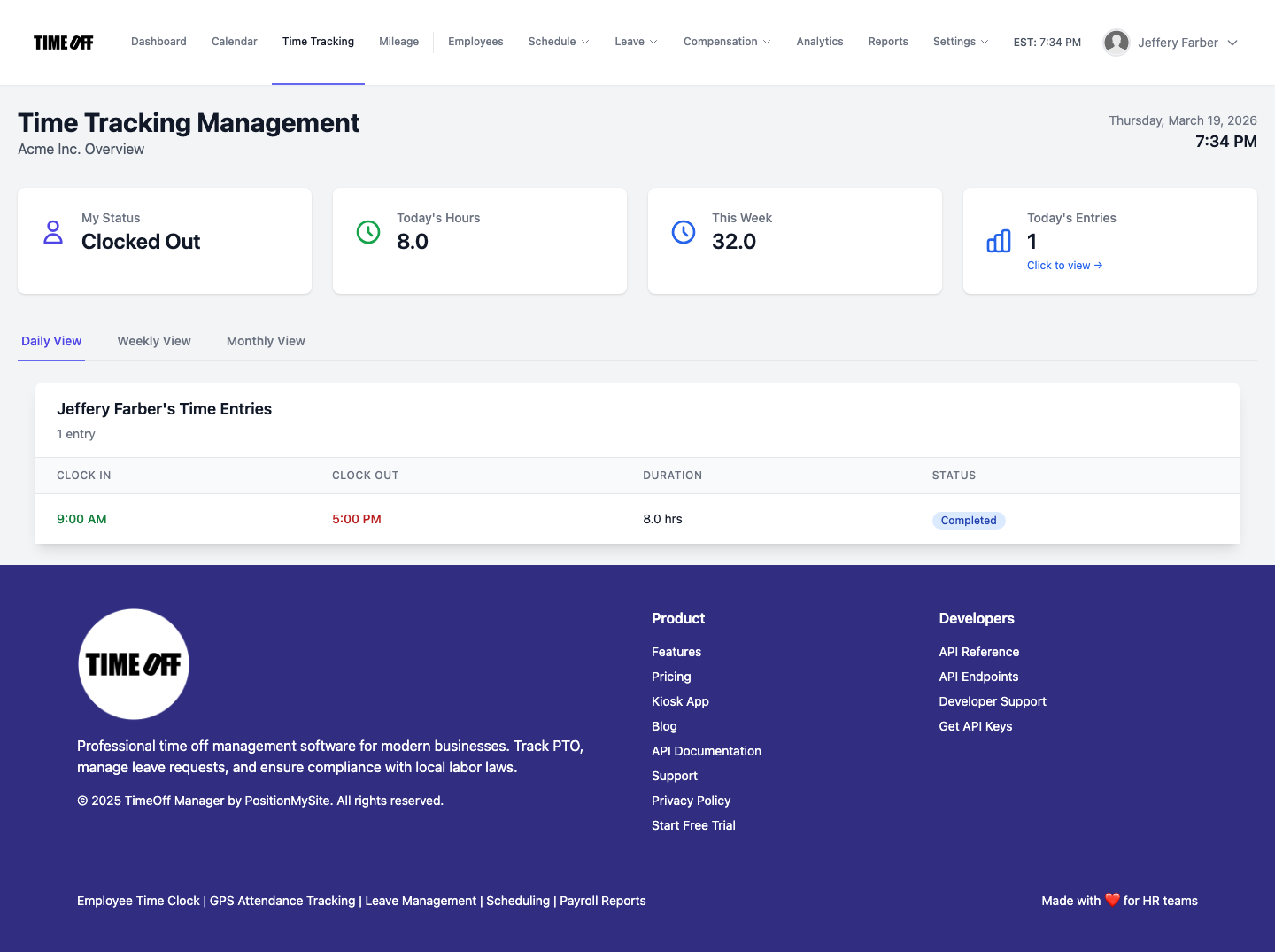
/timesheet gives you a weekly grid view, combining GPS punches, kiosk entries, and approved leave for accurate payroll preparation.What Integrated Actually Means
When your geo time tracking software is truly integrated, it means:
- One Employee Record: Every employee has a single, comprehensive profile within the system. Their scheduled shifts, actual punches (whether GPS-verified mobile, or kiosk), approved PTO, and compensation details all reside in one central location. This eliminates the need to update multiple systems, reducing administrative burden and the risk of data inconsistencies.
- One Clock Surface: Employees interact with a single, intuitive app or kiosk for all their time-related needs. They use the same interface to clock in/out, request leave, and view their schedule and PTO balances. This unified experience simplifies their daily routine, reduces confusion, and encourages consistent usage, leading to more accurate data.
- One Weekly/Pay-Period View: As a manager, you gain immediate clarity. Opening the Manager & HR hub at /timesheet presents a comprehensive weekly grid. This view integrates all punches (complete with location data if GPS-enabled), recorded breaks, and any approved leave. You can instantly spot discrepancies, review hours, and prepare for payroll with confidence, knowing all relevant data is consolidated.
- Reports That Match Approvals: When it's time to export data for payroll, you can trust its accuracy. The reports reflect real-time punches, pre-approved leave, and automatically calculated overtime, all validated within the system. This eliminates the need for manual cross-referencing and ensures that what you send to payroll precisely matches what was worked and approved, significantly reducing errors and compliance risks.
- Automated Overtime Tracking: Your company's specific overtime rules are configured once in Overtime Admin, whether they are federal, state-specific, or company policy. As employees clock hours, the system automatically applies these rules, flagging potential overtime before you run payroll. This proactive insight is crucial for managing labor costs, adjusting schedules if needed, and ensuring full HR compliance in 2026 with complex wage and hour laws.
This integrated approach saves you significant administrative time, reduces errors, and helps ensure you're always compliant with labor laws, which can vary significantly by state and locality in the US. For example, if an employee works 45 hours in a week, the system automatically calculates the 5 hours of overtime based on your company settings and state laws, presenting it clearly for manager review.
Employee vs. Manager Flows
A good time clock app with GPS verification needs to work smoothly for everyone. It should empower employees while providing managers with the oversight they need.
Employee Experience:
Employees simply open the TimeOff Manager app on their mobile device or navigate to /clockin on a shared device. If mobile GPS clock-in is enabled and they're within a geofence, they tap to punch in or out. It's fast and intuitive. From their dashboard, they can also:
- View their personal timesheet, seeing all their punches and any approved leave.
- Submit leave requests (like vacation or sick time), which automatically update their availability for scheduling.
- Check their remaining PTO balances.
- View their upcoming shifts from the schedule.
/timesheet/employee.Manager & HR Experience:
Managers get a powerful hub to oversee their team's time and attendance. At /timesheet, they can:
- See a daily roster or a weekly grid of all employee punches and leave.
- Review and approve employee timesheets, making any necessary edits (with an audit trail).
- Spot potential overtime issues before they hit payroll.
- Approve leave requests, knowing how it impacts coverage thanks to the integrated calendar.
- Manage schedules, create shift templates, and ensure proper coverage.
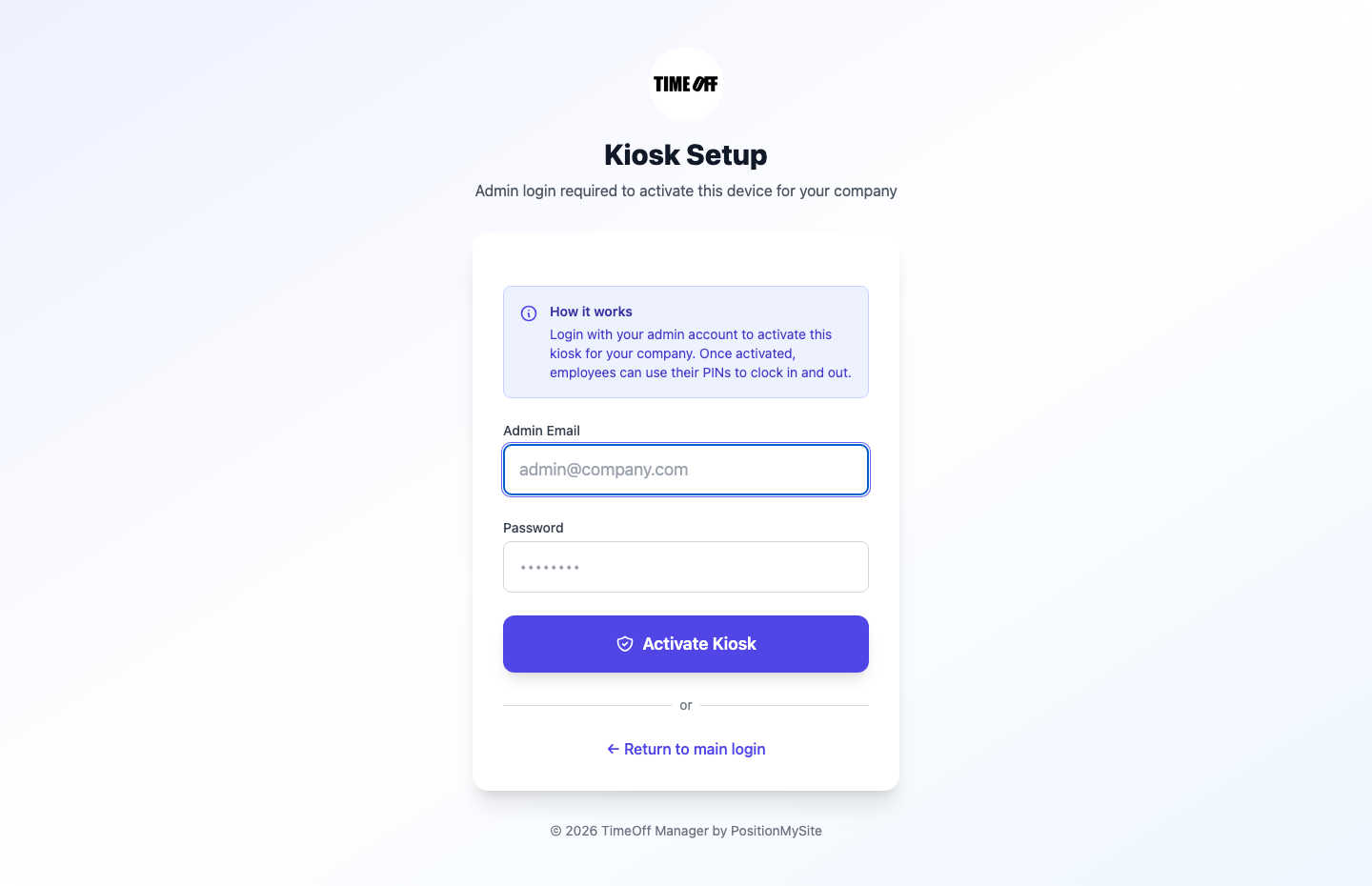
/clockin PIN kiosk provides a simple, secure way for employees to punch in and out.Workflow Walkthrough: From Punch to Payroll
Let's walk through a typical workflow using TimeOff Manager, showing how GPS time tracking seamlessly integrates into your operations:
- Setting Up Company Defaults & Geofences:
- First, you define your company's company settings, including your work week, default overtime rules, and any specific holidays.
- Next, you'll set up your work locations. For each location (e.g., your main office, a client site, a remote warehouse), you'll add the address and define a geofence radius. You decide if GPS verification is mandatory for clock-in at these locations.
- You also configure your overtime rules, specifying daily and weekly thresholds, and how overtime is calculated (e.g., 1.5x after 40 hours).
- Employee GPS Clock-In or Kiosk Punch:
- An employee arrives at their designated work location. They open the TimeOff Manager app on their smartphone.
- The app uses their device's GPS to verify their location against the geofence you set up.
- If they are within the geofence and mobile clock-in is enabled, they tap "Clock In." The system records the precise time and their verified location.
- If an employee is in the office, they might use a shared tablet running the /clockin PIN kiosk, entering their unique PIN to punch in/out.
- Manager Review & Timesheet Approval:
- Throughout the week, managers can view their team's punches in real-time on the Manager & HR hub at
/timesheet. They see daily totals, breaks, and any leave requests. - If an employee had an approved vacation day, that leave time is already reflected alongside their punches.
- The system automatically highlights any potential overtime based on the rules you configured, allowing managers to address it proactively.
- Before the pay period closes, the manager reviews the weekly grid, makes any necessary edits (e.g., adjusting a missed punch with an explanation, which is logged for audit purposes), and approves the timesheets.
- Throughout the week, managers can view their team's punches in real-time on the Manager & HR hub at
- Seamless Payroll Handoff:
- Once timesheets are approved, the data is ready for payroll. You can run reports from /admin/reports that consolidate all hours, including regular time, overtime, and leave.
- This single, verified data set can then be exported in a format compatible with your payroll provider, eliminating manual data entry and reducing errors.
/admin/overtime. These rules automatically apply to all tracked punches, including those from GPS.This integrated flow ensures that every hour worked, every minute of leave, and every dollar of overtime is accurately tracked, approved, and ready for payroll, all while maintaining compliance and transparency.
What to Look For in Time Clock Software with GPS
When you're evaluating geo time tracking software, think beyond just the basic clock-in function. Here's a buyer checklist for SMB owners, HR leads, and ops managers:
- Ease of Use: Is the app intuitive for employees? Can they clock in/out with a single tap, request leave, and view their schedule without needing extensive training? For managers, is the review process straightforward?
- Geofencing Accuracy & Flexibility: Does it allow you to define multiple, customizable work locations with adjustable geofence radii? Can you assign specific locations to specific employees or shifts?
- Mobile & Kiosk Functionality: Does it support both mobile GPS clock-in for remote teams and a PIN-based kiosk mode for office or shared device use?
- Integration with HR Core Functions: Does it integrate time tracking with PTO software, employee scheduling, and overtime tracking? A truly unified platform is far more efficient than trying to stitch together separate products.
- Overtime & Compliance Features: Does it automatically calculate overtime based on your configured rules? Does it help you stay compliant with federal and state wage and hour laws, including break requirements?
- Reporting & Analytics: Can you generate detailed reports on attendance, hours worked, overtime, and leave? Is there an analytics dashboard to give you insights into labor costs and trends?
- Audit Trails: Does the system maintain a clear audit trail of all punches, edits, and approvals for compliance and dispute resolution?
- Scalability: Can the software grow with your business? Is it suitable for 5 employees today and 50 employees next year?
Opting for a solution that combines these features into one workflow, rather than managing separate products, will save you time, reduce errors, and ultimately lower your operational costs. It moves you from reactive problem-solving to proactive workforce management.
Compliance
Using a GPS time clock software helps with HR compliance 2026, but it's not a silver bullet. You still need to understand and adhere to local, state, and federal labor laws. Here are key areas where accurate time tracking is critical:
- Wage and Hour Laws: The Fair Labor Standards Act (FLSA) sets federal standards for minimum wage, overtime pay, and critical recordkeeping requirements. Accurate time tracking is not just good practice; it's fundamental to complying with FLSA. Without precise records of hours worked, including start and end times, breaks, and total daily/weekly hours, you expose your business to significant legal and financial risks. You can find more comprehensive information and resources on dol.gov/agencies/whd/flsa.
- Overtime Regulations: Beyond federal rules, overtime laws vary significantly by state and even locality. Many states have daily overtime laws (e.g., overtime after 8 hours in a day) in addition to the federal weekly rules (after 40 hours). Your geo time tracking software must be configurable to handle these complex nuances, automatically applying the correct rates and thresholds to avoid costly penalties for miscalculation.
- Meal and Rest Breaks: Certain states mandate paid or unpaid meal and rest breaks, with specific rules on duration and timing. Accurate punch data, including clearly recorded break times, is essential for proving compliance. A system that prompts employees to take breaks and records them accurately provides the necessary audit trail. Always check your state's labor department website for specific requirements, as non-compliance can lead to significant fines.
- Recordkeeping: The FLSA mandates that employers keep accurate records of employee hours, wages, and other details for a minimum of three years. A robust, digital time clock system provides the immutable audit trail you need, automatically storing punch data, edits, and approvals in a secure, accessible format. This digital record is invaluable for internal reviews, external audits, and defending against wage disputes.
Beyond these, privacy considerations are paramount. Always have a clear, written policy informing employees about GPS tracking, its purpose (work-related time verification, not personal surveillance), and when it is active. Ensure your use of GPS tracking complies with all state and local privacy laws, which can vary widely. Transparency and clear communication build trust and mitigate legal risks.
Remember, this information is for general guidance and not legal advice. Always consult with a legal professional or HR expert to ensure your specific policies and practices comply with all applicable laws.
Demo TimeOff Manager's GPS Time Clock
Ready to see how a unified system can transform your time tracking? We've set up a live, resettable demo for you. See how an employee clocks in via GPS from a specific work location, how that punch instantly appears on the manager's weekly grid at /timesheet, and how overtime is automatically calculated before you even think about payroll. Log in to our demo to experience it firsthand.
FAQ: Your Questions About GPS Time Clocks Answered
What is the best clock in and out app with GPS verification in 2026?
The best clock in and out app with GPS verification for small businesses in 2026 is one that offers accurate geofencing, flexible mobile and kiosk clock-in options, and seamless integration with PTO, scheduling, and overtime tracking. TimeOff Manager provides a unified platform for these critical HR functions, ensuring accuracy and compliance.
How does GPS time tracking software prevent time theft?
GPS time tracking software prevents time theft by verifying an employee's physical location at the moment they clock in or out. By setting geofences around designated work locations, the system can flag or prevent punches made outside the approved area, ensuring employees are on-site when recording work hours.
Can geo time tracking software integrate with my payroll provider?
Yes, effective geo time tracking software like TimeOff Manager integrates with your payroll process. After managers approve timesheets with GPS-verified punches and leave, you can generate detailed reports consolidating all hours for easy export to your payroll provider.
Is a mobile time clock app with GPS suitable for all types of businesses?
A mobile time clock app with GPS is ideal for businesses with remote teams, field service employees, or multiple job sites where location verification is crucial. It's also beneficial for in-office staff, often used alongside a PIN kiosk for flexibility and backup, ensuring accurate timekeeping for diverse workforces.
What are the benefits of combining GPS time clock with PTO software?
Combining GPS time clock with PTO software creates a single source of truth for all employee hours. Managers see actual punches alongside approved leave, preventing scheduling conflicts and ensuring accurate overtime. This unified view simplifies payroll preparation by eliminating manual data reconciliation between separate systems.
How does geofencing work with employee time tracking?
Geofencing for employee time tracking sets virtual boundaries around work locations using GPS coordinates. When an employee clocks in via mobile app, the system verifies their device's GPS signal is within the geofence. If outside, the punch can be restricted or flagged, ensuring employees are physically at the correct job site.
What compliance considerations should I be aware of with GPS time tracking?
When using GPS time tracking, be aware of federal and state wage and hour laws (FLSA), overtime regulations, and meal/rest break rules. Always inform employees about tracking policies, ensure it's used only for work-related time, and consult legal counsel to ensure compliance with privacy and state-specific regulations.