Canadian vs US HR Law & Compliance: A Complete SMB Guide (July 2026)
Managing teams across the US and Canada? You know the headache. Two sets of labor laws, different leave entitlements, varying overtime rules. It's a compliance tightrope. TimeOff Manager helps SMBs navigate these complexities with flexible HR tools.


Managing teams across the US and Canada? You know the headache. Two sets of labor laws, different leave entitlements, varying overtime rules. It's a compliance tightrope. TimeOff Manager helps SMBs navigate these complexities with flexible HR tools.
You run a business across the US and Canada. Maybe a sales team in Toronto and tech in Seattle. Or manufacturing in Windsor, Ontario, and a distribution center in Detroit, Michigan. You know the headache: two entirely different legal landscapes for every HR decision.
Payroll is a nightmare. Leave requests are a guessing game. Overtime calculations change depending on which side of the border an employee clocks in. One wrong step can mean fines, audits, or worse, unhappy employees and legal action.
It’s not enough to know the laws; you need to *enforce* them. How do you ensure your PTO, scheduling, and time clock software actually apply those rules, every single day? How do you stay compliant without hiring a legal team for each country?
TimeOff Manager was built for this complexity. We give you the flexibility to configure HR processes for diverse legal requirements, whether your team is in Vancouver, Boston, or both. No more fixing spreadsheets after the fact. No more guessing if a manager approved PTO without understanding its local impact on overtime or statutory leave.
The Compliance Tightrope: Why Overtime Math Breaks with Siloed Systems
The problem isn't just different laws; it's that traditional HR tools force you to pick one country's rules or manage everything by hand. This creates silos:
- Leave Management: US FMLA, state-specific paid sick leave, vacation accrual, and holiday pay differ greatly from Canadian federal and provincial statutory holidays, vacation, and protected leaves (parental, bereavement, critical illness). Tracking both in one rigid PTO system is impossible.
- Time & Attendance: Overtime is a key example. In the US, it's usually time-and-a-half after 40 hours weekly, with some daily rules by state. Canada has federal rules (for regulated industries) and provincial rules that vary widely—some after 8 hours daily, some after 44 hours weekly, some with different multipliers. Your time clock software must handle these details automatically.
- Scheduling & Breaks: Meal and rest break rules vary. Some US states mandate specific paid or unpaid breaks based on shift length. Canadian provinces also have specific rules. Scheduling software that doesn't check against these local rules leaves you exposed.
- Payroll Data: When your leave, time clock, and scheduling systems don't communicate, your payroll provider gets conflicting data. This means manual fixes, potential errors, and a high risk of non-compliance, especially with statutory holiday pay or complex overtime across different regions.
These aren't small differences; they are fundamental legal distinctions impacting everything from a daily clock-in to an annual vacation payout. Without an integrated, flexible system, you're always catching up, risking penalties, and wasting time on admin instead of growing your business.
What "Integrated" Actually Means for Cross-Border Compliance
At TimeOff Manager, integration isn't just data moving between modules. It's a unified workflow that respects the unique compliance demands of each region your business operates in. For you, this means:
- One Employee Record, Multiple Rules: Each employee's profile links to their work location and its HR rules. A Canadian employee's leave accrual follows provincial guidelines; a US employee's overtime is calculated per state law.
- One Clock, Smart Rules: Whether an employee uses the PIN kiosk, their mobile time clock, or the web clock, the system knows their location (with GPS time clock functionality if enabled) and applies the correct overtime and break rules.
- One Weekly View, Clear Compliance: The Manager & HR hub shows a complete picture of clock-ins, approved leave, and scheduled shifts. It highlights potential overtime or scheduling conflicts *before* they hit payroll, based on the rules for that employee's region.
- Reports That Match Rules: No more exporting CSVs and reconciling leave balances with hours worked. Our reports reflect your operations, aligned with your configured compliance settings. This is invaluable for internal audits or if a government agency comes knocking.
- Flexible Leave Types: You can create custom leave types that mirror specific statutory leaves in Canada (e.g., provincial sick leave, family responsibility leave) or the US (e.g., state-mandated paid family leave, specific PTO policies). This ensures every leave request is tracked correctly.
Employee vs. Manager: Tailored Views for Diverse Compliance Needs
For Employees: Clarity and Self-Service
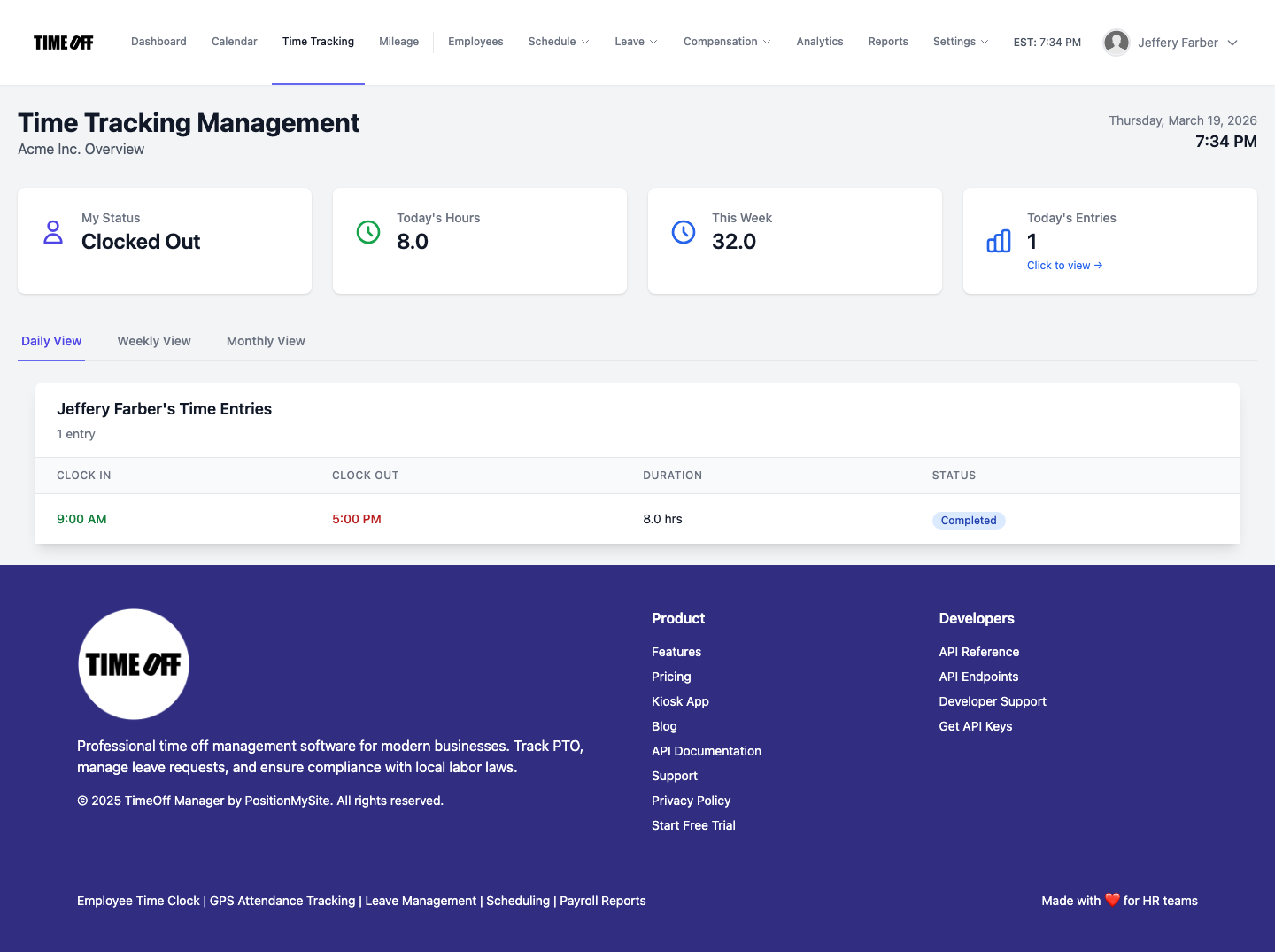
Your employees need to know their entitlements and how to request time off or track hours, whether they're in Ontario or Oregon. On their dashboard, they see their leave balances, upcoming shifts, and pending requests. This clarity reduces questions and ensures they understand their rights and responsibilities under local laws.
To request leave, an employee goes to My requests. The system automatically shows available leave types based on their location and tenure. To review hours, the employee timesheet provides a clear breakdown of clock-ins and approved time.
For Managers: Oversight and Local Rule Application
Managers are on the front lines of compliance. They approve leave, adjust schedules, and sign off on timesheets. They need tools to make compliant decisions quickly.
The Manager & HR hub is their command center. Here, they can see the daily roster, review the weekly grid, or check monthly rollups. This view consolidates all time data—clock-ins, leave, and scheduled shifts—allowing them to spot potential overtime issues or coverage gaps specific to their team's region.

When approving leave, managers go to Manage requests. The system provides context, such as current coverage and the employee's remaining balance, calculated based on the specific leave policies (US state, Canadian provincial) assigned to that employee. This prevents blind approvals that might violate local leave laws or create staffing shortages.
From Clock-in to Overtime: Configuring for Dual Compliance
Company Settings for Defaults
Your journey begins in Company settings. This is where you define your default work week, timezones, and other foundational elements. Crucially, this is also where you start to define your overtime defaults.
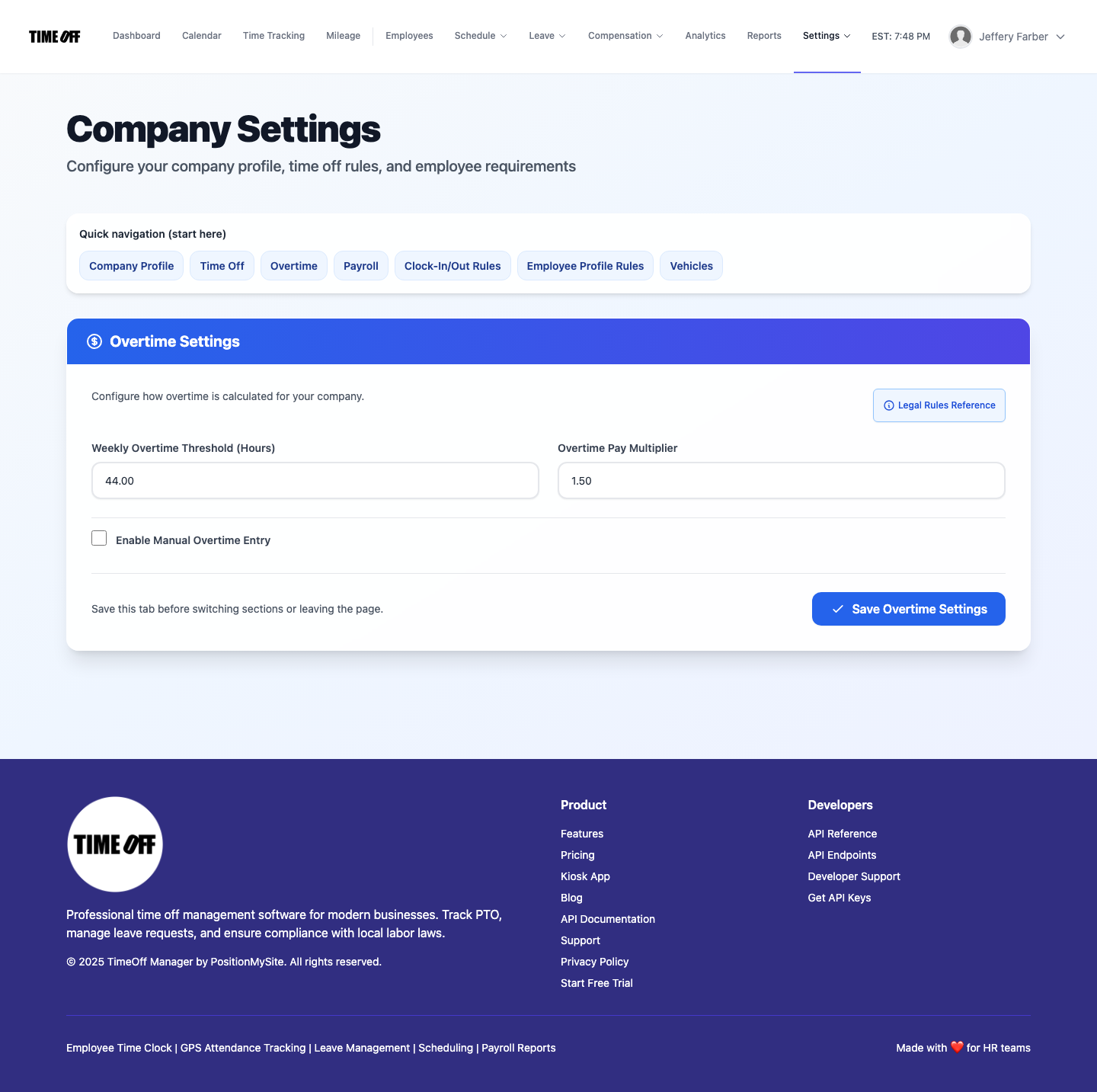
Defaults are just the beginning. For businesses spanning the US and Canada, you'll use more granular settings for overtime rules and leave types to tailor the system to each region.
Defining Overtime: US vs. Canadian Rules
This is where TimeOff Manager truly shines for dual compliance. Navigate to Overtime admin. Here, you can create specific overtime rules that apply to different employee groups or locations.
For your US employees, you might set up a rule that calculates time-and-a-half after 40 hours in a workweek, and perhaps a daily overtime rule for specific states like California. For your Canadian employees, you’d create rules reflecting provincial labor standards—for example, time-and-a-half after 44 hours in a week in Ontario, or after 8 hours a day in British Columbia, with double time after 12 hours. You can even define different multipliers.
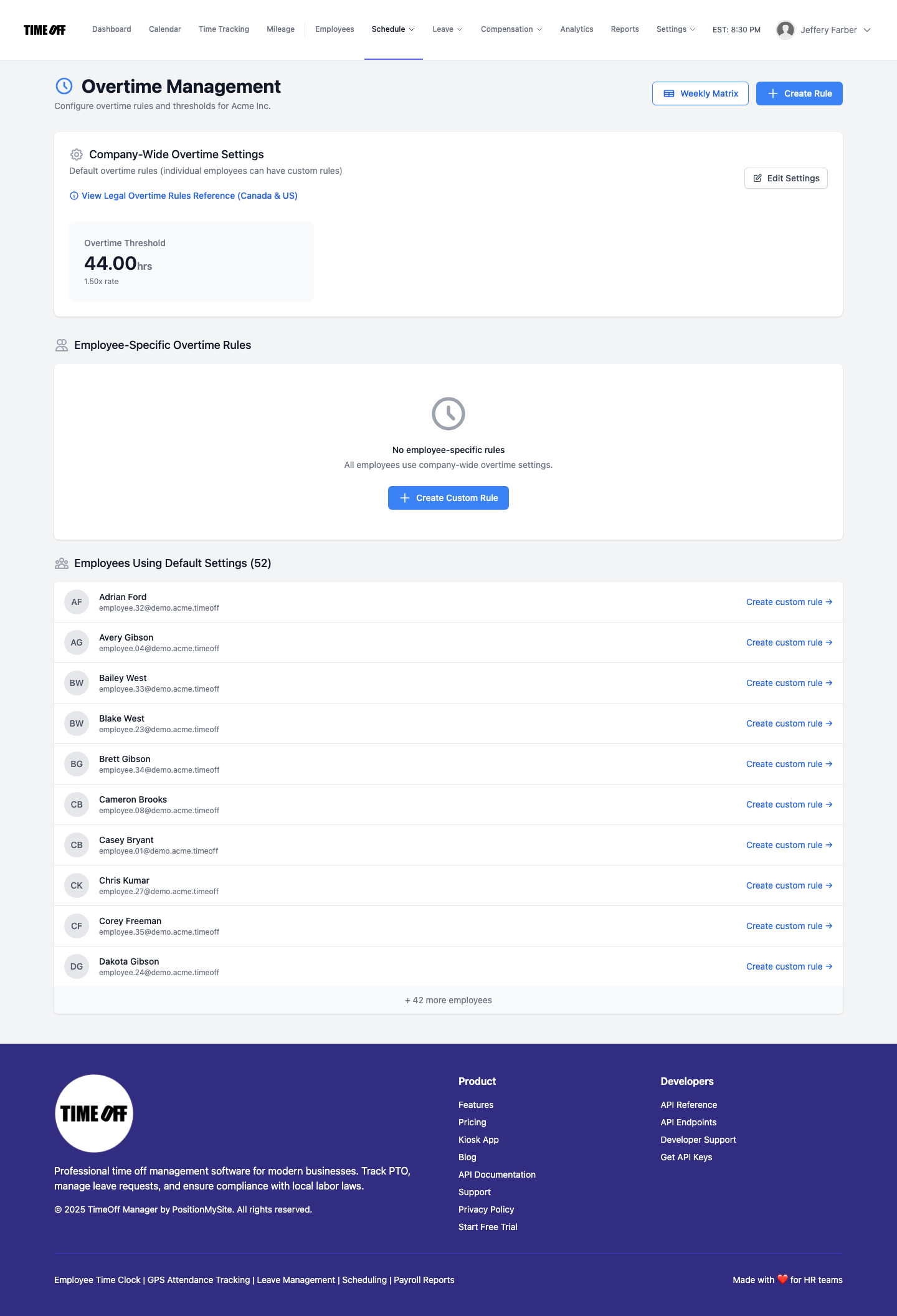
This flexibility is critical. Your PTO, clocks & overtime features work together to ensure that when an employee clocks out, their hours are automatically categorized and flagged for the correct overtime calculation based on *their* assigned rules.
Custom Leave Types for Statutory Compliance
Similarly, under Custom leave types, you can create and manage specific leave categories. This allows you to define "Ontario Sick Leave" with specific accrual and usage rules, separate from "California Paid Sick Leave." You can also account for different holiday schedules by setting up Holiday management for each region.
Scheduling with Validation Rules
Your schedule management also needs to ensure compliance. In Schedule validation rules, you can set parameters for shift lengths, required breaks, and maximum hours. This means you can create one set of rules for your US locations and another for your Canadian ones, preventing managers from accidentally creating non-compliant schedules.
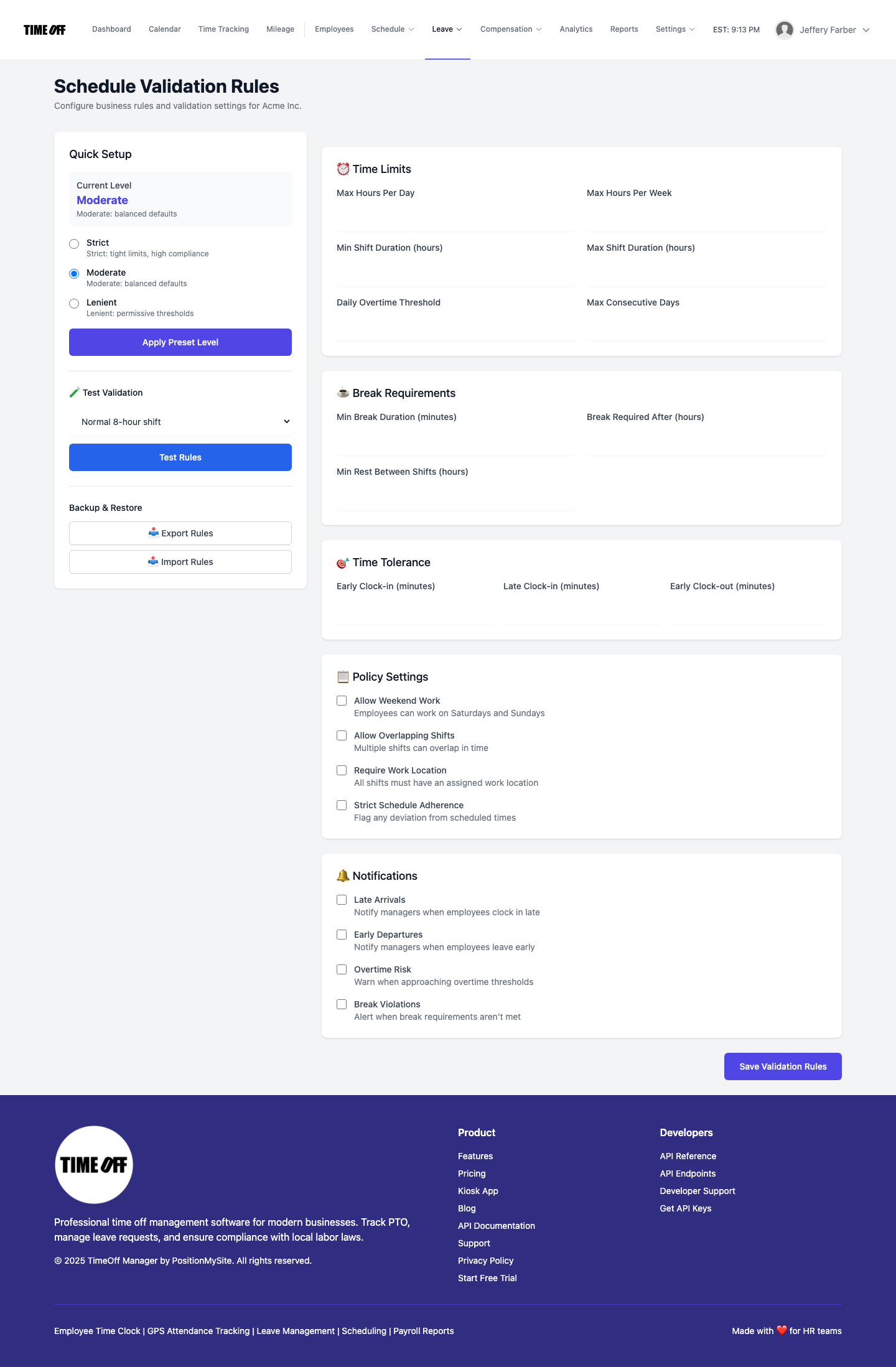
This proactive approach, combined with shift templates, means your scheduling software isn't just about coverage; it's about compliant coverage.
Payroll Handoff: Clean Data, Every Time
Once all time, leave, and scheduling data is captured and processed according to the correct regional rules, the handoff to your payroll provider becomes seamless. Whether you run payroll in-house or use an outside service, you'll have clean, accurate data for each employee, categorized correctly for their specific HR compliance demands. This significantly reduces payroll errors and ensures you meet obligations for overtime tracking and leave payouts.
For companies using TimeOff Manager's payroll features, the Payroll: Runs & history and Payroll: Create run wizard streamlines the entire process, ensuring every calculation adheres to your rules.
A Simple Story for Your CFO or Owner
Imagine you own a small manufacturing company with operations in Buffalo, NY, and Fort Erie, ON. Here's how TimeOff Manager simplifies HR compliance:
- Set Up Rules: During the Setup wizard, you define work locations, assign US state and Canadian provincial rules for overtime, and create custom leave types for both. You link employees to their locations via the Admin roster.
- Employee Requests Leave: Your Buffalo employee requests 3 days of Paid Family Leave. Your Fort Erie employee requests 2 days of Family Responsibility Leave. Both requests go through the same system, but available leave types and balance calculations reflect their respective regions.
- Recording Clock-ins: Your factory workers use the PIN kiosk. Your sales team uses the mobile time clock with GPS functionality. The system automatically records clock-ins, noting location and applying correct daily/weekly limits and break rules.
- Managers Review Weekly Grid: Your production manager in Fort Erie reviews the weekly grid. She sees one employee is set to hit 48 hours, triggering provincial overtime. Your Buffalo manager sees a different employee approaching 40 hours, triggering federal overtime, and can adjust the schedule if needed.
- Overtime Auto-Calculates: At the end of the pay period, all clock-ins are tallied. The system automatically applies Buffalo-specific overtime rules for US employees and Fort Erie-specific rules for Canadian employees. No manual calculations, no missed compliance.
- Payroll Handoff: You generate a report from Reports & exports. This report clearly segregates hours, regular pay, and overtime pay for both US and Canadian employees, ready for your payroll provider.
- Audit Trail: If an audit comes up, from the US Department of Labor or the Ontario Ministry of Labour, you have a complete, transparent record of all time worked, leave taken, and how overtime was calculated, all aligned with your configured rules.
This integrated workflow eliminates guesswork and ensures you're always operating within complex, dual-jurisdictional HR law.
Questions to Ask Any Vendor
When evaluating HR solutions for cross-border operations, ask yourself: Am I buying separate products I'll have to manually integrate, or am I investing in one workflow designed for flexibility and compliance?
- Does your PTO software understand the difference between US FMLA and Canadian parental leave?
- Can your time clock software apply different overtime rules for employees in California versus British Columbia?
- Does your employee scheduling software validate against local break laws in multiple jurisdictions?
- How much manual reconciliation will your HR team or accountant have to do before running payroll?
TimeOff Manager is built to be that single, flexible workflow. It reduces admin burden, mitigates compliance risks, and frees you up to focus on your business, not on wrestling with disparate HR systems. This is the difference between separate products and one workflow.
Compliance is Key (Not Legal Advice)
Navigating HR compliance across the US and Canada is complex. This information is general guidance only and not legal advice. Labor laws for PTO, overtime, and scheduling change and vary significantly by federal, state, and provincial jurisdictions.
Always consult a qualified legal professional or HR expert familiar with both US federal and state laws (e.g., US Department of Labor, IRS) and Canadian federal and provincial labor standards (e.g., Employment and Social Development Canada, provincial Ministries of Labour) to ensure your practices are compliant. TimeOff Manager provides tools to implement your compliance strategy, but you define that strategy correctly.
See TimeOff Manager in Action
Ready to simplify your cross-border HR compliance? Our resettable demo environment lets you explore all features firsthand. Set up different locations, create custom leave types, configure unique overtime rules, and see how our scheduling and time clock software adapt. Check out our Demo logins to get started.
Frequently Asked Questions
Q: Can TimeOff Manager handle both US federal and state-specific HR laws?
A: Yes. You can configure company settings and specific rules for overtime, leave types, and scheduling validation to meet both US federal and various state-specific requirements. You assign these rules to employees based on their work location.
Q: How does TimeOff Manager support Canadian provincial labor laws?
A: Our system's flexibility extends to Canadian provincial laws. You can create custom leave types that match provincial statutory leaves, set up overtime rules specific to each province (e.g., Ontario, British Columbia, Quebec), and configure scheduling validation rules to comply with provincial break and maximum hour mandates.
Q: Is GPS time clock functionality available for cross-border teams?
A: Yes, if enabled, our mobile time clock includes GPS time clock functionality. Employees can clock in from different locations, and the system applies the relevant rules based on where they clocked in, aiding accurate overtime tracking and compliance.
Q: How does TimeOff Manager help with payroll integration for both countries?
A: TimeOff Manager consolidates all time, leave, and overtime data, calculated according to the specific rules for each employee's region. This provides clean, categorized data for seamless export to your payroll provider, reducing manual errors and ensuring accurate payouts whether your employees are paid in USD or CAD.
Q: Can I manage different holiday schedules for US and Canadian employees?
A: Absolutely. Our Holiday management feature lets you define multiple holiday calendars. You can create one for US federal and state holidays and another for Canadian federal and provincial holidays, assigning them to the appropriate employee groups.
Q: What if I have employees who travel between the US and Canada for work?
A: For employees who frequently work across the border, you can configure their profiles with the necessary flexibility or assign them to their primary jurisdiction. For specific trips, our optional Mileage: My Mileage and Mileage: Submit a trip features can help track travel, and you'd apply the relevant labor laws based on where the work was performed.