Engineering Time Tracking Software: Site Visits, Activity Codes and PTO (2026)
How engineering firms can track site visits, activity codes, mileage and overtime for hourly staff, while salaried engineers only touch the app for time off.


A site visit is a clock-in at the plant, with GPS saved at that moment.
Your senior engineer was at the treatment plant Tuesday. Or was it Wednesday? The timesheet says "site visit, 6 hrs," the mileage claim shows up three weeks later on a separate form, and the technician who went with her logged nothing because he assumed she would. Meanwhile someone booked Friday off by email, and you only find out when the client asks why nobody showed up for the walkthrough.
Engineering firms don't have a time problem at the desk. They have one in the field, where the hours are the hardest to check and the easiest to question. This guide shows how to set up engineering time tracking that matches the way a firm actually works: mostly salaried people, some hourly technicians, a few site days a week, and a bookkeeper who still wants one clean file at the end of the pay period.
Why engineering hours are hard to track
Most engineering time tracking advice assumes everyone sits at a computer and logs hours against a project all day. Real firms are messier than that.
- Two kinds of people, one spreadsheet. Licensed engineers are often salaried. Drafters, field technicians and inspectors are often hourly. A single sheet ends up wrong for both groups.
- Site days leave no trace. "Out of office" on a calendar doesn't say which plant, which client or how long. When a client disputes a visit, you have a note, not a record.
- Travel lives somewhere else. Drive time and miles end up on expense forms that never meet the hours they belong to.
- Overtime sneaks in on hourly staff. A long commissioning day or a weekend inspection pushes a technician past the limit, and you see it on payday.
- Time off collides with site work. A field engineer books a week off in one place while a project manager schedules him for a site visit in another.
The fix isn't asking engineers to fill in more boxes. It's capturing the few moments that matter (arriving at a site, switching tasks, leaving) and letting the system do the adding.
What good engineering time tracking looks like
- Salaried staff only touch it for time off. No daily clock-in for people whose pay doesn't depend on hours.
- Hourly staff clock in and out, on their own phone or the website, with overtime split out automatically.
- A site visit is a clock-in at a saved location, with GPS stored at that moment, not a line of text typed on Friday.
- Hours can be split by activity (office design, site visit, travel, inspection) when you need to see where the time went.
- Miles to the site sit next to the hours and go through the same manager approval.
- Time off shows on the same team calendar your project leads check before they send someone out.
- A manager approves the hours first, then the bookkeeper gets an Excel or CSV file.
That last point matters more than it sounds. If hours reach payroll before anyone has looked at them, every error becomes a correction on the next cheque.
Who does what: engineers, technicians and managers
Salaried engineers
They request time off in the app or on the web and see their balances under My requests. Approved days show on the team timeline calendar, so a project lead can see who's out before booking a site visit. If you want them to record site days for cost tracking, they can clock in for just those visits. Nothing forces a daily clock-in on salaried staff.
Hourly technicians, drafters and inspectors
They clock in and out on the signed-in TimeOff Manager Pro phone app or the website. If the plant basement has no signal, the phone app saves the clock event with the original time and GPS and sends it when the connection comes back (the website clock does not save offline; see the phone app guide). They see their own hours on the employee timesheet, and if they forget to clock out after a long site day, they file a missed clock-in or clock-out request instead of texting the office.
Managers and HR
Managers work out of the Timesheet hub at /timesheet: Daily for who's clocked in right now, Weekly for adjusting hours and seeing regular versus overtime, Monthly for totals. Leave requests, missed clock-ins and mileage trips land in one approvals inbox on the dashboard. Company admins set overtime thresholds and per-person rules under Overtime admin rules.

Step by step: set up engineering time tracking in an afternoon
1. Split your roster into hourly and salaried
Before you touch any settings, write down who gets paid by the hour and who doesn't. Add everyone to the employee roster, but only turn on time tracking for people whose pay depends on hours, plus anyone you want to record site visits. Everyone else uses the account for leave.
2. Save your regular sites as work locations
Add the plants, treatment facilities, client campuses and job sites your team visits often as work locations, each with an address and a geofence radius. When GPS is required on clock-in for a location, the clock-in only counts inside that radius, and the location is stored at the moment of the tap. One-off sites don't need to be saved; you can add them as they become regular.
3. Create a short list of activity codes
Turn on work activities if you want to know how site time breaks down. Keep it to five or six codes your team will actually use: office design, site visit, inspection, travel, client meeting, admin. Each code can have a short code, a rate type, an optional hourly rate and a billable flag. Staff switch activity during the same clock-in without clocking out, and the activity report shows time by code. For a deeper look at choosing codes, see our guide to job codes and cost allocation.
A word of caution: activity codes are not a project accounting system. TimeOff Manager doesn't create client invoices. If you need hours by client project for billing, keep the code list short and do the billing in the tools you already use.
4. Turn on mileage for field staff
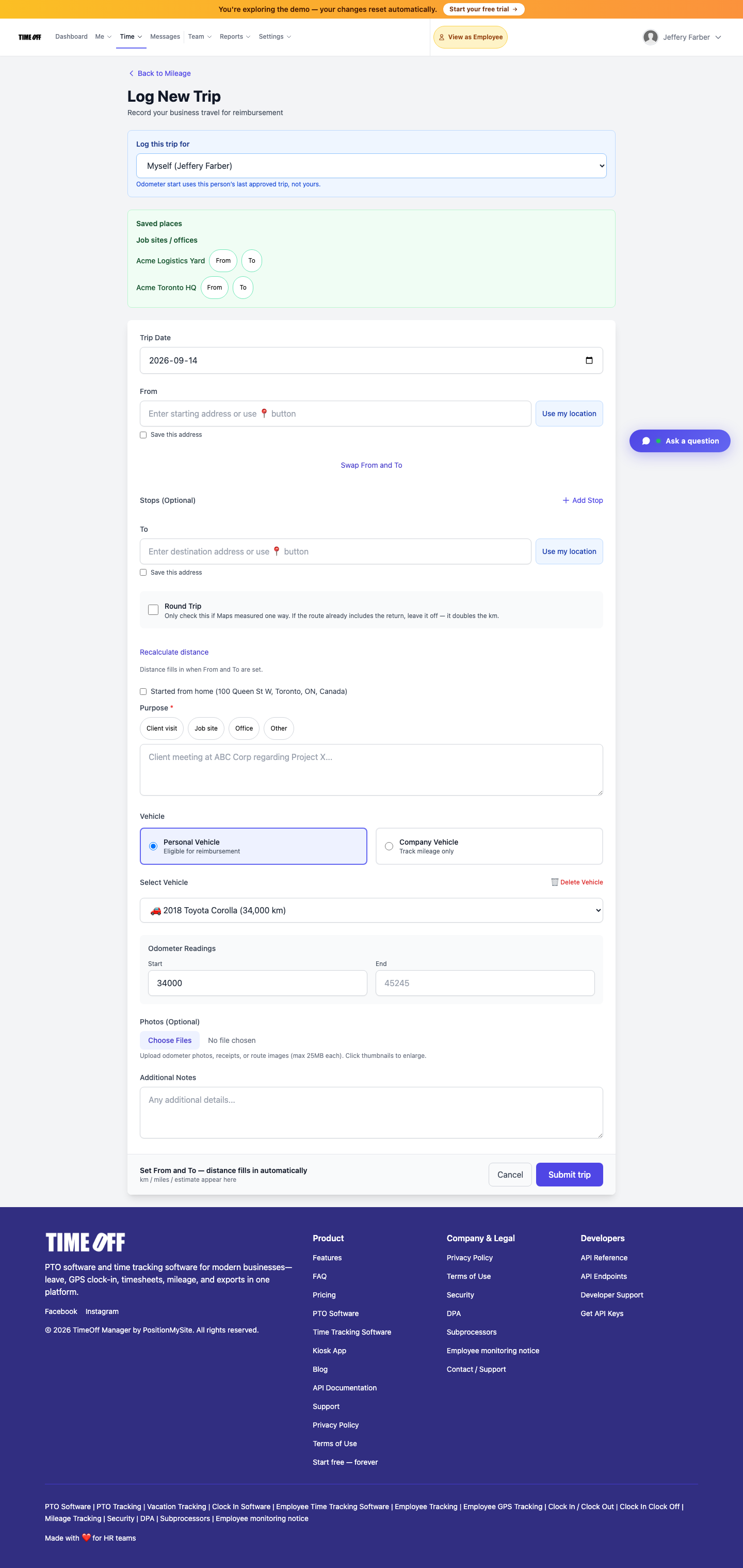
With mileage on, a field engineer can start a live GPS trip from the mileage page or use the new trip form to log a drive they already made. Trips stay pending until a manager approves them. Now the drive to the plant and the hours at the plant are reviewed together, not three weeks apart. If you reimburse mileage, our mileage reimbursement guide covers the policy side.
5. Set overtime rules for hourly staff
Set your company-wide weekly threshold, then add per-person rules for anyone with a different arrangement. Overtime shows on the timesheet as it builds, so a technician heading for a long commissioning week shows up on Wednesday, not on payday.
6. Decide whether you want the live map
The live staff map is for managers, HR and admins only. It shows people who are on shift during the live-location window your company turns on, and GPS history is kept for a short rolling window. For an office-heavy firm it's usually overkill. For a firm with several technicians out at once, it answers "who's still at the plant?" without a phone call. Either way, tell staff what you record in your monitoring notice.
7. Agree on the weekly close
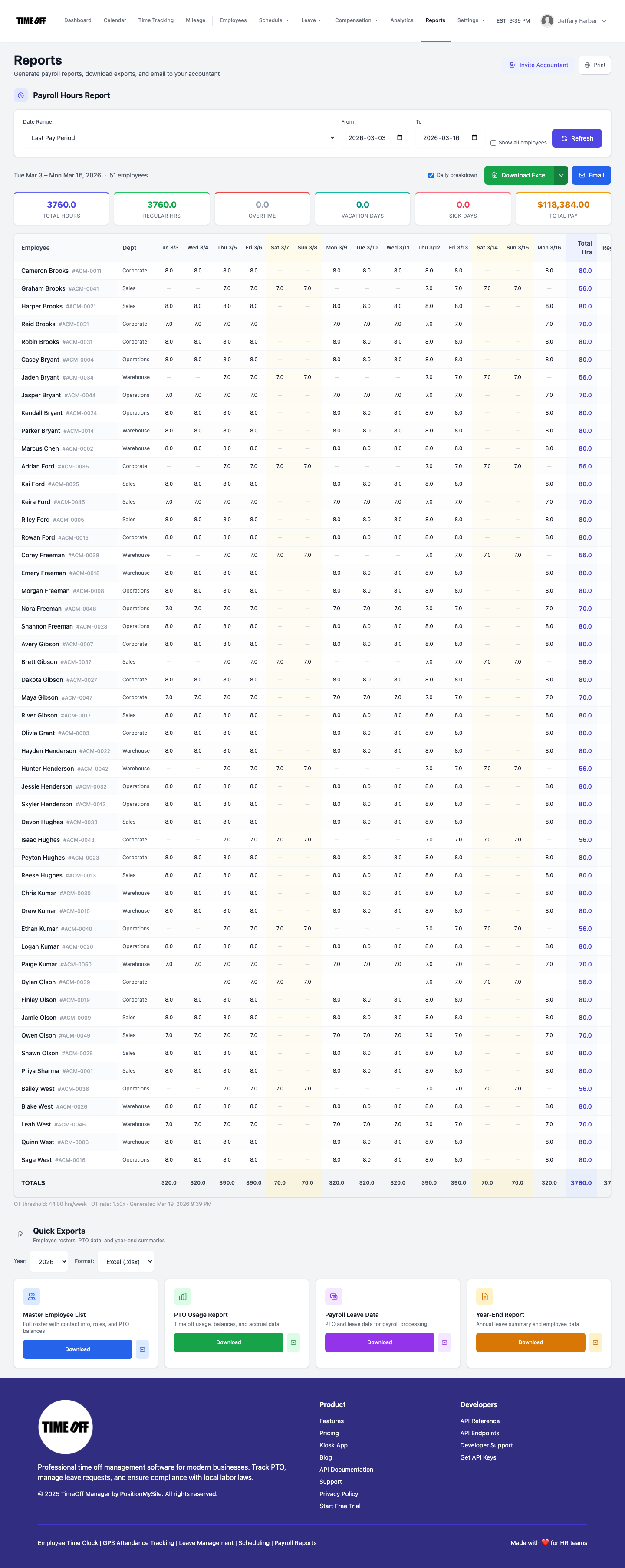
Pick a day and a person. Managers clear missed clock-ins and mileage in the approvals inbox, review the Weekly grid, then the admin or bookkeeper runs the Payroll Hours Report under Reports and downloads Excel or CSV. TimeOff Manager doesn't calculate pay or taxes; it hands your payroll provider approved hours. If your accountant needs their own login, accountant access gives them a read-focused seat.
How this differs from construction crews and service techs
If you've read our posts on construction crew time tracking or HVAC, plumbing and electrician field techs, you'll notice the tools overlap. The workflow doesn't.
- Crews start at the same job site every day, often on a shared tablet in a trailer, and nearly everyone is hourly.
- Service techs run several customer calls a day from a van, so the day is a string of short stops.
- Engineering firms are mostly salaried and desk-based, with a handful of site days a week. The setup is lighter: leave for everyone, clock-ins for hourly staff and site visits, a short code list and mileage.
Our engineering field teams page has the product overview. This guide is the practical setup.
Compliance notes for engineering firms
This is not legal advice. Check the rules where your staff work, and talk to your payroll provider or employment lawyer about specific roles.
- United States. Engineering is listed as a field of science or learning for the learned professional exemption, but job titles don't decide exemption. Duties and salary do. Read the U.S. Department of Labor's Fact Sheet #17D on the professional exemption. Technicians and drafters who don't meet the test are usually owed overtime past 40 hours in a workweek, so track their hours.
- Ontario. Ontario lists special rules for engineers and engineering students, including exemptions from hours-of-work limits, overtime pay, public holidays and vacation with pay. See Ontario's exemptions page for professionals. Non-engineer staff in the same firm are generally covered by the standard rules in Your guide to the Employment Standards Act. Many firms still give engineers paid vacation by policy, so track it the same way.
- Location data. If you require GPS on clock-in or turn on the live map, tell staff in writing what you collect and when.
- Records. Keep time records as long as your jurisdiction requires, and export copies if you need them longer than your system keeps them.
Common mistakes to avoid
- Forcing salaried engineers to clock in daily. They'll resent it and the data won't change anything. Use leave for them and clock-ins only for site visits if you want them.
- Thirty activity codes. Nobody picks the right one from a long list on a phone at a plant gate. Start with five.
- Approving mileage without the hours. Review them together in the same weekly close.
- Booking site visits without checking the calendar. Make the team leave calendar the first thing a project lead opens.
- Sending unapproved hours to payroll. Approve first, export second. Our timesheet approval guide walks through a weekly routine.
Try it with your team
A full year to try it with your team. Get comfortable before you pay. Start your 1 year free trial: you pay $0 for 12 months. A card is required to start, and the yearly price is charged on your anniversary unless you cancel first. After the year, Starter (1 to 20 people) is $180 per year, Growth (21 to 50) is $300 per year, and Scale (51 to 1,000) is $479.90 per year or $49.99 per month.
Want the feature list first? See time tracking features and the TimeOff Manager Pro phone app. You can also click through a sample company to see the screens before you sign up.
FAQ
What is engineering time tracking software?
It is a time clock and timesheet tool set up for how engineering firms actually work: most hours happen at a desk, but the ones that get questioned happen at plants, sites and client facilities. Good engineering time tracking records site visits at the location, splits hours by activity code, flags overtime for hourly staff and keeps time off on the same calendar, so a manager can approve the week and hand payroll a clean file.
Do salaried engineers have to clock in?
Not in TimeOff Manager. Salaried staff can use the app only for time off, with no daily clock-in, while hourly technicians, drafters and inspectors clock in and out in the same company account. Whether a person is exempt from overtime depends on their duties and pay under the law where they work, not on their title.
Can we track time by project or phase?
You can use work activities for that. A company admin turns tracking on, then adds codes, each with an optional short code, rate type, hourly rate and a billable flag. Staff switch the current activity while clocked in, and the activity report shows time by code. Keep the list short. TimeOff Manager does not create client invoices, so your billing and project ledgers stay in your accounting tools.
How do we prove an engineer was on site?
Save the plant or job site as a work location with a geofence. When GPS is required for that location, the clock-in records the location at the moment of the tap. If live location during shifts is turned on, managers can also see who is clocked in on the live staff map and review GPS history for a short rolling window.
Can field engineers log mileage to the site?
Yes, if mileage is turned on for your company. Staff can start a live GPS trip from the mileage page or log a trip they already drove, and a manager approves it. The trip sits next to the clocked hours instead of on a separate expense form.
How does the 1 year free offer work?
A full year to try it with your team. New companies pay $0 for 12 months. A card is required to start, and the yearly price is charged on your anniversary unless you cancel first. After the year, Starter (1 to 20 people) is $180 per year, Growth (21 to 50) is $300 per year, and Scale (51 to 1,000) is $479.90 per year or $49.99 per month.