Employee Vacation Tracking: How to Manage Vacation Time (2026)
Vacation requests in texts, balances nobody trusts, and everyone wants the same week in December. Here's how to track and manage employee vacation time all year, from the first request to the year-end review.


Check who is off before you approve, and review balances before December fills up.
It's late October. Two people on the same team just asked for the week of December 22, someone else realized they still have nine vacation days left and wants to burn them in November, and your "system" is a shared spreadsheet that one manager updates and nobody else trusts. You'll approve the first request you see, then find out in January that the warehouse was down to one person for a week.
Employee vacation tracking isn't hard because the math is hard. It's hard because requests, approvals, coverage and balances live in four different places. This guide shows you how to manage vacation time all year, with one place to ask, one place to approve, a coverage check before you say yes, and a year-end review that doesn't turn into a fire drill.
Why vacation time gets messy in small teams
Most small businesses don't start with vacation software. They start with a calendar on the wall, then a spreadsheet, then a Slack thread where people say "hey, can I take Friday?" That works for five people. Somewhere around 15 or 20, it stops working, and it usually breaks in the same ways:
- Requests come in sideways. Text messages, hallway asks, an email to the wrong manager. Nobody can say what was actually approved.
- Balances drift. The spreadsheet says Maria has six days left. Maria says eight. Payroll has a third number.
- Approvals happen blind. A manager says yes without seeing that two other people on the team are already off that week.
- Vacation and sick get mixed up. A sick day gets logged as vacation (or isn't logged at all), and the balance is wrong from that point on.
- Year-end is a surprise. In November you find out half the team still has a week or more of vacation, and everyone wants the same two weeks in December.
None of that is a people problem. It's a tracking problem, and it's fixable.
What good employee vacation tracking looks like
Whatever tool you use, a vacation process that holds up has a few things in common:
- One front door for requests. Every vacation request goes through the same place, with dates, the leave type and a note, so there's a record.
- Vacation is its own leave type. Vacation, sick and anything else you offer (personal, unpaid, bereavement) are separate, so each balance stays honest.
- Coverage before approval. The person approving can see who else is off that week before they click approve.
- Live balances. Employees can see what they've taken and what's left without asking HR.
- Holidays handled separately. Public and company holidays show on the calendar and don't eat into anyone's vacation.
- A year-end check. Someone looks at who has used how much before the last quarter, not after it.
If you've already got the basics of PTO in place, our guide on how to track PTO for a small team covers setup. This article is about running vacation time well once people are actually asking for it.
How employees and managers use it day to day
What employees do
In TimeOff Manager, employees ask for vacation from My requests at /leave-requests. They pick the leave type, choose the dates, add a note if your policy asks for one and submit it. The same list shows every request they've made with its status: pending, approved, rejected or cancelled. If plans change, they can edit or cancel the request while your policy still allows it, and cancelled requests stay in the history so nobody wonders what happened.
Employees who'd rather do this on their phone can use the TimeOff Manager Pro app, which has a Leave tab for requests and shows the holidays that apply to them. Holidays also live on My holidays on the web, so nobody books a vacation day on a day the office is already closed.
What managers and HR do
Managers approve from the Approval Center on the dashboard (/dashboard#approval-center). It's one inbox for leave and the other things that need a manager's sign-off, soonest first. If you only want vacation and other leave, the leave-only queue at /admin/requests shows each request with PTO context next to it.
Before approving, managers check coverage on the team timeline. Each row is an employee and each column is a day, with short codes for vacation (V), sick (S), personal (P), unpaid (U) and holidays (H). You can see in a few seconds whether the week someone wants is already thin.
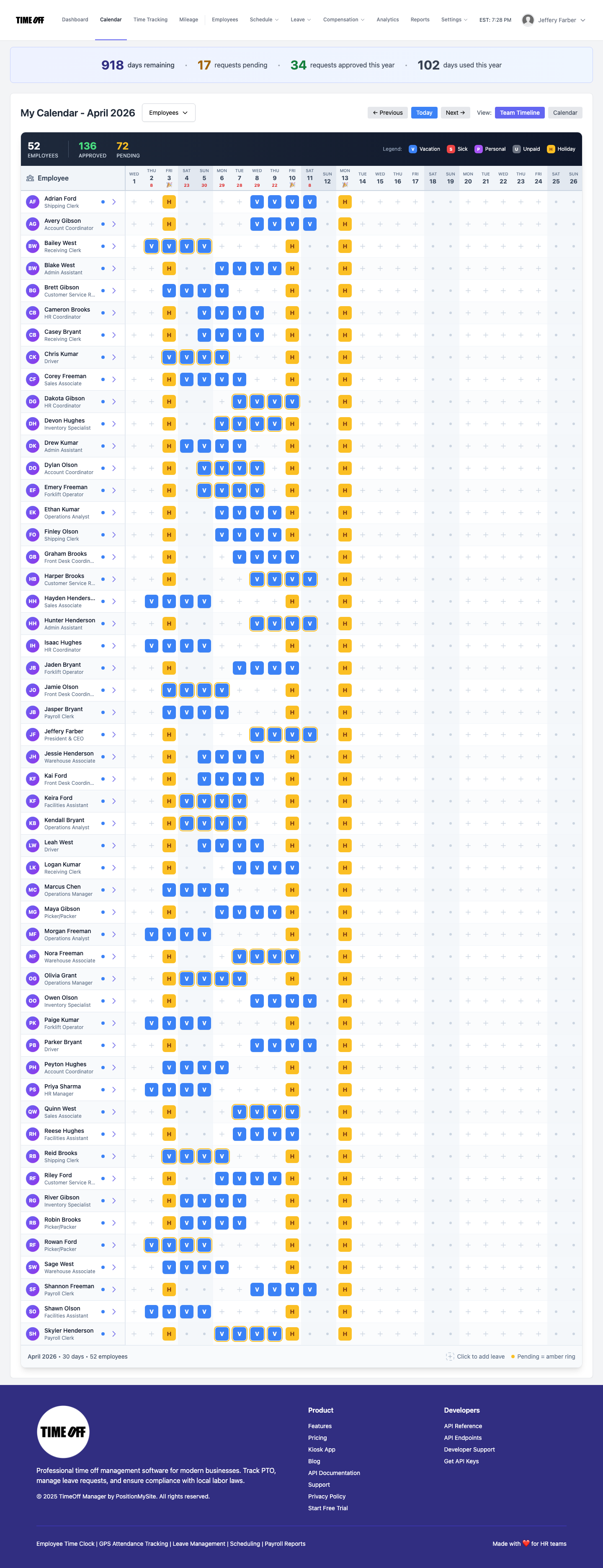
We wrote a full walkthrough of that view in team leave calendar coverage if you want the details.
How to manage employee vacation time, step by step
1. Write the vacation rules down in plain language
Before you touch any software, put your vacation policy on one page. How many days does each person get? Does it grow with tenure? How far ahead should people ask? Is there a cap on how many people can be off at once? What happens to unused days at year-end? If you can't answer those questions in a sentence each, your managers will each answer them differently.
2. Keep vacation separate from sick and everything else
Vacation and sick are built into TimeOff Manager and can't be deleted. If you offer other kinds of leave, turn on custom leave types and add them with their own names and colors, so a bereavement day or an unpaid day never comes out of someone's vacation balance by accident.
3. Load your holidays first
Admins and HR sync public holidays and add company-specific days in holiday management at /admin/holidays. Only weekday holidays count in the leave math, so a holiday that falls on a Saturday doesn't change anyone's balance. Doing this first stops the classic mistake of charging someone a vacation day for Thanksgiving or Canada Day.
4. Set a request window and a coverage rule
Pick a lead time that fits your business (two weeks is common for a few days off, a month or more for a full week) and a simple coverage rule, like "no more than two people from the same team off on the same day." Then tell managers to check the team timeline before every approval. The software shows the overlap; your rule decides what to do about it.
5. Handle peak weeks fairly
Summer, spring break and the last two weeks of December are where most vacation fights happen. Decide ahead of time how you'll settle a tie: first come, first served by request date, rotation from last year, or seniority. Because every request has a timestamp and a status, first-come is easy to defend when someone asks why they didn't get the week they wanted.
6. Review balances before the last quarter, not after
This is the step most teams skip. The employee leave summary at /admin/summary shows each person's time off for the year: taken, remaining and a utilization bar. Managers see their direct reports, and admins and HR see the whole company.
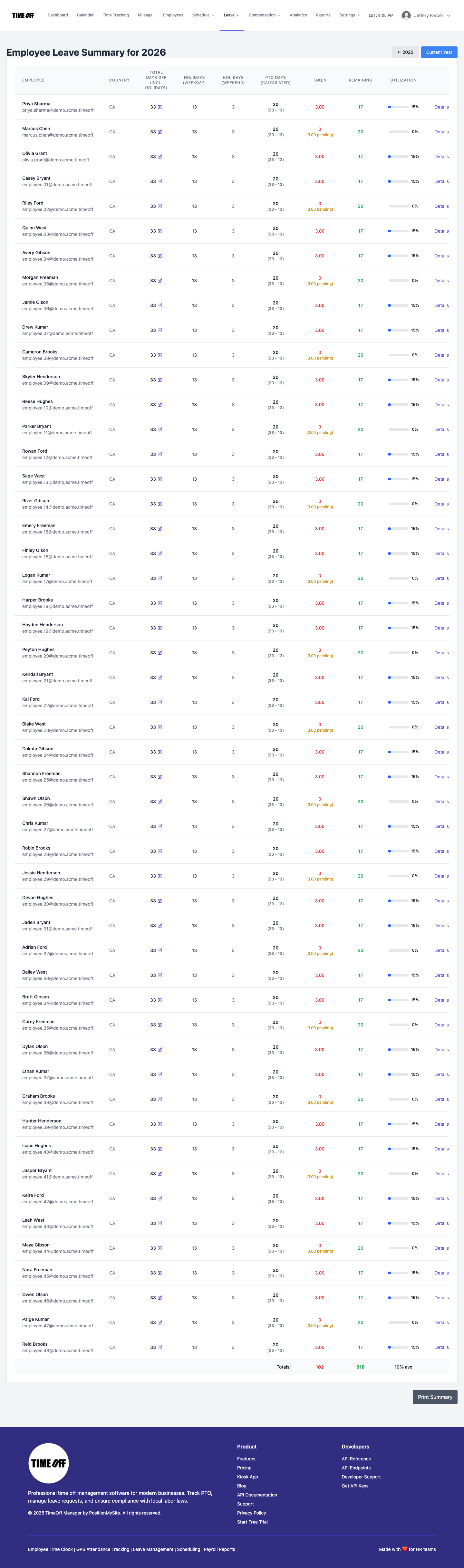
Open it in September or October. Anyone sitting on a big balance gets a friendly nudge to plan their days now, before December fills up. Anyone who has already used almost everything gets a heads-up too, so there are no surprises when they ask for the holidays. For a deeper look at patterns across teams, see time off reporting by team.
7. Decide what happens to unused days, then apply it the same way for everyone
Use-it-or-lose-it, a carryover cap, or a payout are all policy decisions, and some of them are restricted by law where you operate (more on that below). Settle the rule with your accountant or counsel, put it in your handbook, and use the year-end summary to apply it consistently. Don't let each manager improvise.
8. Allow partial days if your team needs them
A lot of "vacation" is really a long lunch for a school play or a late start after a red-eye. If you let people take part of a day, track it as part of a day, not a whole one. Our guide to hourly and partial-day PTO covers how to set that up.
Vacation rules in the US and Canada
This is not legal advice. Vacation law varies by country, state and province, and it changes, so check the current rules for every place you have employees.
- United States, federal. The U.S. Department of Labor says the Fair Labor Standards Act does not require payment for time not worked, such as vacations. Vacation is a matter of agreement between you and your employees, so your written policy matters a lot.
- States can add rules. California, for example, treats earned vacation as wages. Its Labor Commissioner says use-it-or-lose-it policies aren't allowed, a reasonable cap on accrual is, and earned, unused vacation must be paid out when someone leaves.
- Canada. Paid vacation is required. In Ontario, the Employment Standards Act gives two weeks of vacation after each vacation entitlement year, and three weeks once someone has five or more years, with vacation pay of at least 4% (6% at five years). Other provinces have their own minimums; our PTO in Canada guide walks through them by province.
If you have people in both countries, the statutory PTO wizard article explains how TimeOff Manager helps you start from local minimums instead of a blank page.
A year-end vacation checklist
- Sync next year's holidays (the holiday screen also preloads the following year).
- Open the leave summary and list everyone with more than a week left.
- Check the team timeline for the last two weeks of December and the first week of January.
- Remind employees of the request deadline for holiday-season vacation.
- Confirm your carryover or payout rule with your accountant before the last payroll of the year.
- Export what payroll needs from reports, or give your bookkeeper accountant access.
Try it on your own team
See how vacation requests, coverage and year-end balances work together on the TimeOff Manager PTO software page, or open the live demo and click through a real team calendar. When you're ready, start a 14-day trial and load your own holidays and vacation rules.
FAQ
What is employee vacation tracking software?
It's a tool that records vacation requests, approvals and balances in one place. Employees ask for time off, managers approve it after checking coverage, and everyone can see how much vacation is left without a spreadsheet.
How do I keep track of employee vacation time without a spreadsheet?
Send every request through one system, keep vacation separate from sick leave, and have managers check a team calendar before approving. In TimeOff Manager, employees request from My requests, managers approve in the Approval Center, and the leave summary shows taken and remaining days for the year.
How should I handle two people asking for the same week off?
Decide your tie-breaker in advance, such as first come by request date, rotation, or seniority, and write it into your policy. Check the team timeline before approving so you can see the overlap, then apply the same rule every time.
Do public holidays count against vacation days?
Not in TimeOff Manager. Holidays are loaded separately, and only holidays that fall on a weekday count in the leave math, so nobody is charged a vacation day for a day the business is already closed.
Can I stop employees from carrying over unused vacation?
It depends on where your employees work. Some places allow use-it-or-lose-it policies and others, like California, don't. Check with your accountant or employment lawyer, write the rule into your handbook, and apply it the same way for everyone.
When should I review vacation balances?
Before the last quarter, ideally in September or October. That gives people with large balances time to plan their days before the December rush, and it gives you time to plan coverage.