How to Track PTO for a Small Team in 2026
How a small team requests leave, approves it with the coverage calendar open, and checks taken versus remaining before payroll week.


Leave requests and the coverage calendar belong in the same week as the timesheet.
You should not need three files to answer a simple question: how much time off is left? A request that never leaves a spreadsheet is invisible on the day someone else is already off. PTO software only helps when the request, the approval, and the year summary live in the same place as the timesheet.
This is the setup a small US or Canadian team can run in TimeOff Manager. It is not a legal memo. Approved leave does not write itself into a paycheck.
Why the spreadsheet fails
The failure is ordinary. Someone asks for Thursday and Friday. You check a sheet, say yes, and move on. The person who would cover that shift never sees the yes. Payroll week arrives and the timesheet still looks like a full week of work.
A second failure is the balance argument. The employee has one number. You have another. Neither of you can point at a request history, so the morning goes to reconstruction.
A third failure is the holiday nobody entered. The calendar says the person is working. The state or the province says the office is closed. You find out when the hours look short.
What good tracking looks like
- Employees submit a request and can see the status later.
- Vacation and sick are always available. Extra labels, such as bereavement, exist only if you turn custom leave types on.
- Managers approve leave in a leave queue, with the coverage calendar open.
- A year summary shows calculated PTO, taken, remaining, and utilization.
- Payroll week starts from the weekly timesheet and an export, not from a second copy of the leave list.
What employees do
Employees use My Leave Requests. The route is /leave-requests. They pick a type, a date range, and any note you require, then submit. The list shows pending, approved, rejected, and cancelled rows. They can edit or cancel while your policy still allows it.
Their own year view is the personal summary at /summary. Company admins and HR who need the whole roster use the employee leave summary at /admin/summary. Pick the year. The table shows calculated PTO, taken, remaining, holiday splits, and a utilization bar. Managers see direct reports. Admins see the company. That screen is the record you both look at when the numbers disagree. It does not invent a statute, and it does not push a payment.
The signed-in phone app is TimeOff Manager Pro. The shared tablet PIN clock is a different app. Do not send people to the kiosk to request leave. Phone setup is in the mobile app help. If you also track hours, the employee view of those hours is the employee timesheet.
What managers do
Leave approvals sit in Manage Requests at /admin/requests. That queue is leave. The dashboard approval center, at /dashboard#approval-center, also shows pending leave. The same inbox shows forgot-punch items, mileage, and day notes. Those are not vacation requests. A missed clock-in is forgot to clock in. A payroll day note is a day adjustment. Keep them apart or Friday gets confusing.
Before you approve, open the team coverage calendar. Use /calendar?who=team&calendar;_view=coverage. You want to see who is already off on those dates, not find out from a text the night before.
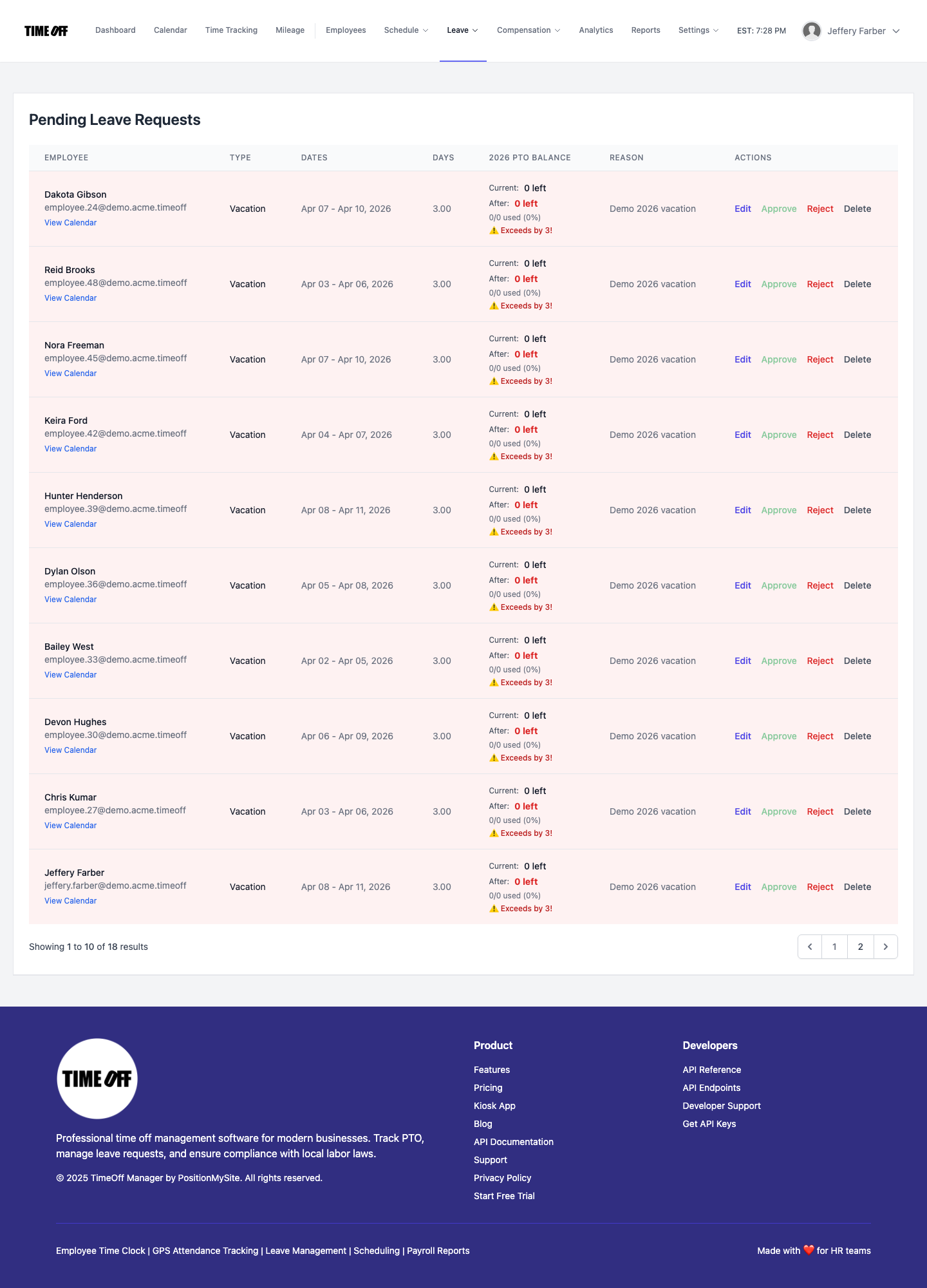
If you need more than vacation and sick, turn custom leave types on and open leave types at /admin/leave-types. Vacation and sick cannot be deleted. Added types get a code made of lowercase letters and underscores, a color, and a sort order. If the feature is off, that screen sends you back to the dashboard until you enable it.
Put company holidays on the holidays screen before the long weekend. Employees can read the list that applies to them under my holidays.
Payroll week, without a fake paycheck update
Approving PTO does not drop hours into a paycheck. On payroll week, open the manager timesheet at /timesheet. Clock-ins and tagged overtime sit on that grid. Overtime rules are the ones you saved in overtime admin. Your counsel sets the threshold. The product classifies hours from those rules. If the team also clocks in, the public overview is time tracking.
When the grid looks right, export from reports. If a bookkeeper should not use your admin login, give them accountant access. The accounting connection matches time by email for QuickBooks and FreshBooks. It does not post approved leave into a paycheck.
A setup you can finish in one sitting
- Confirm vacation and sick. Add other types only if you actually use them.
- Show employees My Leave Requests. Point phone users at the Pro app, not the kiosk.
- Approve from Manage Requests with the coverage calendar open.
- When someone disputes a balance, open the year summary instead of a side sheet.
- Enter holidays before the closure, not after the timesheet looks wrong.
- On payroll week, review /timesheet and export. Do not wait for a paycheck to update itself.
United States and Canada
This is not legal advice. In the United States, start with the Department of Labor page on the FMLA, then check the state paid sick leave rule that applies to your sites. In Canada, vacation minimums are provincial. Ontario publishes its vacation rules in the Employment Standards Act guide. Other provinces publish their own. TimeOff Manager stores the requests, the holidays, and the summary numbers for the policy you run. It does not pick the statute for you.
Two closer walkthroughs: how employees submit a time off request, and how the team leave calendar shows coverage.
Try it on your company
Start a 14-day trial. If you want to click the screens first, open the live demo.
FAQ
How do employees ask for PTO in TimeOff Manager?
Employees open My Leave Requests, pick a leave type, choose the dates, and submit. They can see whether a request is pending, approved, rejected, or cancelled, and they can cancel when your policy still allows it.
Where do managers approve leave?
Use Manage Requests for the leave queue. The dashboard approval center also lists pending leave, next to forgot-punch, mileage, and day notes. A missed clock-in is not a vacation request, and a payroll day note is not either.
How do I see who is already off before I approve?
Open the team coverage calendar at /calendar?who=team&calendar;_view=coverage. The leave summary shows calculated PTO, taken, remaining, and utilization for the year you pick. Managers see the people they are allowed to see. Employees see their own summary.
Does approved PTO land on the paycheck by itself?
No. Approving leave updates the request and the summary. It does not write the paycheck. On payroll week, review the weekly timesheet, then export from reports. The accounting connection matches time by email. It is not a payroll sync.
Can I add leave types besides vacation and sick?
Yes, when custom leave types are turned on. Vacation and sick stay on the list and cannot be removed. You can add labels such as bereavement or unpaid leave, each with a code, a color, and a sort order.
Is this legal advice for the US or Canada?
No. This is not legal advice. Confirm federal, state, and provincial rules with counsel or the employment standards office. TimeOff Manager stores the requests, holidays, and summary numbers for the policy you run. It does not decide the statute.