Free PTO Tracking Software: What "Free" Really Means for Small Teams (2026)
Spreadsheets, free-forever plans and free trials all call themselves free PTO tracking. Here's what each really costs a small team, what to check first, and how to test a tracker over a full leave year.


Free is easy to start. The real test is whether it still works when everyone wants the same week off.
You need to know who's off next week. You don't want another bill. So you search for free PTO tracking software, and you get three very different things that all call themselves free.
Some are spreadsheets. Some are free-forever plans with a catch you find in month two. Some are trials that end before you've seen a single real vacation request. This guide sorts them out, shows what "free" really costs a small team, and explains how to test a PTO tracker properly before you pay anything.
The three kinds of "free" PTO tracking
When people say free PTO software, they usually mean one of these:
- A spreadsheet or template. A shared sheet with names down the side and dates across the top. Free to start, and everyone already knows how to use it.
- A free-forever plan. A real app with a free tier. The tier is free because something is missing: a user cap, one location, no approvals, no export, or ads.
- A free trial. The full product, for a while. The question is how long, and whether that window covers enough of your year to tell you anything.
None of these is wrong. They just answer different questions. A spreadsheet answers "where do I write this down?" A free plan answers "can I get something better than a spreadsheet without paying?" A trial answers "will this work for my team before I commit?"
What a free spreadsheet really costs
The sheet costs nothing. Running it does. Here's where the time goes on most small teams:
- Requests arrive everywhere. A text, an email, a sticky note, a "hey, can I take Friday?" in the hallway. Someone has to copy each one into the sheet, and some never make it.
- Nobody approves anything on the record. The sheet shows the dates. It doesn't show who said yes, or when. When two people both thought they had the week after Christmas, you have no trail.
- Balances drift. One formula gets pasted over, a row gets sorted wrong, and now the remaining days are off for half the team.
- Employees can't check their own balance. So they ask you. Every time.
- Year-end turns into an argument. Carry over, pay out or expire only works if the numbers are right. On a sheet, they often aren't.
Do the rough math. If a manager spends 20 minutes a week chasing requests and fixing the sheet, that's more than 17 hours a year. For one manager. That's the real price of free.
Questions to ask any free PTO tracker before you load your team
Moving a team into a new tool takes effort. Once your people have accounts and history in it, switching again is a pain. So check these before you start, whatever the price tag says:
- How many people does free cover? If the cap is below your headcount, or below next year's headcount, free ends the day you hire.
- Can employees request time off themselves? On the web and on a phone, without emailing you.
- Is there a real approval step? A manager approves or rejects, and the request keeps a status and history.
- Can you set your own leave types? Vacation and sick, plus things like bereavement, appointments or unpaid leave if your policy has them.
- Does it know your holidays? US and Canadian public holidays, plus your own company days, so a holiday isn't counted as a vacation day.
- Can you see coverage? A team calendar that shows when too many people are out at once.
- What happens at year-end? Can you carry over, pay out or expire unused vacation, and does the tool record which one you chose?
- Can you export your data? If you leave, your leave history should leave with you.
- What happens when free ends? Does it need a card? When is it charged? What's the price after? Read that page before you sign up, not after.
If a free plan passes all nine, great. Many don't, and that's usually where the paid tier starts.
Why a short trial rarely tells you enough about PTO
Time tracking shows up every day, so you can judge it in a couple of weeks. Time off doesn't work that way. It has a yearly rhythm:
- December: holiday requests, overlapping time off, and the year-end decision on unused days.
- January: new allowances, new holidays loaded, and the first questions about "how much do I have left?"
- Spring break and summer: the coverage crunch, when everyone wants the same two weeks.
- Fall: people realize they haven't used their days, and the requests pile up.
A short trial in a quiet month shows you a clean screen and not much else. You never see the busy weeks, the clashes or the year-end close. That's why we give new signups a full year.
How the TimeOff Manager free year works
A full year to try it with your team. Get comfortable before you pay. Here's exactly how it works:
- You pay $0 for 12 months. New company signups get 1 year free.
- A card is required to start. It has to be valid past your anniversary.
- Nothing is charged until your anniversary. Cancel before that day and you owe nothing.
- If you stay, the yearly price is charged on the anniversary. No surprise invoices in the middle of the year.
- Same product on every plan. You pick the plan by headcount, not by location or module.
| Plan after your free year | Team size | Price |
|---|---|---|
| Starter | 1–20 people | $180/yr |
| Growth | 21–50 people | $300/yr |
| Scale | 51–1,000 people | $479.90/yr or $49.99/mo |
Put a reminder in your calendar for a month before the anniversary. By then you'll have a full year of real requests, approvals and balances to decide with.
What you can set up in the first afternoon
You don't need a project plan. A company admin can get the basics done in one sitting.
As the admin
- Run the setup wizard. The setup wizard at
/setup-wizardasks where your team works and what you need. Time off is always on. You choose whether to measure leave in days, hours or both, and set hours per workday. - Add your leave types. Vacation and sick are built in. Turn on custom leave types to add bereavement, appointments or unpaid leave at
/admin/leave-types. - Add your people. The add employee wizard has a compliance step that suggests vacation, sick and personal-day amounts from the US state or Canadian province where that person works. You accept them or change them. Your policy, your call.
- Check your holidays. Holiday management at
/admin/holidaysloads US and Canadian public holidays. You can add a company holiday or hide one you don't observe. The next year is preloaded automatically on December 15, and you can preload it sooner yourself.
As an employee
- Request time off. From My requests at
/leave-requests, pick a type and dates and submit. Each request shows pending, approved, rejected or cancelled. - Use a phone. The TimeOff Manager Pro app lets people request leave and see what's pending without opening a laptop.
As a manager
- Approve in one place. The Approval Center on the dashboard lists leave and other requests, soonest first.
/admin/requestsis the leave-only queue. - Check coverage first. The team timeline calendar shows who's out, so you can spot a clash before you approve it.
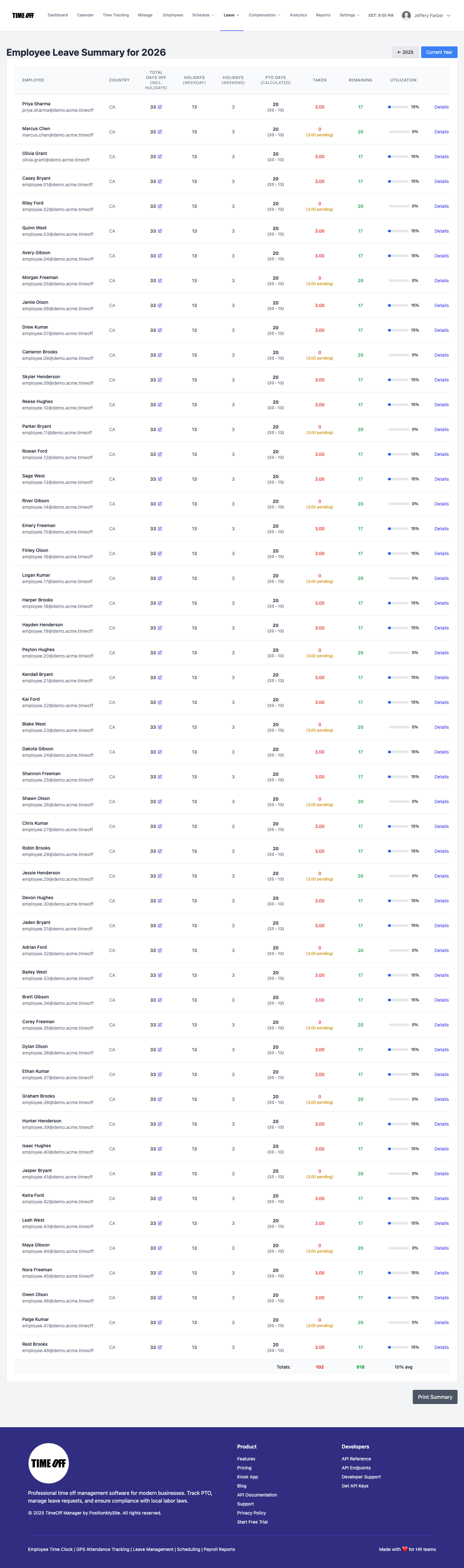
- See the year at a glance. The employee leave summary at
/admin/summaryshows taken, remaining and utilization for each person. Managers see their direct reports.
A month-by-month plan for your free year
If you start now, here's how to get the most out of the year:
- Late November to December: set up leave types and allowances, load your people, and check that the 2027 holidays are in place. Move December requests out of email and into the app so the holiday weeks are on record.
- January: new allowances start. Tell the team to check their own balance in the app instead of asking you. Count how many "how many days do I have?" messages you get compared with last year.
- February to April: watch the approval flow. Are managers approving in the Approval Center? Is anything sitting in pending too long?
- May to August: this is the real test. Use the team calendar to handle summer clashes. If two people want the same week, you'll see it before you say yes.
- September to October: open the leave summary. Find who has barely used their time and nudge them now, not in the last week of December.
- November to December: make your year-end call. Choose whether unused vacation carries over, pays out or expires, then pull your exports from Reports for your records.
- A month before your anniversary: decide. Keep it and the yearly price for your plan is charged on the anniversary. Cancel before then and you owe nothing.
By the end you've run a full leave year through the tool, including the hard parts. That's a much better basis for a decision than a two-week look around.
What TimeOff Manager doesn't do
Free or paid, you should know the edges before you start:
- No per-pay-period earning engine. You set an annual allowance per leave type. At year-end you choose carry over, pay out or expire. The app doesn't calculate hours earned each pay period.
- It's not payroll. It tracks time off and hours, and it exports reports for payroll. It doesn't calculate pay, taxes or deductions.
- Allowances are your policy. The add employee wizard suggests state or provincial minimums, but you're responsible for the numbers you keep.
If you want more depth on picking a tool, our guide to PTO software for small business walks through the features that matter most.
Compliance: free doesn't change your obligations
This is not legal advice. Whatever tool you use, the rules are the same.
- United States. Federal law doesn't require paid vacation. The U.S. Department of Labor treats it as a matter between employer and employee. But many states and cities require paid sick leave, and some states treat earned vacation as wages at termination. Check your state.
- Canada. Vacation is required by law. In Ontario, the Employment Standards Act sets two weeks after each 12-month vacation entitlement year, rising to three weeks after five years, with vacation pay of at least 4% or 6%. Other provinces have their own minimums. Our Canadian PTO guide covers the basics.
- Keep the records. Whatever you use, keep a clear history of requests, approvals and balances. That's the part a spreadsheet does worst.
Start your free year
If you're searching for free PTO tracking software, here's the honest version: start your company account and get 1 year free ($0 for 12 months). A card is required to start, and the yearly price is charged on the anniversary unless you cancel first. After the first year, Starter (1–20 people) is $180/yr, Growth (21–50) is $300/yr, and Scale (51–1,000) is $479.90/yr or $49.99/mo.
Set up your leave types, invite the team, and run December through the app. See how PTO tracking in TimeOff Manager handles a real holiday season before you pay a cent.
FAQ
Is there free PTO tracking software for small businesses?
Yes, in three forms: a spreadsheet or template, a free-forever plan with limits, or a free trial. TimeOff Manager gives new signups 1 year free ($0 for 12 months). A card is required to start, and the yearly price is charged on the anniversary unless you cancel first.
Is a spreadsheet good enough to track PTO?
For a handful of people, sometimes. It breaks when two managers edit it, when requests come in by text, or when someone asks for their balance at year-end and nobody trusts the number. The spreadsheet is free. The time spent fixing it is not.
What do free-forever PTO plans usually leave out?
It depends on the vendor, so read the plan page. Common limits are a small user cap, one location, a single leave type, no manager approvals, no export, or no mobile app. Check that the plan covers how you actually work before you load your team into it.
How does the TimeOff Manager free year work?
You pay $0 for 12 months. A card is required to start, and it has to be valid past your anniversary. Nothing is charged until the anniversary. Cancel before that day and you owe nothing. Otherwise the yearly price for your plan is charged that day.
What does TimeOff Manager cost after the free year?
Starter covers 1–20 people for $180 a year. Growth covers 21–50 people for $300 a year. Scale covers 51–1,000 people for $479.90 a year or $49.99 a month. You pay by headcount, not per location.
Does TimeOff Manager calculate PTO earned each pay period?
No. You set an annual allowance per leave type, and at year-end you choose whether unused vacation carries over, pays out or expires. The app tracks requests, approvals, taken and remaining against that allowance.
Can I get my PTO data out if I leave?
Yes. Admins and HR can download reports from the Reports page, including the payroll hours report in Excel or CSV and quick exports for the roster and PTO usage. Export before you cancel so you keep your records.