Employee Time Off Tracker: What to Track and How to Keep It Accurate (2026)
What an employee time off tracker should record, the balance math behind it, the four views managers and staff need, and US and Canada record-keeping rules.


A tracker should tell you who's out and what's left in seconds, without digging through messages.
Someone asks how many vacation days they have left. You open the tracker, and the number looks wrong. Was the Friday in March a sick day or a vacation day? Did that December request ever get approved, or just talked about? Now you're digging through texts to answer a two-second question.
A good employee time off tracker answers that question instantly, and you can trust the answer. This guide covers what a tracker actually needs to record, how the balance math works, the views managers and employees each need, the mistakes that quietly break the numbers, and the record-keeping rules in the US and Canada that make accuracy more than a nice-to-have.
What a time off tracker is really for
Strip it down and a time off tracker has four jobs. It should answer these questions in seconds, without asking anyone:
- How much does this person have left? By leave type, for this year.
- Who's out on a given day? Before you approve another request for the same week.
- What's waiting for a decision? Requests nobody has said yes or no to yet.
- What happened, and who decided? A history you can show an employee, an accountant or an auditor.
Most trackers handle the first question on a good day. The other three are where they fall apart. If yours can't tell you who approved a request and when, it's a list of dates, not a tracker.
The balance math every tracker runs on
Every balance comes from the same simple formula. Write it down once, and use it everywhere:
Available = allowance + carried over − taken − booked
- Allowance is what your policy gives this person for the year, for this leave type.
- Carried over is what came forward from last year, if your policy allows it.
- Taken is approved time off on dates that have already passed.
- Booked is approved time off on dates still to come.
Pending requests sit outside the formula, in their own column. They aren't approved, so they shouldn't reduce the balance yet. But you need to see them, because approving three pending requests for the same person can push them past zero.
Here's what that looks like for one employee in a year:
| Leave type | Allowance | Carried over | Taken | Booked | Available | Pending |
|---|---|---|---|---|---|---|
| Vacation | 10 days | 2 days | 6 days | 3 days | 3 days | 2 days |
| Sick | 5 days | 0 | 2 days | 0 | 3 days | 0 |
| Personal | 2 days | 0 | 1 day | 0 | 1 day | 0 |
Two things to notice. Each leave type has its own row, because mixing sick and vacation into one number hides problems. And the 2 pending vacation days fit inside the 3 available, so a manager can approve them. A fourth day would need a conversation first.
If some of your people take half days or a few hours for appointments, decide whether you track in days, hours or both, and stick to it. Mixing units is one of the fastest ways to end up with a balance nobody believes. Our guide to hourly and partial-day PTO tracking goes deeper on that.
What to record: the fields that matter
You don't need dozens of columns. You need the right ones, filled in every time.
For every request
- Employee and leave type (vacation, sick, personal, unpaid, bereavement or whatever your policy uses)
- Start date, end date, and hours if it's a partial day
- Status: pending, approved, rejected or cancelled
- When it was submitted, who decided, and when
- A short note if your policy asks for one
For every person, every year
- Allowance by leave type
- Days carried over from last year
- Taken, booked and remaining
- Where they work, so the right public holidays apply
For the company
- Your leave year (calendar year or another 12-month period)
- Public holidays by location, plus any company days
- Your year-end rule: carry over, pay out or expire, and any cap
Keep cancelled and rejected requests. Don't delete them. They're part of the history, and they explain why a balance changed.
The four views your tracker needs
One table can't serve everyone. Employees, managers and whoever closes the year each need a different slice of the same data. Here's how those views map to TimeOff Manager.
1. The employee's own view
Employees should be able to check their own balance and request status without asking you. In TimeOff Manager, My requests at /leave-requests lists every request with its status, and is where people submit new ones. My pending shows what's still waiting on someone else. The TimeOff Manager Pro app does the same from a phone.
2. The approval queue
Managers need one place where decisions wait. The Approval Center on the dashboard lists leave and other requests that need a yes or no, and /admin/requests is the leave-only queue. See managing leave requests for the details.
3. The team calendar
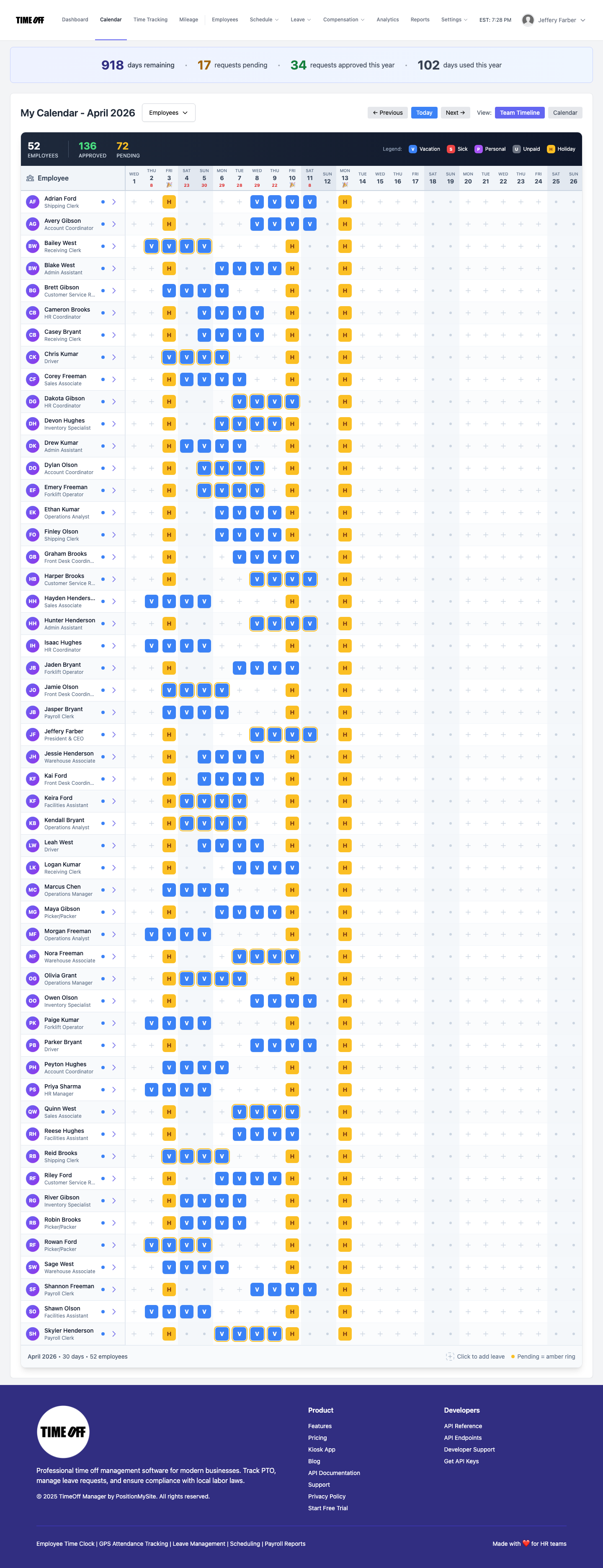
Before you approve, look at who else is out. The team timeline at /calendar shows each person as a row and each day as a column, with short codes for vacation, sick, personal and unpaid leave, so you can spot a clash at a glance.
We wrote a whole piece on using a team leave calendar for coverage if summer and December clashes are your main headache.
4. The year roll-up
Someone has to see the whole year: taken, remaining and how much each person has actually used. The employee leave summary at /admin/summary shows that for each person, with a utilization bar. Managers see their direct reports. Admins and HR see the company. Pick last year, this year or next year from the header.
Mistakes that quietly break a tracker
Trackers rarely fail in one big way. They drift. These are the usual causes:
- Counting holidays as vacation. Someone books Monday to Friday over a public holiday and gets charged five days instead of four. Your tracker has to know the holidays for each person's location. In TimeOff Manager, holiday management loads US and Canadian public holidays, and you can add company days or hide ones you don't observe.
- Treating pending as taken. A request that was never approved still reduces the balance, or a rejected one never comes back off.
- Cancelled time off left on the books. Someone cancels a week in July, but nobody updates the sheet.
- Two copies of the truth. One manager keeps a sheet, HR keeps another, payroll has a third. They never match.
- Last year never closed. January starts with nobody deciding what happened to unused days, so carryover is a guess.
- Leave types that don't match the policy. If your handbook has bereavement and appointments but your tracker only has vacation and sick, people pick the wrong one. Custom leave types fix that.
- A mid-year hire with the wrong allowance. Decide how your policy treats new starters, then set their allowance when you add them. Don't leave the full-year default in place by accident.
A simple routine that keeps the numbers right
Accuracy is a habit more than a feature. This routine takes a few minutes a week.
- Every week: clear the approval queue. Nothing should sit in pending for more than a few days. Glance at the team calendar for the next two weeks.
- Every pay period: make sure payroll sees the same leave you do. Admins and HR can pull the Payroll Hours Report, which includes leave days, from Reports as Excel or CSV.
- Every quarter: open the leave summary and look for people who have used almost nothing. A nudge in September beats a pile of requests in the last week of December.
- At year-end: make the carry over, pay out or expire decision on purpose, record it, and export your records. Our guide to year-end PTO carryover walks through the options.
- Every January: confirm new allowances, check the new year's holidays are in place, and tell people to check their own balance in the app.
Record-keeping rules in the US and Canada
This is not legal advice. Rules vary by state, province and city, so check the ones that apply to your team. But here's why a sloppy tracker is a real risk, not just an annoyance:
- Ontario. The Employment Standards Act requires employers to record vacation time earned, taken and still owing for each vacation entitlement year, plus vacation pay. The province says these records generally must be kept for five years. See Ontario's guide to ESA record keeping.
- California. Employers must show available paid sick leave on the pay stub or a document issued the same day as the paycheck, and keep records of sick leave earned and used for three years. Earned vacation counts as wages and must be paid out at termination. See the Labor Commissioner's paid sick leave FAQ and vacation FAQ.
- Federal US. Federal law doesn't require paid vacation. But employers covered by the Family and Medical Leave Act must keep FMLA records for at least three years. See the U.S. Department of Labor's FMLA page.
- Other provinces and states. Each Canadian province sets its own vacation minimums, and many US states and cities have paid sick leave laws with their own tracking rules. Our Canadian PTO guide covers the provincial basics.
The common thread: if an employee disputes a balance or leaves the company, you need a clear history of what they had, what they took, and who approved it.
Where TimeOff Manager fits, and where it doesn't
TimeOff Manager is built to be the tracker, so you're not maintaining one by hand. Requests, approvals, the team calendar, the leave summary and holidays all live in one place, and every request keeps its status and history. When you add someone with the add employee wizard, it suggests vacation, sick and personal-day amounts from their US state or Canadian province. You accept them or change them.
Know the edges too:
- Annual allowances, not a per-pay-period earning engine. You set an allowance per leave type for the year. At year-end you choose carry over, pay out or expire. The app doesn't calculate hours earned each pay period.
- It's not payroll. It tracks time off and hours and exports reports for payroll. It doesn't calculate pay, taxes or deductions.
- Your policy, your numbers. Suggested minimums are a starting point. You're responsible for the allowances you set.
If you're comparing tools, our PTO tracking software page shows what's included, and the guide to free PTO tracking explains the trade-offs of spreadsheets and free plans.
Try it with your team
A full year to try it with your team. Get comfortable before you pay. New company signups get 1 year free, $0 for 12 months. A card is required to start, and the yearly price is charged on your anniversary unless you cancel first. After the free year, Starter (1–20 people) is $180/yr, Growth (21–50) is $300/yr, and Scale (51–1,000) is $479.90/yr or $49.99/mo.
Set up your leave types, load this year's balances, and run December's requests through it. Start your free year.
FAQ
What should an employee time off tracker include?
At minimum: each person's allowance by leave type, any days carried over, days taken, days booked for the future, pending requests, and a history of who approved what and when. Add a team calendar so you can see who's out on any date, and your public holidays so they aren't counted as vacation.
How do you calculate remaining PTO in a tracker?
Allowance plus carried-over days, minus days already taken, minus approved days still to come. Keep pending requests in a separate column. They aren't approved yet, but you should see them before you approve anything else.
Is a spreadsheet good enough as a time off tracker?
For a few people with one person editing it, it can work. It gets shaky when requests arrive by text, when two managers edit the same file, or when employees can't check their own balance. The math is easy. Keeping the history honest is the hard part.
How long should I keep time off records?
It depends on where your people work. In Ontario, vacation time records generally have to be kept for five years. California requires paid sick leave records for three years, and FMLA records must be kept for at least three years. Check the rules for your state or province. This is not legal advice.
Can employees see their own time off balance in TimeOff Manager?
Yes. Employees see their own requests and statuses under My requests, open items under My pending, and their own leave summary. They can also request time off from the TimeOff Manager Pro phone app.
Does TimeOff Manager calculate PTO earned each pay period?
No. You set an annual allowance for each leave type, and the app tracks requests, approvals, taken and remaining against it. At year-end you choose whether unused vacation carries over, pays out or expires.