Add employee wizard
Admin-only 3-step hire flow at /admin/employees/wizard/step1 (info, statutory PTO recommendations, final setup). Employees do not have a wizard to set up their own accounts.
/admin/employees/wizard/step1
Roles
Company admin
Add New Employee starts at /admin/employees/wizard/step1 — a 3-step hire flow for company administrators. There is no wizard for employees to set up their own accounts.
Purpose
Company admins use this after Add Employee on the roster. Step 1 is labeled Employee Information. Staff later sign in to TimeOff Manager (or punch on TimeOff Kiosk) after the admin creates them — they do not complete this wizard themselves.
The three steps
- Employee Info — identity and contact fields your company requires (see Company settings → Employee Profile Rules).
- Compliance — recommended vacation, sick, and personal-day amounts from US state or Canadian provincial minimums for that hire’s location. You can accept or override; you remain responsible for policy.
- Final Setup — last toggles (schedule/time modules as offered) before the person appears on the roster.
Formal pay-and-benefits offers, when compensation is on, still start from the Job offer wizard — that is a different 5-step path at /offers/create.
Roster vs wizard
CSV import stays on /admin/employees. Editing someone who already exists is Employees: Edit employee.
Product screenshot
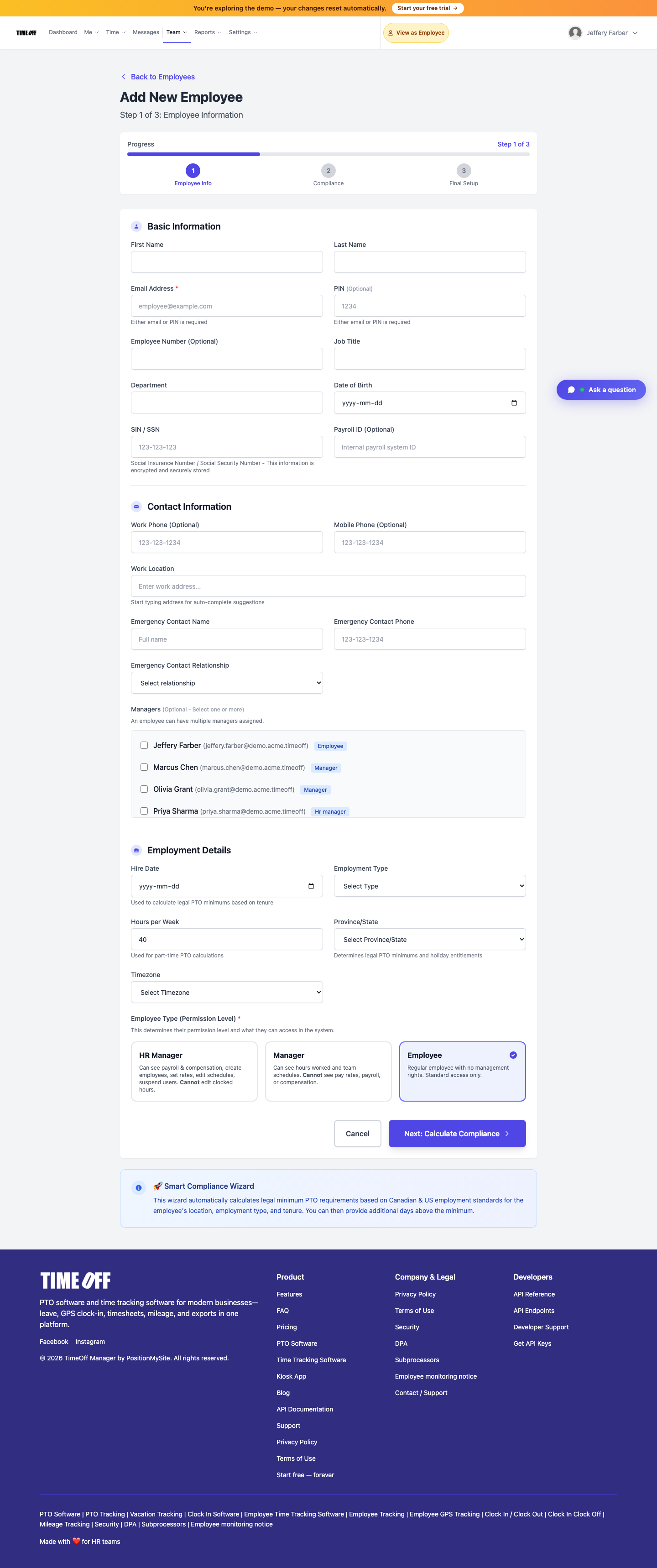
Add employee wizard — step 1 (Acme demo).