Manager PTO Approval Workflows: Speed, Fairness, and Audit Trails (2026)
Manual PTO approvals lead to chaos and inconsistency. TimeOff Manager provides a unified system for managers to approve leave fairly, ensure adequate coverage, and keep a solid audit trail for payroll and compliance.


Manual PTO approvals lead to chaos and inconsistency. TimeOff Manager provides a unified system for managers to approve leave fairly, ensure adequate coverage, and keep a solid audit trail for payroll and compliance.
Manager PTO Approval Workflows: Speed, Fairness, and Audit Trails
You run a business. Your plate is full. The last thing you need is PTO requests arriving by text, email, or a sticky note. Then, you're left juggling an Excel sheet, trying to remember who's off, who's covering, and if two people asked for the same week. It's a mess, and it often leads to blind approvals.
This isn't just inconvenient. It's about fairness to your team, ensuring you have enough staff, and avoiding costly payroll errors. Manual PTO approvals create inconsistencies, frustrate employees, and leave you exposed to compliance risks.
TimeOff Manager gives you back control. We built a system so your managers can approve PTO requests quickly, consistently, and with full visibility into team coverage and employee balances. No more guessing. No more last-minute scrambles. Just clear, auditable workflows from request to payroll.
The Hidden Costs of Disjointed PTO Approvals
You already know the immediate headache: a pile of requests, no central place to track them, and the nagging feeling you're about to approve two people for the same day off. But the problems go deeper. When PTO, time clock-ins, and scheduling live in separate silos, your entire operation suffers.
Think about it. A manager approves a vacation request without seeing the employee's current time clock-ins or the upcoming schedule. Suddenly, you have a critical coverage gap. Or worse, you’re calculating overtime for payroll, and you realize an approved sick day was never factored in, leading to incorrect hours and potential overpayment. Your payroll provider needs clean, accurate data, and if your PTO approvals aren't integrated, you're constantly scrambling to reconcile spreadsheets after the fact.
This fragmentation creates several critical issues for SMBs:
- Inaccurate Payroll: Without a unified view, it’s easy to miscalculate total hours worked, especially when factoring in paid leave. This leads to errors in overtime pay, which can be costly and difficult to correct. You might be paying for hours that were actually PTO, or missing critical data that impacts whether an employee hits overtime thresholds.
- Scheduling Chaos: Managers approve leave based on gut feeling or incomplete information. This results in understaffing during peak times, overworked employees, or scrambling to find last-minute coverage. Your team calendar becomes a guessing game instead of a reliable planning tool.
- Compliance Risks: Are you consistently applying your leave policies? Do you have a clear, auditable record of every request, approval, and denial? Without a system, proving compliance with local, state, or federal labor laws regarding paid leave, sick time, or family leave becomes incredibly difficult. In Canada, provincial labor laws often dictate specific vacation entitlements and sick leave provisions, requiring meticulous record-keeping.
- Manager Burnout: Your managers are spending valuable time on administrative tasks that could be automated. Chasing down paper forms, cross-referencing spreadsheets, and manually updating calendars isn't managing; it's clerical work that drains their productivity and morale.
- Employee Dissatisfaction: Inconsistent approvals lead to perceptions of unfairness. If one employee gets a request approved quickly while another's languishes, or if two similar requests are treated differently, it erodes trust and impacts team morale. Employees also need clear visibility into their own balances and request status.
These aren't just minor inconveniences. They're systemic issues that impact your bottom line, your team's morale, and your business's legal standing. The good news? It doesn’t have to be this way.
What "Integrated" Actually Means for Your Business
When we talk about an "integrated" system at TimeOff Manager, we mean putting all the pieces of employee management in one place. It's not just about having a PTO request form; it's about connecting that request directly to their timecard, their schedule, their leave balance, and ultimately, to your payroll process. This means:
- One Employee Record: Every piece of information about your team members—their leave balances, time clock-ins, scheduled shifts, and compensation history—is tied to a single, comprehensive employee profile. You access it all in one place, like the Admin Roster, and drilling down to Edit Employee for details.
- One Clock Surface: Whether your employees clock in via a shared PIN kiosk, web browser, or mobile app, all clock-ins flow into the same system. This eliminates discrepancies and ensures accurate time tracking.
- One Weekly/Pay-Period View: Your managers and HR leads see everything together. On the Manager & HR hub at /timesheet, they can view daily rosters, weekly grids, and monthly rollups, showing scheduled shifts, actual clock-ins, and approved leave side-by-side. This is critical for catching errors before payroll.
- Reports That Match Approvals: When you run reports or export data, you can trust that it reflects the true state of affairs. Approved leave requests, recorded time, and balance adjustments are all accounted for, providing a clear audit trail via the Reports & Exports (admin) and Analytics Dashboard.
- Customizable Leave Types: You define your company's specific leave policies. Set up vacation, sick leave, bereavement, personal days, or any other custom leave type your business needs at /admin/leave-types. You control the accrual rules, maximums, and carryovers.
- Automated Balance Updates: Once a PTO request is approved, the employee's leave balance is automatically updated. No manual deductions, no forgetting to adjust the spreadsheet. This keeps balances accurate and transparent for both employees and management.
This integration is the foundation for efficient, fair, and compliant PTO management.
Employee vs. Manager: A Unified Workflow for Everyone
A truly effective system works for everyone on your team. Employees need clarity and ease of use, while managers need control and context. TimeOff Manager delivers both, ensuring a smooth flow from request to approval.
For Your Employees: Transparency and Self-Service
Your team members want to know their leave balances, when they can take time off, and the status of their requests. We put this power in their hands:
- Instant Balance Checks: From their employee dashboard, they can see their available vacation, sick, or PTO balances at a glance. No need to ask HR or their manager.
- Easy Request Submission: Submitting a PTO request is straightforward. They go to My Requests, pick the dates, select the leave type, and add a note. The system guides them, ensuring all necessary information is provided.
- Personal Timesheet View: Employees can view their own timesheet at /timesheet/employee to see their scheduled shifts, recorded clock-ins, and approved leave all in one place. This transparency helps them track their own time and understand how their leave impacts their overall hours.
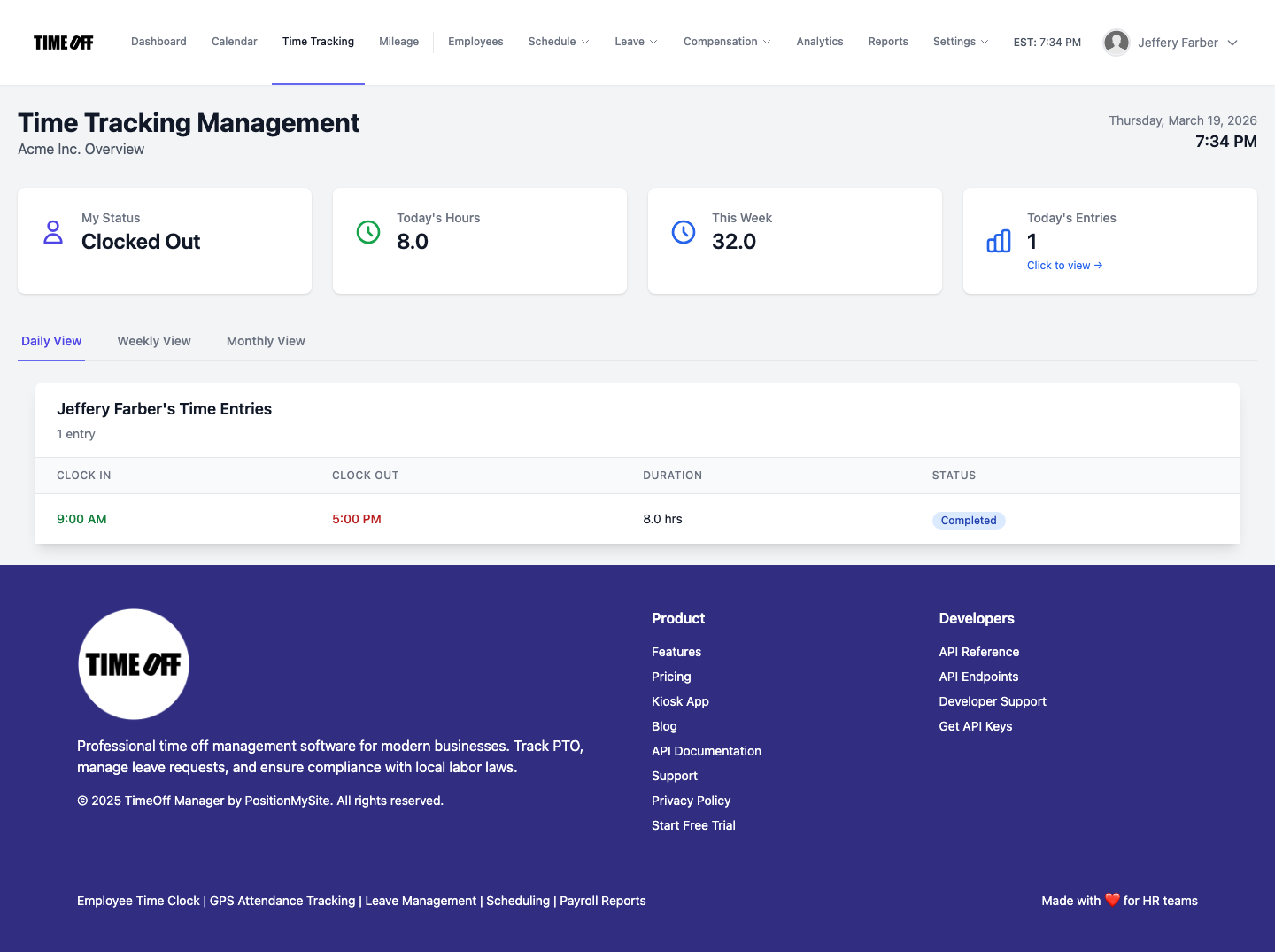 Employee timesheet at /timesheet/employee, showing scheduled shifts, actual clock-ins, and approved leave for full transparency.
For Your Managers and HR: Context, Control, and Compliance
Managers are on the front lines, balancing team needs with business operations. They need tools that make their approval decisions informed and efficient:
- Centralized Request Management: When an employee submits a request, managers receive a notification. All pending requests are consolidated in the Manage Requests (admin) section. Here, they can see who requested time off, for what dates, and for what reason.
- Instant Coverage Visibility: Before approving, managers can quickly check the Team Timeline calendar. This visual tool shows who else is scheduled, who’s already off, and where potential coverage gaps might occur. It's invaluable for preventing situations where too many people are out on the same day.
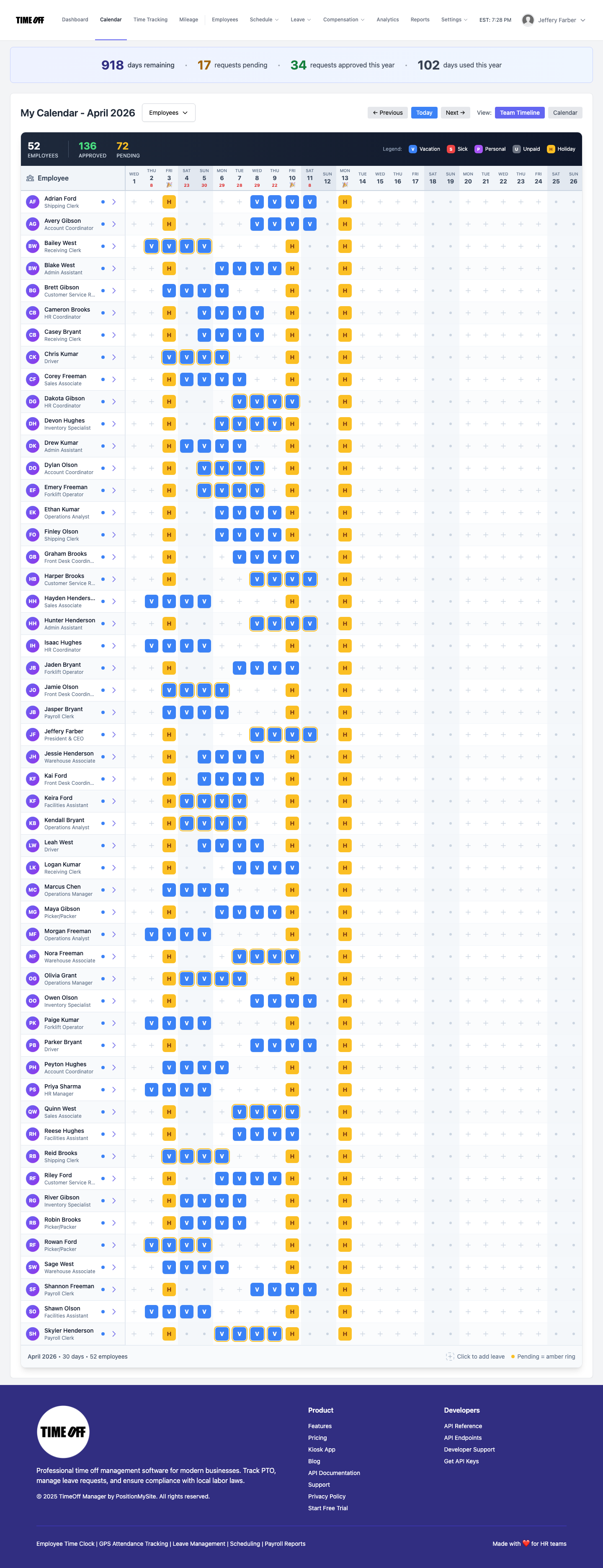 Team Timeline calendar at /calendar/team-timeline, showing who's working and who's off to prevent coverage gaps.
- Employee Balance Context: Alongside the request, managers see the employee’s current leave balances, ensuring they approve within policy limits. They can also review the Employee Leave Summary for a full history.
- Streamlined Approval/Denial: With all the necessary information at their fingertips—coverage, balances, policy—managers can make an informed decision to approve or deny the request. They can add notes for context, and the system automatically notifies the employee of the decision.
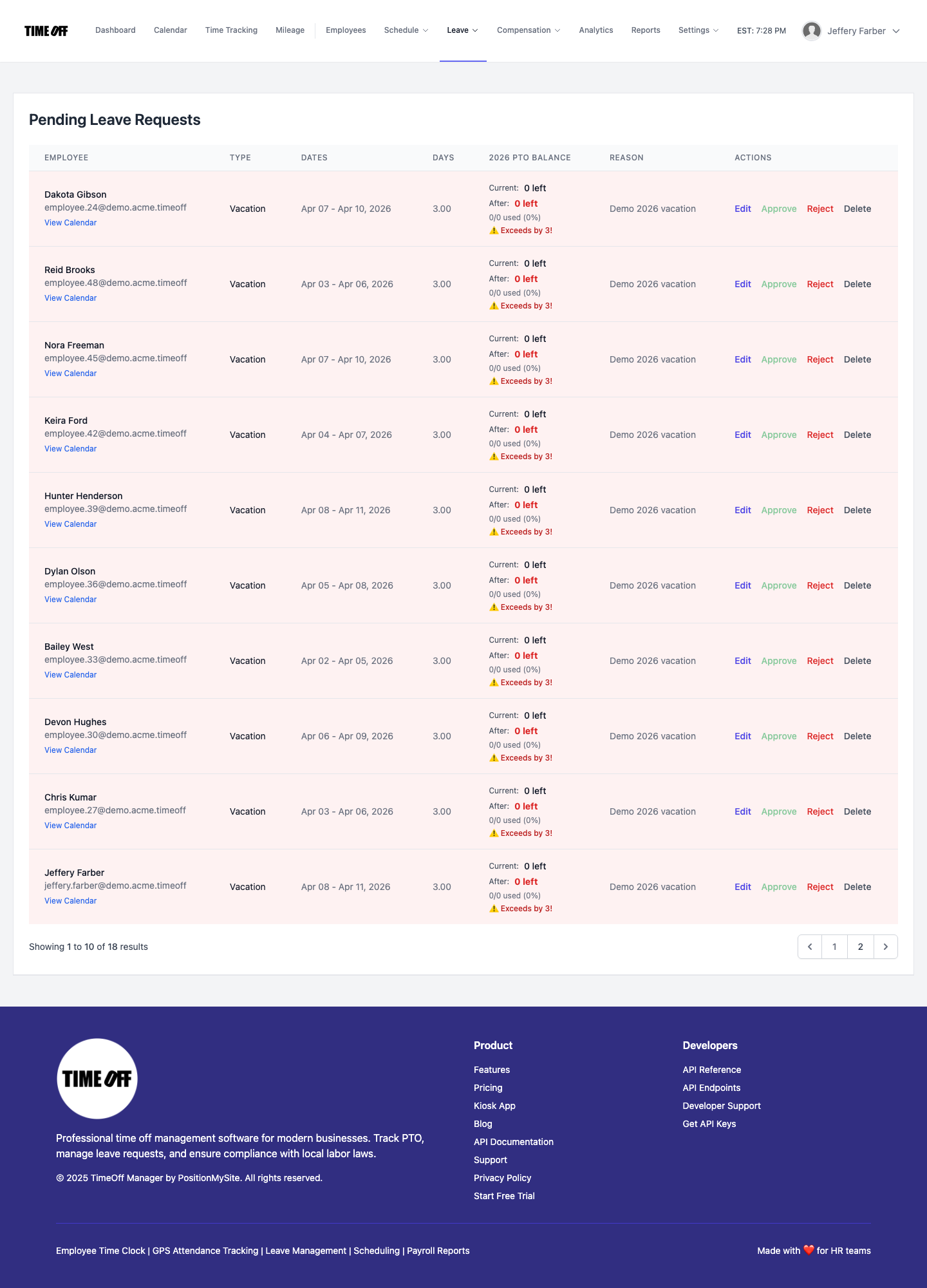 Pending leave requests at /admin/requests, showing full context for quick, informed manager approvals.
- Integrated Timesheet Review: The real magic happens on the Manager & HR hub at /timesheet. Here, managers see a weekly grid that combines approved leave with actual time clock-ins. This unified view is crucial for verifying total hours worked, identifying potential overtime, and ensuring everything aligns before payroll runs.
 Weekly grid at /timesheet, combining approved leave with actual time clocks in for accurate payroll preparation.
This integrated approach empowers managers to be fair and consistent, reduces their administrative burden, and provides a clear audit trail for every decision.
From Request to Approved Leave and Payroll Impact
Let's walk through the full lifecycle of a PTO request and how TimeOff Manager ensures accuracy and compliance every step of the way.
Setting Up Your Leave Policies
The foundation of fair and consistent approvals starts with clear policies. As an administrator, you define these in TimeOff Manager. You can create custom leave types—whether it's vacation, sick leave, personal days, or specific bereavement leave—at /admin/leave-types. For each type, you set up accrual rules (e.g., how many hours accrue per pay period), maximum carryover, and any other specific parameters. This ensures that every employee's balance is calculated and managed according to your company's exact rules, whether you're following US state mandates or Canadian provincial standards.
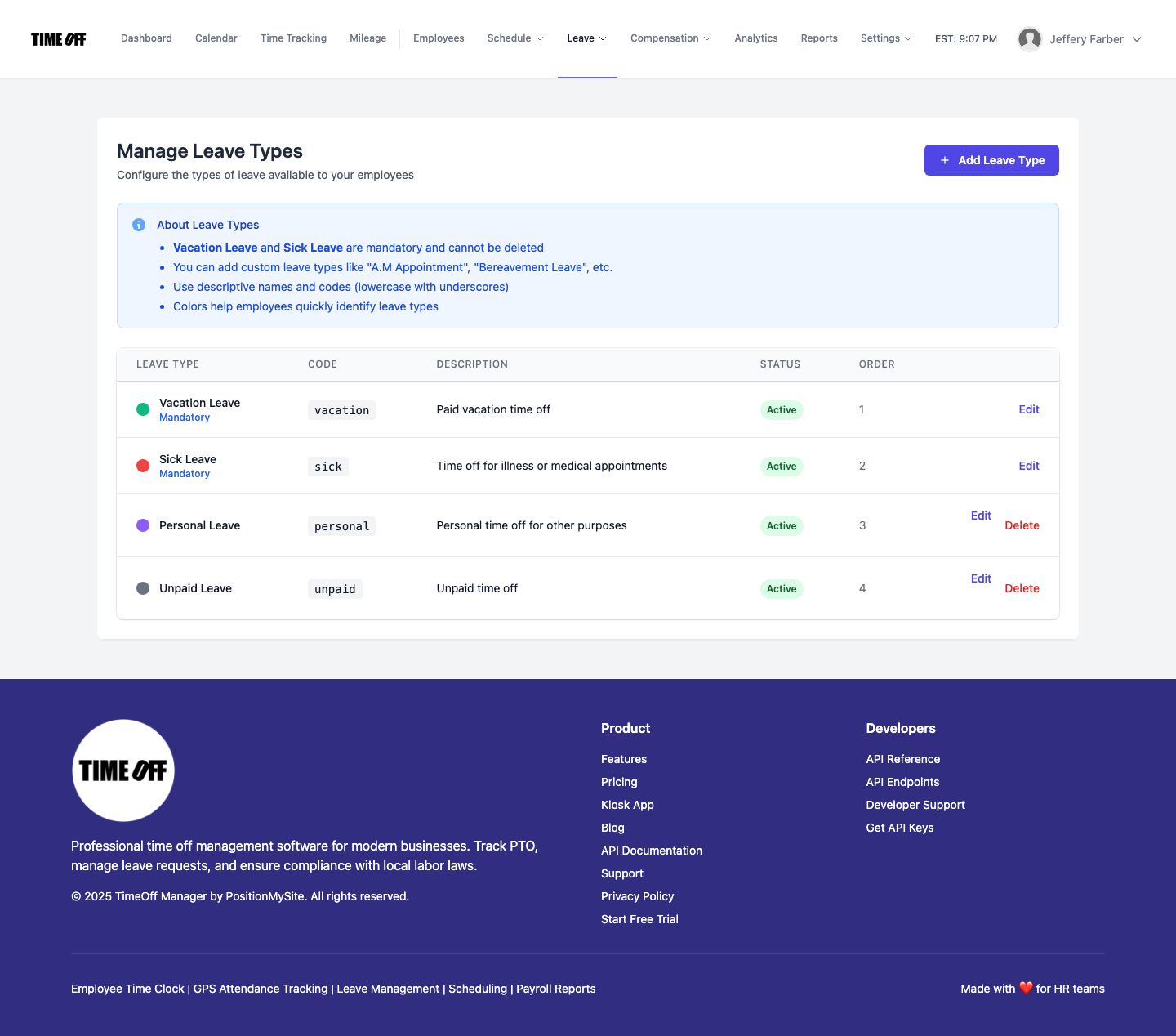 Define custom leave policies and accrual rules at /admin/leave-types for consistency and compliance.
Employee Self-Service Requests
Once policies are in place, employees can easily submit requests. They log into their dashboard, navigate to My Requests, and select the type of leave and the dates. They see their current balances, so they know exactly how much time they have available. This self-service model reduces questions for HR and empowers employees to manage their own time off proactively.
Manager Review and Approval with Context
When a request comes in, the assigned manager receives a notification. They then go to /admin/requests to review it. This isn't a blind approval. Before making a decision, the manager has access to critical context:
- Team Calendar: They can check the Team Timeline to see if other team members are already scheduled off, ensuring adequate coverage.
- Employee Balances: The system displays the employee's current leave balance for the requested leave type, confirming they have enough accrued time.
- Schedule Impact: For businesses using our scheduling features, managers can also see how the requested time off would impact the existing schedule at /admin/schedule. This proactive view helps them prevent understaffing and make informed decisions.
Based on this comprehensive information, the manager can approve or deny the request. They can add notes for their decision, which become part of the audit trail. The employee is automatically notified of the outcome, maintaining transparency.
Automatic Balance Updates
The moment a request is approved, TimeOff Manager automatically deducts the approved hours from the employee's balance. No manual calculations, no forgetting to update a spreadsheet. This ensures that the balances shown to both employees and managers are always up-to-date and accurate, preventing future disputes or errors.
Integrating Leave with Time Tracking & Overtime
This is where TimeOff Manager truly shines. Approved leave isn't just a separate record; it's integrated directly into the employee's time record. When your managers review the weekly grid on the Manager & HR hub at /timesheet, they see both the employee's actual time clock-ins and any approved leave entries. This unified view is essential for calculating total hours worked, especially when overtime comes into play.
For example, if an employee works 32 hours and takes 8 hours of sick leave in a week, the system clearly shows both. Depending on your company's overtime rules (set at /admin/overtime and company-wide Company Settings), those 8 hours of sick leave might count towards total hours for benefit eligibility, but not necessarily towards hours that trigger overtime pay under federal or state laws. TimeOff Manager presents this data clearly, allowing managers to see the full picture before approving a timesheet that goes to payroll.
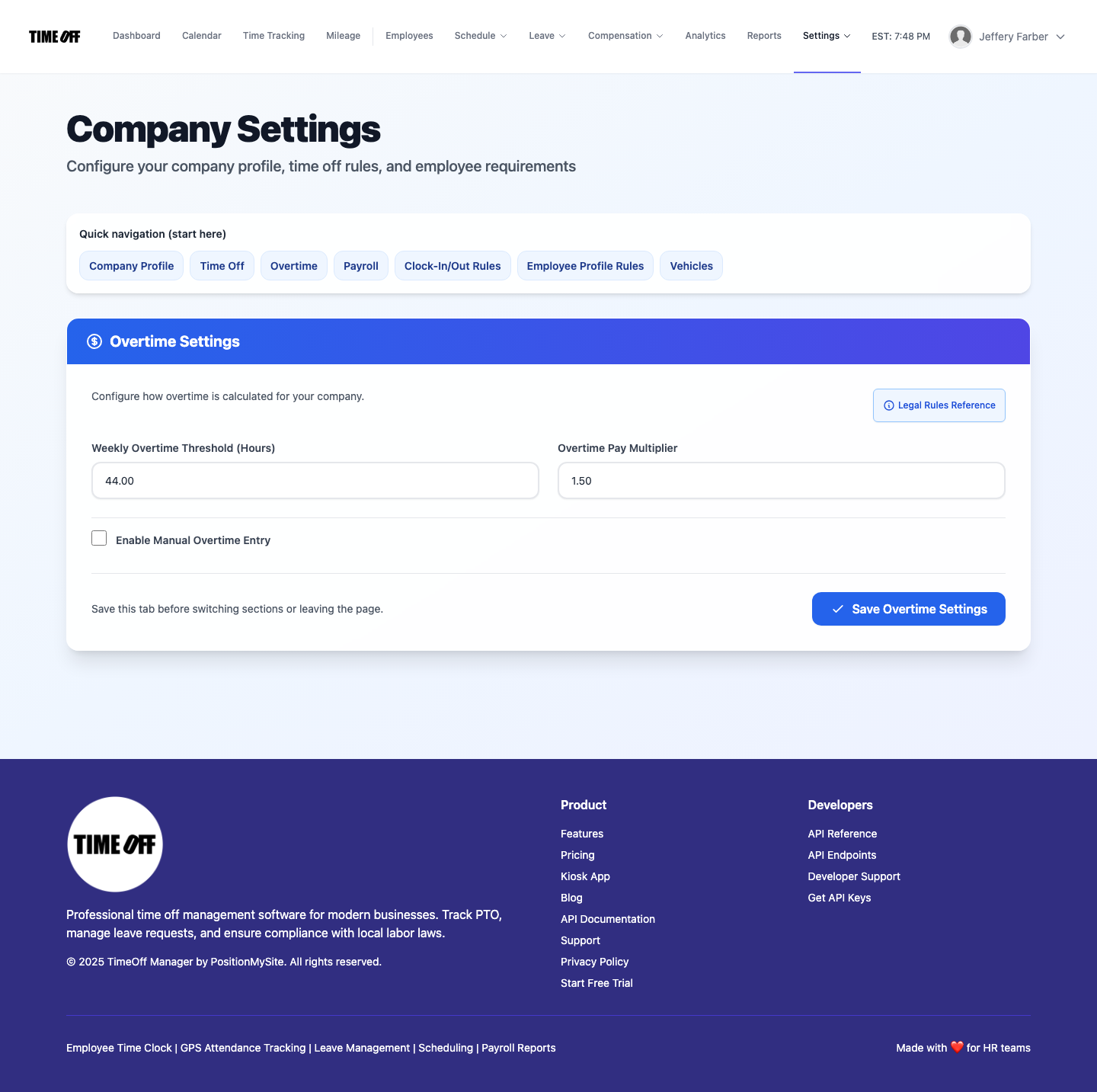 Company Settings for overtime defaults and work week rules, influencing how leave impacts total hours.
The Payroll Handoff: Clean Data, No Surprises
With approved leave and time clock-ins reconciled in one system, your payroll process becomes dramatically simpler and more accurate. When it's time to run payroll, all the data is clean, consistent, and ready for export or direct integration with your payroll provider. No more manual data entry, no more chasing down missing information, no more last-minute corrections. This significantly reduces the risk of payroll errors and ensures your team is paid correctly and on time.
CFO / Owner Story: 7 Plain Steps to a Smarter Workflow
As an owner or CFO, you need systems that reduce risk, save money, and free up your team to focus on core business. Here’s how TimeOff Manager transforms your PTO approval process into a lean, auditable workflow:
- Define Your Leave Policies Once: You, or your HR admin, set up all your company's leave types—vacation, sick, PTO, bereavement, etc.—in /admin/leave-types. You define the accrual rates, caps, and carryover rules. This is your single source of truth for all time off.
- Employees Request Time Off with Transparency: Your team members log into their dashboard, see their available balances, and submit requests for specific dates. The process is clear, and they know exactly how much time they have.
- Managers Review with Full Context: When a request comes in, the manager goes to /admin/requests. Before deciding, they instantly check the Team Timeline calendar to ensure adequate coverage and review the employee's current leave balances. This prevents blind approvals and staffing shortages.
- Approve or Deny with Confidence: With all the necessary information at hand, the manager makes a quick, informed decision. They can add notes for clarity, and the system automatically updates the employee and adjusts their leave balance.
- Leave Automatically Appears on Timesheets: The approved leave days or hours are automatically populated onto the employee’s timesheet and the manager's weekly timesheet grid alongside their actual time clock-ins. This ensures a holistic view of all paid time.
- Managers Review Weekly Grid for Payroll: Before the pay period closes, your managers open the Manager & HR hub at /timesheet. They review the combined clock-ins and approved leave for each employee, ensuring accuracy. This is their last chance to catch any discrepancies before the data goes to payroll, significantly reducing post-payroll adjustments.
- Maintain a Clear, Immutable Audit Trail: Every request, every approval, every denial, and every balance adjustment is logged within TimeOff Manager. You can easily generate reports for any period, providing irrefutable documentation for compliance, internal audits, or employee inquiries. This audit trail is invaluable for protecting your business.
This structured approach cuts down on administrative overhead, eliminates costly errors, and ensures fairness and transparency for your entire team. It's about working smarter, not harder.
Questions to Ask Any Vendor
Many SMBs try to piece together solutions: one tool for PTO, another for scheduling, a spreadsheet for time tracking, and then manually exporting everything to their payroll provider. You know the pain. It’s a constant battle of reconciling data, fixing errors, and trying to make disparate systems talk to each other. This isn't efficiency; it's a never-ending integration project that you didn't sign up for.
When you're evaluating solutions for your business, ask yourself:
- Does this PTO software update employee balances automatically upon approval, or do I need to manually adjust them elsewhere?
- Can my managers see team coverage on a calendar when approving a request, or do they have to check a separate schedule?
- Does approved leave automatically appear on the employee's timesheet alongside their clock-ins, or will I need to manually add it for payroll?
- Can I generate a report that shows both time worked and time off, with a clear audit trail of all approvals?
- Does the system enforce my company's specific leave policies and accrual rules, or is it a one-size-fits-all solution?
If the answer to any of these questions is "no" or "I'm not sure," you're likely looking at a fragmented solution that will create more work for you in the long run. TimeOff Manager was built from the ground up to be a unified platform. We believe that PTO, time tracking, and scheduling are intrinsically linked, and managing them in one workflow dramatically reduces errors, improves efficiency, and gives you a single source of truth for all employee time data.
This integrated approach is especially crucial for SMBs, where every minute of administrative time saved translates directly into resources you can reallocate to growth and customer service. Stop wasting time merging CSVs and chasing down approvals. The choice is clear: separate products versus one seamless workflow.
Compliance: Staying on the Right Side of Labor Laws
Navigating labor laws around paid time off, sick leave, and vacation entitlements can be complex, especially if you operate in multiple states or provinces. While TimeOff Manager provides the tools for robust record-keeping and consistent policy application, it's essential to understand your specific obligations.
- US Federal & State Laws: The Fair Labor Standards Act (FLSA) sets federal standards for minimum wage, overtime pay, and recordkeeping. However, many states have their own, often more generous, paid sick leave or vacation laws. For example, California has specific requirements for paid sick leave accrual and usage (California DLSE), as do cities like New York City. Understanding these nuances is critical.
- Canadian Federal & Provincial Laws: In Canada, leave entitlements are primarily governed by provincial and territorial labor laws, with the Canada Labour Code (Justice Canada) applying to federally regulated industries. Each province, such as Ontario (Ontario ESA Guide) or British Columbia, has its own rules for vacation time, statutory holidays, and sick leave.
- Accurate Record-Keeping: Regardless of jurisdiction, maintaining accurate and accessible records of employee hours worked, leave taken, and leave balances is a fundamental requirement. TimeOff Manager's audit trails and reporting features are designed to help you meet these obligations.
Disclaimer: This information is for general guidance only and should not be considered legal advice. Always consult with legal counsel or an HR professional to ensure your company's policies and practices comply with all applicable federal, state, and local labor laws in the US, and federal, provincial, and territorial laws in Canada. The Bureau of Labor Statistics (BLS) also provides valuable data on employer costs for employee compensation, including benefits.
Experience TimeOff Manager: See It in Action
Reading about it is one thing; seeing how TimeOff Manager streamlines your operations is another. We offer a fully functional, resettable demo environment where you can explore every feature discussed here—from setting up custom leave types to approving requests and reviewing the integrated timesheet. No commitment, just a chance to see how it fits your business.
Visit our blog at /blog/ for more insights and to find information on accessing our demo logins.
Frequently Asked Questions
Got more questions about how TimeOff Manager handles PTO approvals? Here are some common ones:
Can I customize different types of leave, like sick, vacation, and personal days?
Absolutely. You can define any number of custom leave types at /admin/leave-types, each with its own accrual rules, maximums, and carryover policies. This allows you to tailor the system to your exact company policies.
How do managers see if there's enough coverage before approving PTO?
Managers have access to the Team Timeline calendar. This visual tool shows who is scheduled to work and who has approved time off for any given day, allowing them to quickly identify potential coverage gaps before approving a request.
Does approved PTO affect how overtime is calculated for payroll?
Yes, approved leave is recorded and clearly visible on the Manager & HR hub at /timesheet alongside actual time clock-ins. While paid leave generally doesn't count as "hours worked" for federal overtime calculations in the US, it's crucial for understanding total paid hours and how it impacts your overall payroll. TimeOff Manager provides the complete picture, helping you make accurate payroll decisions based on your company's overtime rules and local labor laws.
Is there an audit trail for all PTO requests and approvals?
Definitely. Every step of the PTO workflow—from initial request to manager approval or denial, and any subsequent balance adjustments—is logged. You can access these detailed records and generate comprehensive reports, providing a clear, unalterable audit trail for compliance and transparency.
Can employees see their own leave balances and request history?
Yes, employees have full transparency. From their dashboard, they can view their current leave balances, submit new requests, and track the status and history of all their past requests.