Affordable PTO Software With Overtime Rules (2026): What SMBs Should Look For
TimeOff Manager integrates leave requests, accruals, time tracking, and overtime calculation into one platform, simplifying compliance and payroll for SMBs.


TimeOff Manager integrates leave requests, accruals, time tracking, and overtime calculation into one platform, simplifying compliance and payroll for SMBs.
Affordable PTO management software with overtime rules integrates leave requests, accruals, time tracking, and automatic overtime calculation into one unified platform. This approach saves SMBs an average of 5-10 hours weekly in reconciliation, prevents costly compliance fines, and eliminates manual errors common with disparate systems, ensuring accurate payroll and streamlined operations.
At TimeOff Manager, we built our platform to give you a single source of truth for all your time-related data. This means your employees’ approved time off automatically appears on their timesheets, ensuring overtime is calculated correctly based on all hours worked and all paid leave taken.
Why Manual PTO & Overtime Tracking Always Breaks
You already know the headache: payroll asks for overtime hours, and you get three different answers. Often, that's because your paid time off (PTO) requests live in one spreadsheet, employee clock-ins are in another system, and your overtime rules are just in someone's head. This fragmented approach is a ticking time bomb for SMBs.
Consider this common scenario: an employee requests two days of sick leave. Their manager approves it via email. But those approved hours never make it to the time clock system. So, when the employee works extra hours later in the week, your payroll provider only sees their clock-ins, not the paid sick time. The result? Overtime is either underpaid, leading to compliance issues, or overpaid, eating into your margins. It’s a mess of manual edits, back-and-forth emails, and frantic calculations right before payroll deadlines.
This isn't just about errors; it's about efficiency. Managers approving PTO without seeing the full context of an employee's schedule, including recent clock-ins or upcoming shifts, can lead to coverage gaps. Timezone mismatches further complicate things for remote or multi-location teams, making accurate overtime calculation nearly impossible without a unified system.
Affordable PTO Management Software with Overtime Rules (2026)
For 2026, the key to affordable and compliant PTO and overtime management isn't just about finding cheap software; it's about investing in a solution that eliminates manual work and reduces errors. TimeOff Manager combines all these functions into one integrated platform. This means you don't need separate tools for leave requests, time tracking, and payroll prep, saving you money and valuable time.
Beyond error reduction, an integrated system like TimeOff Manager significantly cuts administrative overhead. Managers spend less time chasing down spreadsheets or clarifying conflicting data, freeing them to focus on core business activities. Payroll processing becomes faster and more reliable, reducing the need for last-minute adjustments and the stress associated with tight deadlines. This efficiency translates directly into cost savings, making the software truly affordable in the long run by optimizing your entire time management workflow.
Our system allows you to define custom leave types – whether it's vacation, sick leave, personal days, or specific state-mandated leave. You set up accrual rules, carryover policies, and eligibility criteria once. Employees request time off directly through their dashboard, and managers approve or deny requests in real-time. Crucially, these approved leave hours are automatically reflected in the employee's timesheet, sitting right alongside their clocked hours.
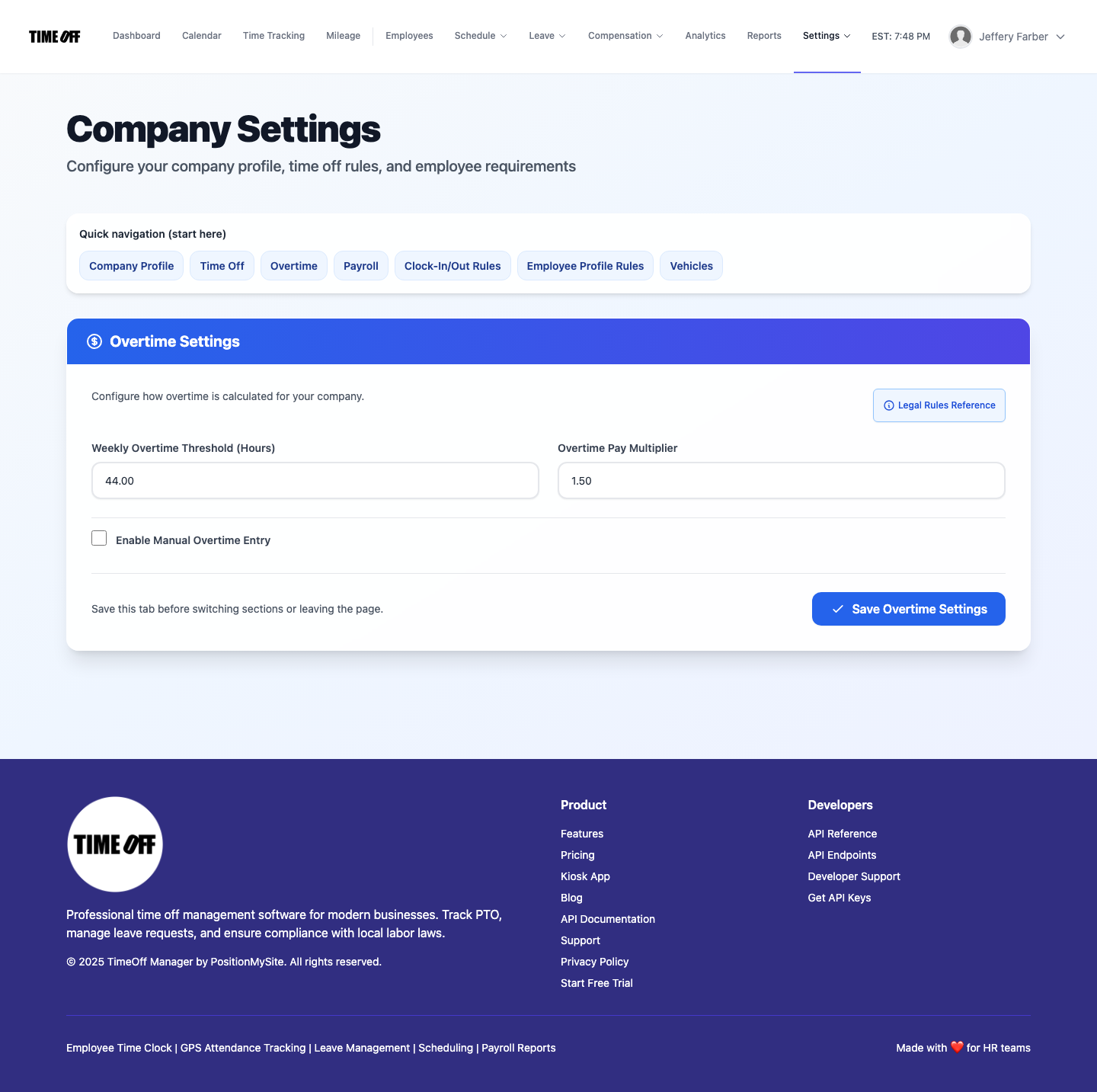
When it comes to overtime, this integrated approach is a game-changer. Your company's specific overtime rules, including daily or weekly thresholds and multipliers, are configured in the system. TimeOff Manager then automatically applies these rules to the combined total of an employee's worked hours and approved paid leave, ensuring accurate overtime calculations before you ever export to payroll. This unified data flow drastically reduces the risk of compliance violations and ensures you pay employees correctly, every time.
Best Way to Track PTO, Sick Leave, and Overtime Automatically
The best way to track PTO, sick leave, and overtime automatically is through a single, integrated system where all time-related data converges. This eliminates the need for manual data transfer and reconciliation, which is where most errors occur. In TimeOff Manager, it starts with clear policies and employee self-service.
Employee self-service is a cornerstone of this efficiency. When employees can independently check their balances, submit requests, and view their timesheets, it drastically reduces inquiries to HR and managers. This transparency fosters trust and empowers employees to manage their own time responsibly. Furthermore, an automated system excels at handling complex scenarios, such as employees taking a partial sick day and working the rest of their shift, or accruing different types of leave at varying rates. The system accurately processes these nuances, ensuring compliance with even the most intricate state-specific labor laws without manual intervention.
Employees use their dashboard to view their current leave balances and submit requests. Once a manager approves a request via the Leave: Manage requests (admin) interface, the system automatically updates the employee's leave balance and marks the approved hours on their timesheet. This visibility is crucial for both the employee and the manager to understand remaining leave and upcoming absences.
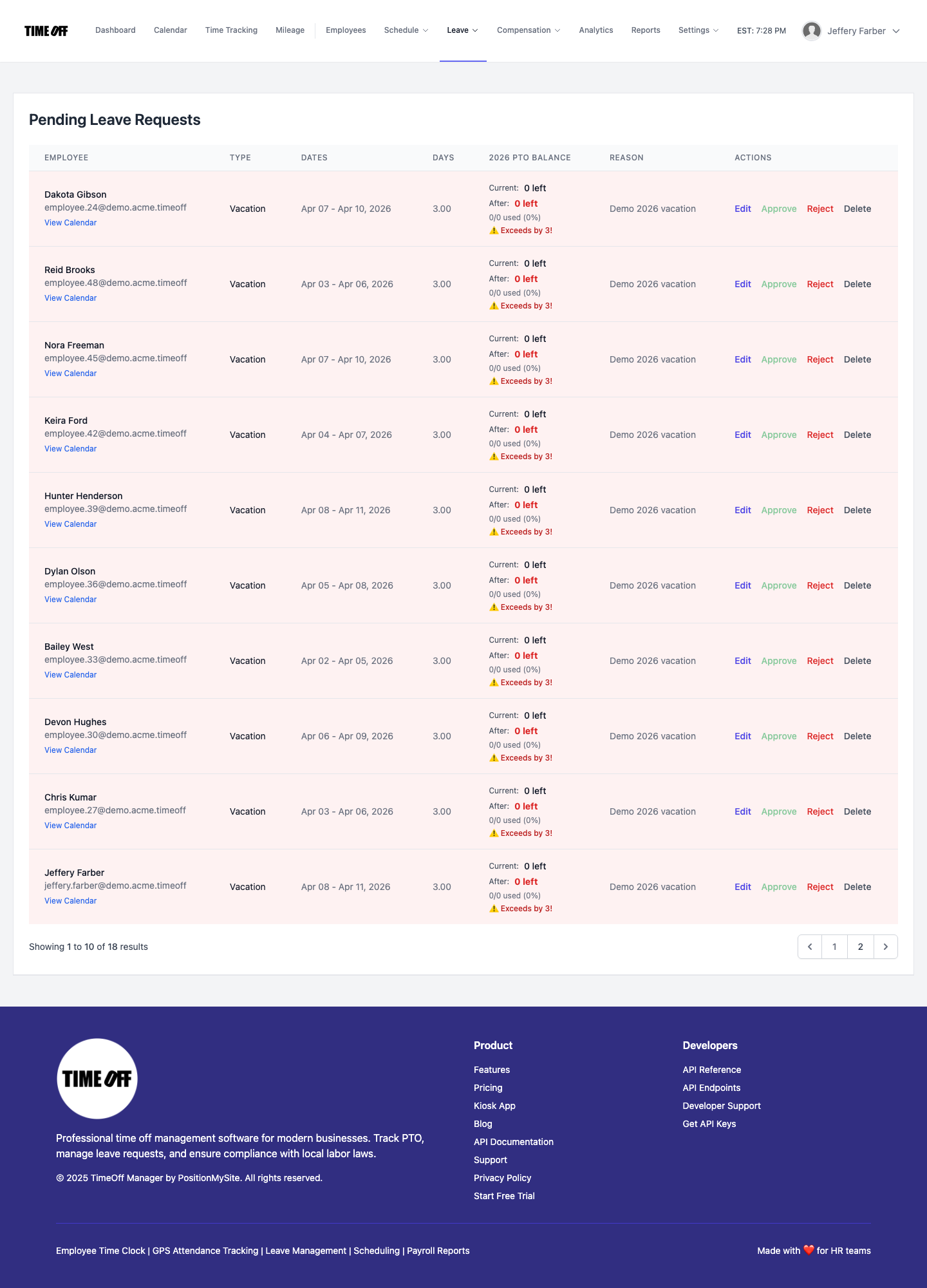
The magic happens when these approved leave hours flow directly into the employee's weekly timesheet. Whether your employees clock in via web, mobile, or a shared PIN kiosk at /clockin, all their worked hours are recorded. The system then combines these clocked hours with any approved PTO. When it's time to calculate payroll, TimeOff Manager applies your predefined Overtime: Admin rules to this complete picture of an employee's time. This ensures that any hours worked beyond daily or weekly thresholds, including those days where PTO was taken but other hours were worked, are correctly classified as overtime.
This integrated approach also helps with HR compliance 2026, especially regarding state-specific sick leave laws that might require different accrual rates or carryover rules. By automating these calculations, you reduce the risk of non-compliance and avoid costly penalties. You can also easily generate reports to demonstrate adherence to labor laws, giving you peace of mind.
Best Paid Time Off (PTO) Tracking Software 2026
The best PTO tracking software for 2026 goes beyond simply recording days off; it provides a comprehensive leave management system that integrates seamlessly with time tracking and payroll preparation. It needs to be flexible enough to handle diverse company policies and robust enough to ensure compliance.
For growing SMBs, scalability and flexibility are paramount. The best PTO software adapts to your evolving needs, whether you're adding new employees, opening new locations, or adjusting policies. It should offer robust reporting capabilities that go beyond simple compliance, providing insights into leave trends, potential staffing shortages, and the true cost of time off. These analytics empower HR and management to make data-driven decisions, optimize staffing levels, and forecast future needs, transforming PTO tracking from a compliance burden into a strategic asset.
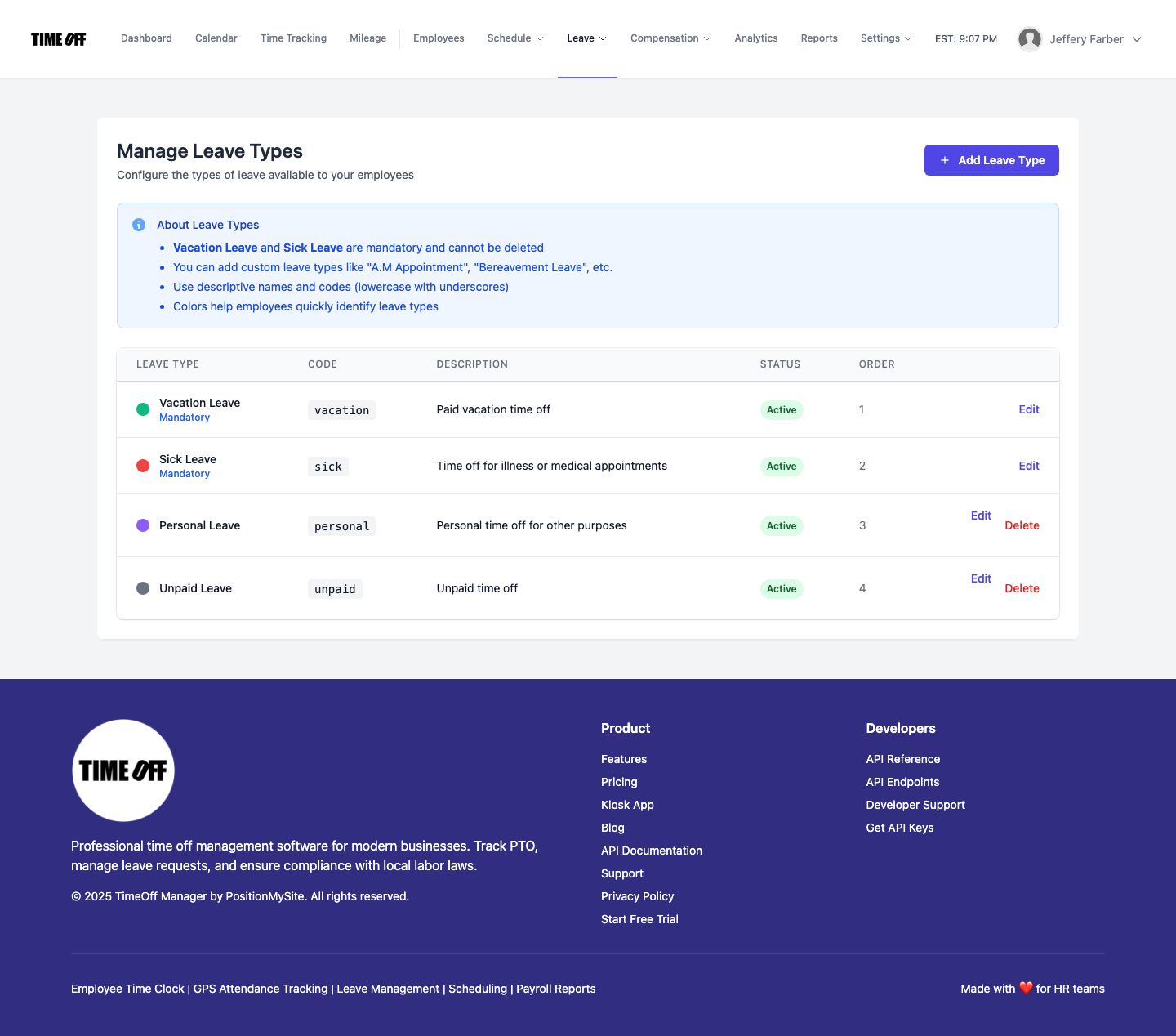
TimeOff Manager offers customizable custom leave types, allowing you to define different categories like vacation, sick time, bereavement, or jury duty. For each type, you can set specific accrual methods (e.g., per pay period, annually, or by hours worked), maximum accrual limits, and carryover rules. This flexibility is essential for SMBs that often have unique policies or need to comply with varying state and local regulations.
Beyond setup, the software needs to provide clear visibility. Employees can always see their current and projected leave balances on their dashboard overview, empowering them to plan their time off responsibly. Managers gain insight into team availability through a calendar: team timeline, helping them manage coverage and approve requests without creating staffing shortages. This proactive visibility is key to preventing last-minute scheduling crises and maintaining operational efficiency.
How to Handle Time Off Policies and Accrual Tracking Using Digital Platforms
Handling time off policies and accrual tracking on digital platforms like TimeOff Manager centralizes all your rules and automates the calculations, eliminating manual errors and confusion. It starts with a clear setup process.
- Define Your Leave Types: Go to /admin/leave-types to create all the different types of leave your company offers. For each, specify if it's paid or unpaid, and set up its unique accrual method (e.g., 40 hours per year, or 1 hour for every 30 hours worked).
- Set Accrual Rules: Within each leave type, you can configure detailed accrual rules, including when employees start accruing, how often, and any caps on how much they can accrue or carry over. This ensures fairness and compliance with your company policy and relevant labor laws.
- Assign Policies to Employees: Once leave types and rules are defined, you assign them to individual employees or groups. This allows you to have different policies for full-time, part-time, or salaried staff, reflecting the nuances of your workforce.
- Automated Accrual: The system automatically tracks and updates employee leave balances based on their work hours (if applicable) and the defined accrual schedules. You don't need to manually calculate or update spreadsheets every pay period.
- Employee Self-Service: Employees can log in to their My requests portal to see their current leave balances and submit new requests. This reduces administrative burden on HR and gives employees transparency.
- Manager Approval Workflow: Managers receive notifications for new requests and can review them in the /admin/requests section. They can see an employee's schedule and existing time off to make informed decisions about coverage.
- Integrated Reporting: The system provides reports on leave balances, usage, and accruals, which are essential for HR planning, financial forecasting, and compliance audits.
By digitizing these processes, you ensure that your time off policies are consistently applied, and accruals are always accurate, simplifying payroll and improving employee satisfaction.
What Integrated Actually Means
When we talk about an "integrated" system for PTO, time tracking, and overtime, it means more than just having a few features under one login. It means all your critical workforce data lives in one place, talking to itself, without manual intervention or data exports between different tools. Here's what that looks like in practice:
- One Employee Record: Each employee has a single profile that holds their personal details, compensation, assigned leave policies, and historical time and leave data. No duplicate entries, no conflicting information. This single platform also means you can manage GPS-verified clock-ins and mileage reimbursement alongside PTO and time tracking, centralizing all your workforce data.
- Seamless PTO to Timesheet Flow: When a manager approves a PTO request, those hours don't just update a balance; they automatically populate the employee's employee timesheet view. This means a manager reviewing the weekly grid at /timesheet sees both clocked hours and approved leave side-by-side.
- Unified Overtime Calculation: Your overtime rules are applied to the *total* hours recorded in the system for the pay period, including both worked hours (from the time clock) and paid leave. This ensures accurate calculations for compliance.
- Consistent Reporting: All reports pull from the same dataset. Whether you're looking at leave usage, total hours worked, or overtime costs, the numbers align because they originate from the same source. This eliminates reconciliation nightmares.
- Reduced Human Error: By automating the flow of data from request to timesheet to payroll calculation, you drastically reduce the chances of human error that plague manual or siloed systems.
Without true integration, you're often dealing with conflicting information – one set of hours in your time clock system, another in your PTO spreadsheet. This leads to duplicate data entry, inconsistent reports, and a constant need for manual reconciliation, which is both time-consuming and prone to error. An integrated system eliminates this problem by ensuring that every piece of time-related data, from a clock-in to an approved vacation day, contributes to a single, accurate picture of an employee's workweek. This holistic view is essential for accurate payroll, efficient scheduling, and confident compliance, removing the need to piece together disparate time records.
Employee vs. Manager Flows in TimeOff Manager
TimeOff Manager is designed with distinct, intuitive flows for both employees and managers, ensuring everyone has the tools they need without unnecessary complexity.
For employees, the journey usually starts at their /dashboard. Here, they get a quick overview of their upcoming shifts, current leave balances, and any pending requests. When they need to request time off, they navigate to My requests. This is where they submit new leave requests, view the status of past requests, and see their updated leave balances. For reviewing their own worked hours, they can access their employee timesheet, which clearly shows both their clocked time and any approved paid leave.
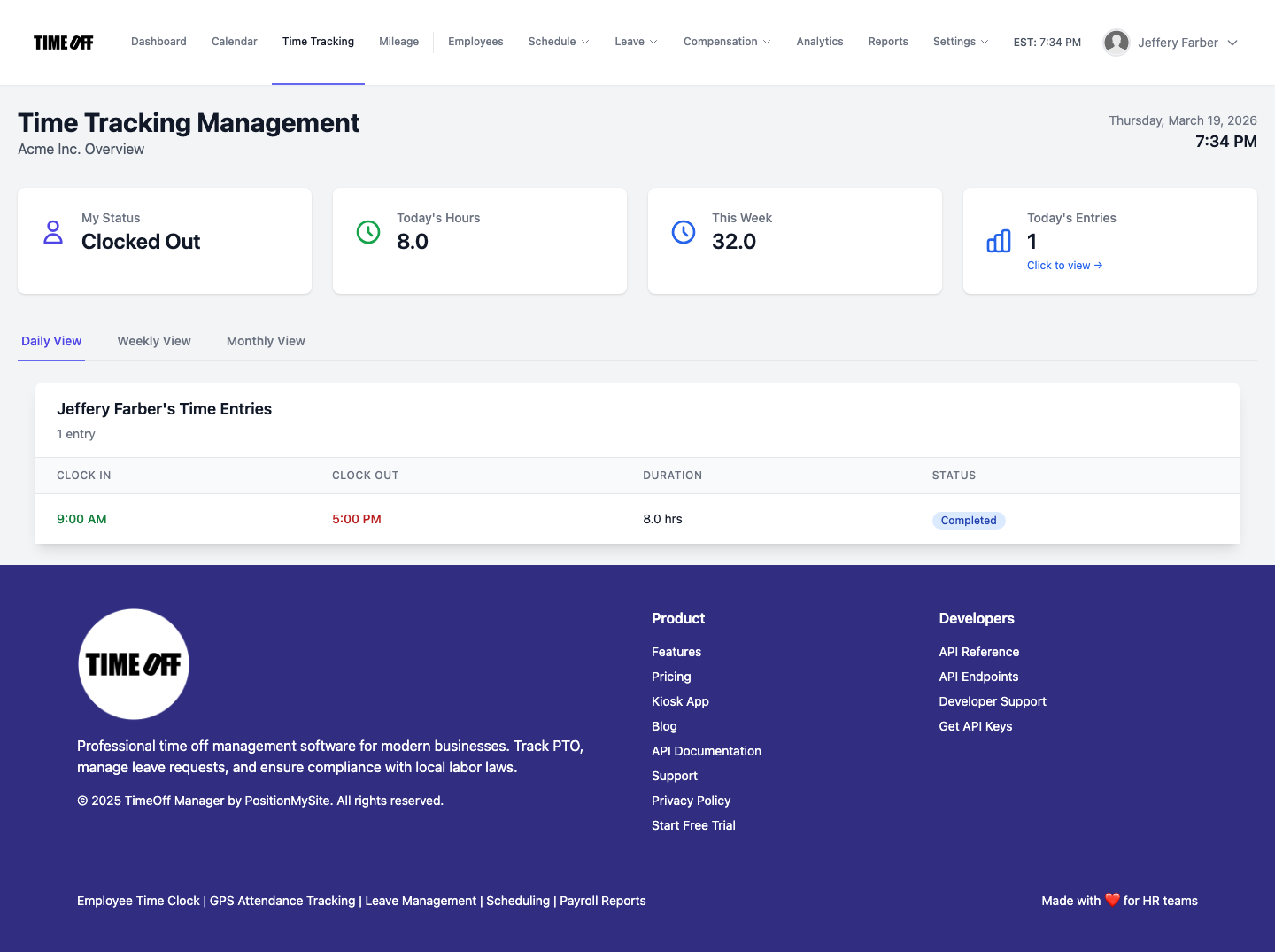
Managers and HR leads have a more comprehensive view, designed for oversight and action. Their central hub is often the Manager & HR hub at /timesheet. From here, they can see the daily roster, review the weekly grid for their team, and access monthly rollups. This view is critical for seeing not just clock-ins, but also how approved PTO impacts staffing. Managers can also head to /admin/requests to efficiently review and approve or deny all pending time off requests from their team. If they're involved in scheduling, they'll use /admin/schedule to manage shifts and ensure adequate coverage, often cross-referencing with the team timeline calendar to spot potential gaps caused by approved leave.

Workflow Walkthrough: PTO, Time, and Overtime in TimeOff Manager
Let's walk through a typical workflow, from setting up your policies to preparing for payroll, all within TimeOff Manager:
1. Define Your Leave Policies and Accruals
First, you'll establish your company's time off policies. Navigate to /admin/leave-types. Here, you can create various leave types like "Vacation," "Sick Leave," or "Personal Time." For each, you define how employees accrue time (e.g., 10 days per year, 1 hour for every 40 hours worked), any maximum carryover limits, and when accruals begin. This ensures that every employee's leave balance is calculated consistently and automatically.
2. Configure Overtime Rules
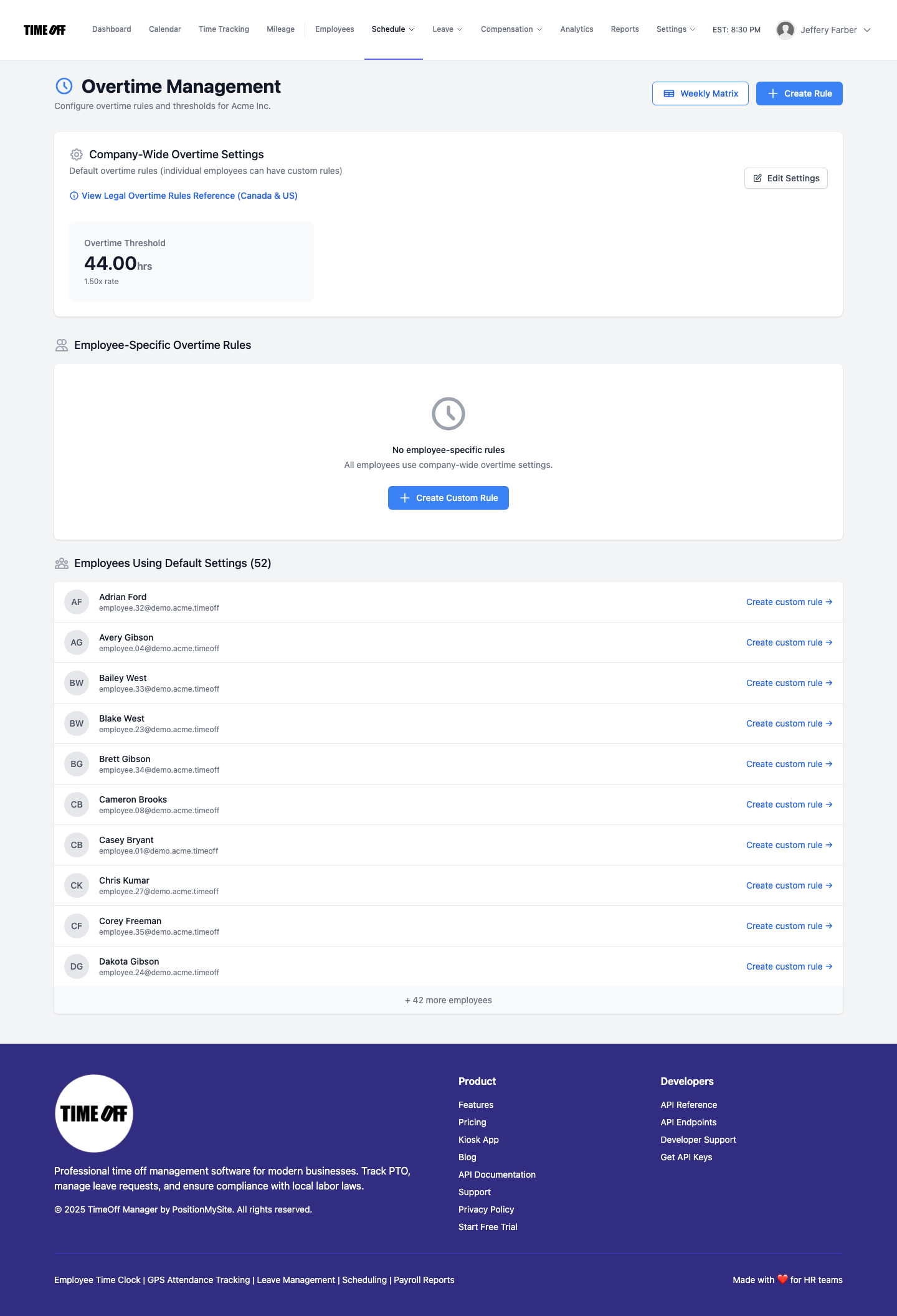
Next, set up your company's overtime rules, which are critical for HR compliance 2026. Go to /admin/overtime. You can define rules based on daily hours (e.g., anything over 8 hours in a day is 1.5x pay) or weekly hours (e.g., anything over 40 hours in a week is 1.5x pay). You can also set different multipliers for specific scenarios. These rules will automatically apply to all hours recorded in the system, including those with approved PTO.
3. Employee Requests PTO
An employee logs into their dashboard and, seeing their available balance, submits a request for vacation time through My requests. They select the dates, the leave type, and add any necessary notes. The system immediately checks their balance to ensure they have enough accrued time.
4. Manager Approves Leave
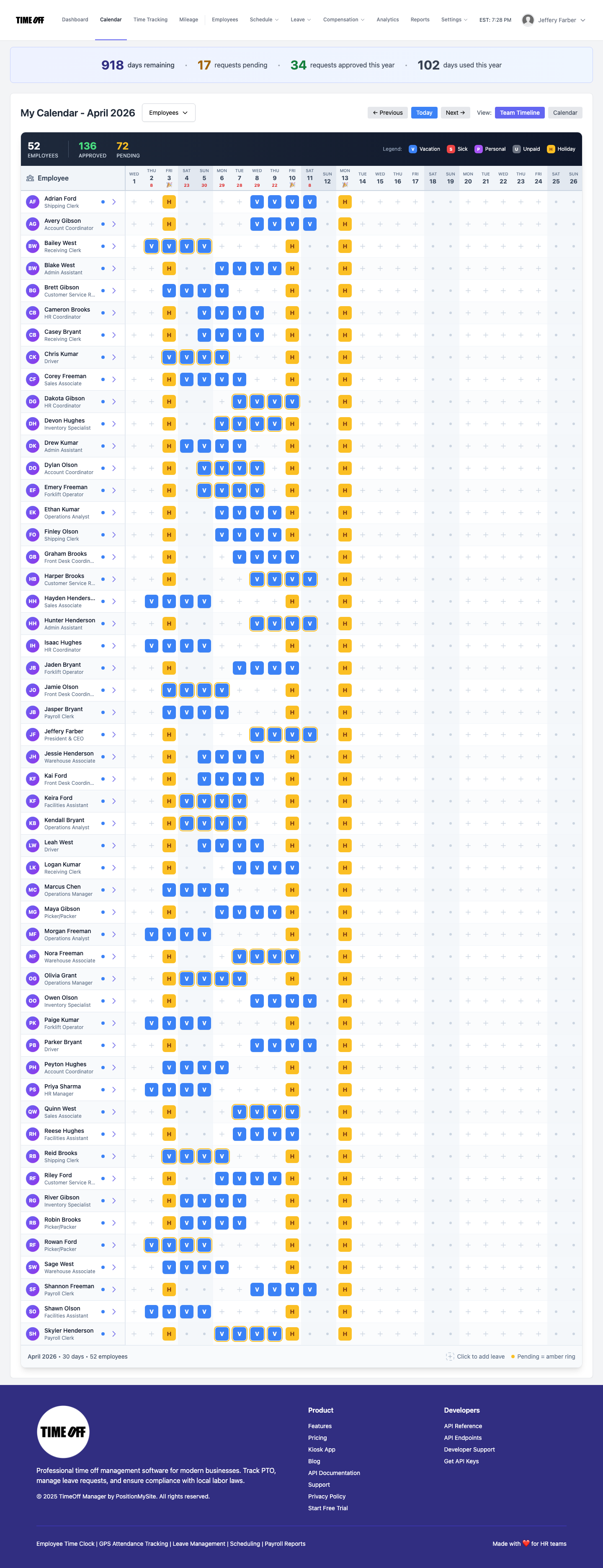
The employee's manager receives a notification about the new request. The manager logs into TimeOff Manager, goes to /admin/requests, and reviews the request. They can see the employee's current schedule and any other team members already off. With a clear picture of potential coverage, they approve the request. The employee's leave balance is instantly updated, and the approved leave is automatically scheduled on their timesheet and the team calendar.
5. Time Tracking and PTO Hours Converge
Throughout the pay period, employees clock in and out using the web, mobile time clock software, or a shared PIN kiosk at /clockin. These clock-ins record their actual worked hours. When the employee takes their approved PTO, those hours are automatically added to their timesheet for the relevant days. This automatic convergence is crucial: it means no manual entry of PTO into timesheets, no forgotten leave days, and no discrepancies between different systems. The system acts as a single source of truth, ensuring that all time data, whether worked or taken as leave, is accurately captured and immediately available. At the end of the week, when the manager opens the Manager & HR hub at /timesheet, they see a complete picture: both clocked hours and PTO, all in one grid.
6. Automated Overtime Calculation and Payroll Handoff
Before payroll, the manager reviews the weekly grid at /timesheet. TimeOff Manager has already applied the configured overtime rules to the combined total of worked hours and PTO. This means if an employee worked 32 hours and took 8 hours of PTO in a week, totaling 40 hours, and then worked an additional 5 hours, those 5 hours would be correctly flagged as overtime. The system presents a clear breakdown of regular, PTO, and overtime hours. You can then generate payroll reports or export the data to your payroll provider, confident that all hours, including paid leave and overtime, are accurate.

What to Look For in PTO Software with Overtime Rules (Buyer Checklist)
When you're evaluating PTO software, especially with an eye on overtime rules and affordability, don't just look for a long list of features. Focus on how those features work together to solve your real-world problems. Here's a buyer checklist for 2026:
- Unified Platform: Does it handle PTO requests, accruals, time tracking, and overtime calculation all in one system? Avoid separate products that require manual data transfer.
- Customizable Leave Types & Accruals: Can you define specific leave types (vacation, sick, personal) with unique accrual rates, carryover limits, and eligibility rules to match your company policies and state laws?
- Automated Overtime Application: Will it automatically apply your company's daily and weekly overtime rules to *all* hours recorded, including paid time off, before payroll?
- Manager Visibility: Can managers easily see both clocked hours and approved PTO on a single weekly grid or team calendar to manage coverage effectively?
- Employee Self-Service: Does it empower employees to check their balances and request time off easily, reducing HR administrative tasks?
- Payroll Integration Readiness: Does it provide clean, accurate reports and exports that are ready for your payroll provider, minimizing manual adjustments?
- Reporting & Analytics: Can you generate reports on leave usage, overtime costs, and other key metrics for HR planning and compliance audits? Check out the analytics dashboard.
- Affordable & Scalable: Is the pricing model clear, affordable for SMBs, and does the system scale with your business as you grow?
Ultimately, the goal is to find a solution that offers one workflow for all your time and leave needs, rather than juggling multiple, disconnected systems.
Compliance Considerations for PTO and Overtime
Navigating PTO and overtime compliance can be complex, especially with varying federal, state, and local regulations. While TimeOff Manager automates many of the calculations, understanding your obligations is key.
- Fair Labor Standards Act (FLSA): The FLSA dictates federal minimum wage, overtime pay, recordkeeping, and child labor standards. For overtime, it generally requires employers to pay non-exempt employees 1.5 times their regular rate of pay for all hours worked over 40 in a workweek. It's important to note that paid time off generally does not count as "hours worked" for federal overtime calculation purposes, but it must be tracked and paid according to your company policy. However, state laws can vary. You can find more details on the Department of Labor's FLSA page.
- State and Local Sick Leave Laws: Many states and cities have their own mandated paid sick leave laws, which often specify accrual rates, eligible uses, and carryover rules. These can be more generous than federal guidelines. Ensure your custom leave types and accrual settings in TimeOff Manager reflect these specific requirements. For instance, states like California, New York, and Colorado have distinct sick leave mandates that can differ significantly from federal FLSA guidelines, requiring specific accrual rates, carryover limits, and eligibility criteria. An automated system configured with these rules ensures you remain compliant without constant manual policy checks. Check your state's Department of Labor website for local regulations.
- Recordkeeping: Accurate recordkeeping of hours worked and leave taken is mandatory under FLSA and other labor laws. An integrated system like TimeOff Manager ensures all this data is captured and stored digitally, making it easy to generate reports for audits. Moreover, robust audit trails are crucial. TimeOff Manager automatically logs all time entries, leave requests, approvals, and system changes, providing an indisputable record for any potential audit or dispute. This level of detailed recordkeeping is not just good practice; it's a legal necessity that protects your business from costly penalties and litigation.
Remember, this information is for educational purposes only and not legal advice. Always consult with a legal professional or HR expert to ensure your policies and practices are fully compliant with all applicable laws.
See the Integrated Workflow in Action: TimeOff Manager Demo
Ready to see how TimeOff Manager can streamline your PTO and overtime management? We invite you to explore our demo. You'll see firsthand how a PTO request flows directly into the weekly timesheet, impacts overtime calculations, and provides clear visibility for both employees and managers.
Experience how easy it is to:
- Submit a leave request as an employee and track its status.
- Approve that request as a manager and immediately see it reflected on the team calendar and timesheet.
- Review the weekly grid at /timesheet where PTO hours combine seamlessly with clocked hours, and overtime is automatically calculated based on your custom rules.
Visit our demo page and use the provided login credentials to take TimeOff Manager for a spin. No commitment, just a clear look at how integrated time management works.
FAQ: Your Questions on PTO Software & Overtime Answered
What is affordable PTO management software with overtime rules?
Affordable PTO management software with overtime rules is a unified digital platform that handles employee time off requests, tracks accruals, records worked hours via a time clock, and automatically calculates overtime based on both types of time. It streamlines HR and payroll processes by integrating these functions into one system, reducing manual effort and the cost associated with errors.
How can I track PTO, sick leave, and overtime automatically?
You can track PTO, sick leave, and overtime automatically using an integrated system like TimeOff Manager. Set up custom leave types and accrual rules, enable digital time off requests, and use a time clock. The system combines all data, applying your company's overtime rules to calculate total compensable hours accurately before payroll.
What is the best paid time off (PTO) tracking software for 2026?
The best PTO tracking software for 2026 offers comprehensive leave management (customizable leave types, accruals, carryover), integrates seamlessly with time tracking and overtime calculation, and provides clear visibility for employees and managers. It simplifies payroll, scales for SMBs, and ensures compliance with evolving labor laws within an affordable, unified platform.
How does PTO accrual software work?
PTO accrual software automates employees earning time off. You configure rules (e.g., 40 hours per year, 1 hour per 30 hours worked) for each leave type. The software then automatically calculates and updates employee leave balances based on tenure or hours worked. Employees view updated balances and only request time they've accrued, reducing administrative burden.
How can digital platforms handle time off policies and accrual tracking?
Digital platforms handle time off policies and accrual tracking by centralizing all rules and automating calculations. You define company-specific leave types and accrual methods, which the system applies automatically. Employees use a self-service portal for requests, managers approve them, and all data flows into a single record. This ensures consistent policy application, accurate balances, and streamlined reporting.