Calendar: Employee month view
Single-person month grid (Sun–Sat), holidays and approved leave per day, plus month summary and leave list — for employees and for managers viewing a selected user.
/calendar?user=…
Roles
Employee · Manager · Company admin · HR manager
The employee month calendar is the classic week-by-week grid for one person: approved leave, company holidays, and (when mileage is on) trip hints per day — with a month summary alongside.
/calendar?user=employee_id&year=YYYY&month=M
—
Managers and admins pick an employee from the calendar header; employees land on My Calendar without a user parameter.
Overview
Unlike the team timeline, this layout shows a single monthly calendar (Sun–Sat columns) plus a right-hand panel on large screens with PTO-style totals and “leave this month” detail. Use it for planning one person’s time off without scanning the full roster grid.
Who sees this view
- Employees — always their own month; they are not shown other people’s calendars unless they have manager/HR permissions.
- Managers — their calendar plus direct reports (and themselves), via the employee picker.
- Company admin / HR — anyone in the company roster they’re allowed to open.
- Company admin — with the right company context, any employee in the directory.
The app enforces these rules server-side; invalid user ids are ignored and you’ll fall back to your default calendar.
Opening someone’s month
- Go to Calendar from the main navigation.
- Choose the person — header dropdown (“Employees”, or manager team list). Pick a name to add
?user=…to the URL. - Set the month — Previous, Next, or Today; the
yearandmonthquery parameters update for bookmarking or sharing. - Return to the team — use All Employees / back control to exit single-person view and open the coverage timeline where your role allows.
Reading the grid
Each cell is one day. Weekends are visually muted; holidays show the holiday name (sourced from the public holiday library at /admin/holidays); approved leave shows type and labels from the request.
Today is highlighted with a ring when it falls in the visible month.
Clicking a day may open a detail modal (implementation varies by build) so you can see the underlying leave rows for that date.
Summary & leave list
On desktop widths, the month summary cards count vacation, personal, sick, and total leave days in view. Below that, an agenda-style list groups leave in the same month — useful when you need dates and descriptions without scanning every cell.
On smaller screens, the layout stacks; scroll to see the same information below the grid.
Related: team timeline
For cross-team coverage and comparing many employees in the same month, switch to Calendar: Team timeline. Approvals still happen under Leave → Manage requests, not on this page.
Product screenshot
Below is a live UI capture for an individual’s month (demo employee; click to open full size).
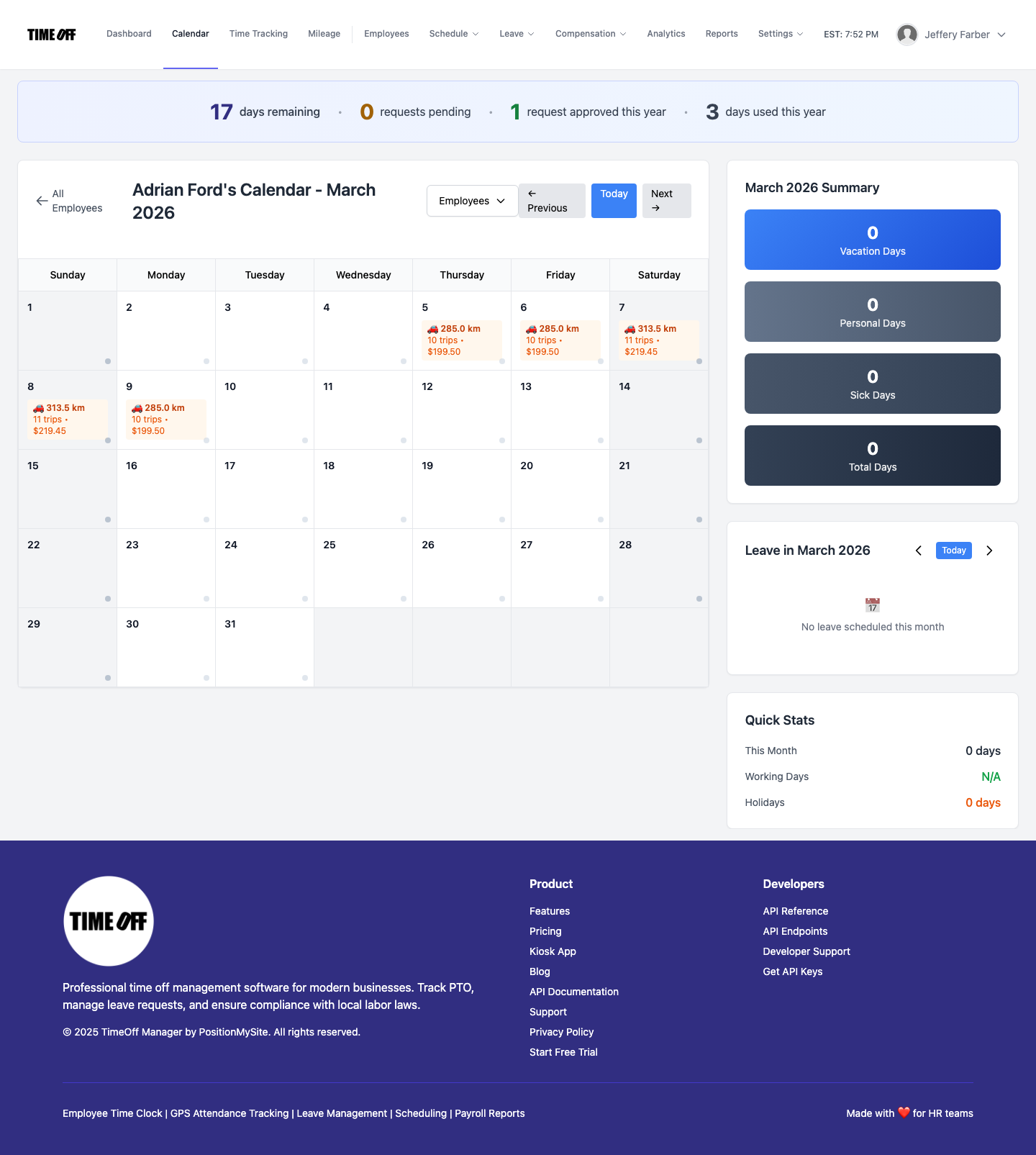
Employee month view — grid + summary (desktop ~1440px width).