Best PTO Management Platform For Companies That Allow Overtime Instead Of Time Off (2026): What SMBs Should Look For

The best PTO management platform for companies allowing overtime instead of time off seamlessly integrates time tracking and leave management. This ensures accurate overtime calculations and compliance, preventing payroll headaches.

David Dayan
David Dayan
Author
August 7, 2026
Published
19 min read
Read time
Best PTO for Overtime Instead of Time Off (2026) The best PTO management platform for overtime integrates time tracking, leave management, and automated overtime calculations. This unified system ensures accurate payroll and compliance for SMBs prioritizing overtime pay.

The best PTO management platform for companies allowing overtime instead of time off integrates three core functions into a single system: time tracking, leave management, and automated overtime calculations. This unified approach eliminates manual reconciliation, ensures accurate payroll, and prevents compliance headaches for small to medium businesses (SMBs) that prioritize overtime pay over compensatory time off.

Most modern workforces operate on a combination of scheduled hours, unexpected overtime, and various types of leave. A platform that can track all these elements in one place simplifies HR and payroll processes, reducing errors and ensuring your team is paid correctly according to your specific policies. This is especially true when your company policy allows for, or even encourages, overtime pay over accruing compensatory time off.

Why Overtime & PTO Management Breaks Without Integration

You already know the headache: payroll asks for overtime hours, and three different managers give three different answers. Or an employee works extra hours, and there's confusion about whether they get paid overtime or accrue more PTO. This usually happens because leave requests, time punches, and overtime calculations live in separate, disconnected systems.

Imagine this common scenario: a manager approves an employee's PTO request for a Friday. But then, that same employee works a few extra hours on Monday and Tuesday to cover a busy period. If your time clock software doesn't "talk" to your PTO software, the manager might not see the approved leave when reviewing the weekly timesheet. The system might incorrectly flag the extra hours as regular time, or worse, miss the overtime entirely because it doesn't account for the full work week in conjunction with scheduled leave.

This creates a mess of manual adjustments. You're editing Excel spreadsheets after the fact, trying to reconcile punch data with approved leave, and hoping you catch all the nuances of overtime rules. This isn't just inefficient; it's a huge compliance risk. One missed overtime payment can lead to significant fines and back pay, especially under federal laws like the Fair Labor Standards Act (FLSA) and various state labor laws. A manager might approve PTO without seeing the full picture of an employee's punches for the week, leading to unexpected overtime calculations or missed opportunities to manage labor costs proactively.

Beyond compliance, disconnected systems hurt your team's morale. Employees get frustrated when their paychecks don't reflect the hours they worked, or when there's constant back-and-forth about their time. It erodes trust and wastes valuable time for everyone involved. For businesses that deliberately allow overtime instead of time off, clarity and accuracy are paramount. You need a system that makes this policy transparent and easy to manage, not a source of constant confusion.

Affordable PTO Software with Overtime Rules: What to Look For

Finding a solution that combines PTO management with robust overtime rules doesn't have to break the bank. In fact, an integrated platform often ends up being more affordable than trying to stitch together multiple single-purpose tools. When evaluating PTO software that handles overtime, look for these key capabilities:

  • Configurable Overtime Rules: Your software needs to handle different overtime thresholds (e.g., daily, weekly, consecutive days) and multipliers (e.g., 1.5x, 2x). It should also distinguish between different types of hours, like regular, holiday, or weekend hours, and apply rules accordingly.
  • Seamless Time Tracking: Whether it's a web clock, mobile app, or a shared kiosk, the time clock should feed directly into the same system where PTO is managed. This eliminates manual data entry and ensures all hours are captured accurately.
  • Real-time Overtime Visibility: Managers should be able to see overtime accumulating in real-time, or at least before payroll processing. This allows them to make informed decisions about scheduling and labor costs.
  • Integrated Leave Management: PTO requests, approvals, and balances must live in the same system as time worked. This way, when an employee takes leave, the system correctly interprets their total hours for overtime calculation purposes.
  • Payroll-Ready Exports: The ultimate goal is to get accurate data to your payroll provider. The software should generate reports or exports that are easy to use and minimize manual adjustments.

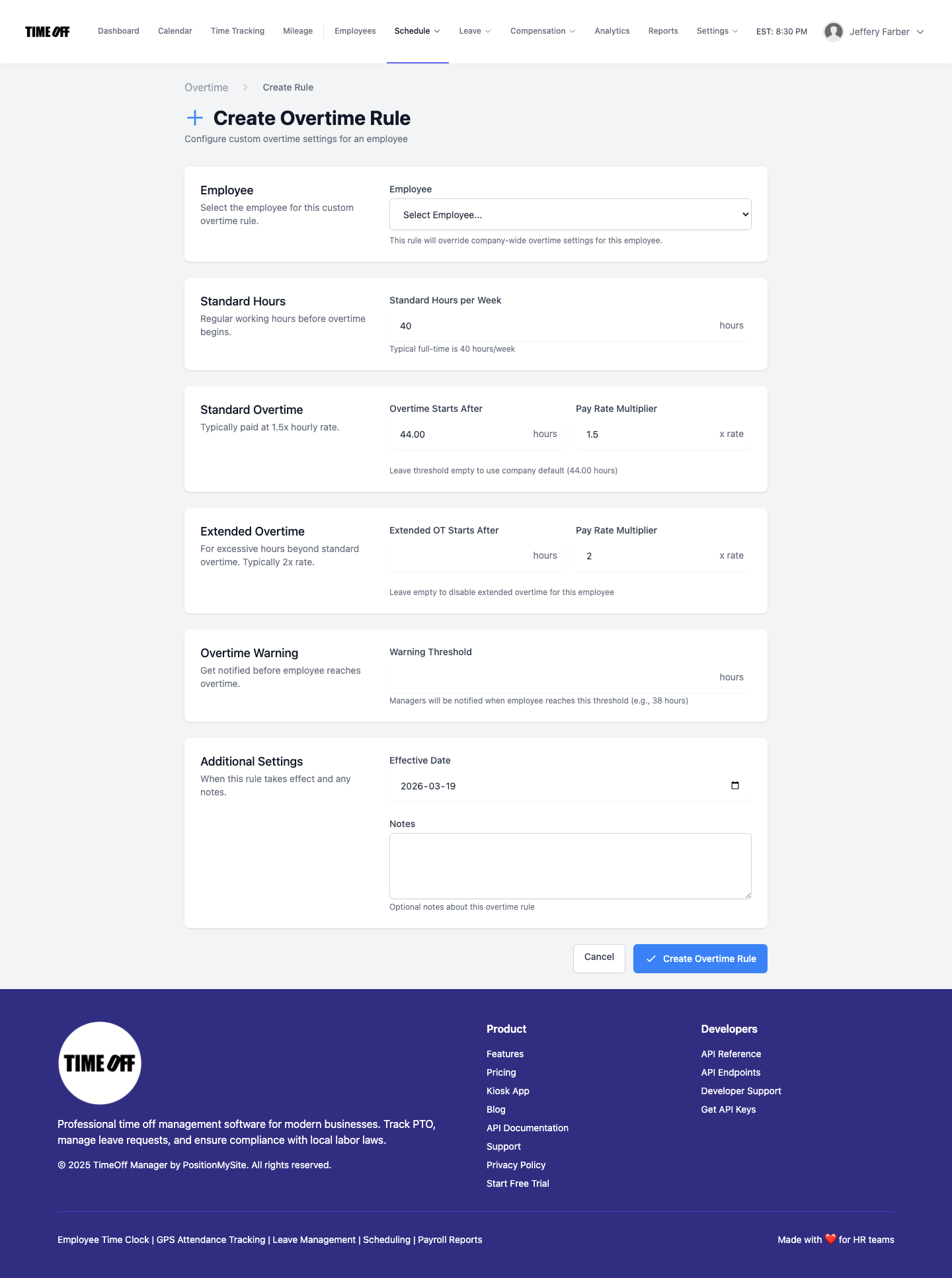
In TimeOff Manager, you set up your company's unique overtime rules in the Overtime Admin section at /admin/overtime. Here, you define thresholds for daily, weekly, and even consecutive day overtime. You can specify different multipliers for various scenarios, ensuring that when employees work beyond regular hours, the system knows exactly how to calculate their pay. This centralized control means you apply your policies consistently across your entire workforce.

Screenshot of Overtime Admin rules in TimeOff Manager
Customize your company's overtime rules and multipliers at /admin/overtime to ensure accurate calculations.

Beyond the core rules, you can also configure company-wide defaults for overtime in your Company Settings. This includes defining your standard work week and how various leave types interact with overtime calculations. This level of detail is crucial for SMBs that want to manage labor costs effectively while remaining compliant with labor laws.

Best PTO Management Platform for Overtime Instead of Time Off (2026)

For businesses that explicitly allow or prefer overtime pay over accruing additional time off, TimeOff Manager offers a cohesive solution. Our platform is built to handle this specific policy by treating all hours—whether regular, overtime, or leave—as part of a single, integrated workflow. This means you aren't just tracking PTO; you're managing the entire employee lifecycle from punch-in to payroll, with overtime calculation built right in.

Here’s how it works:

  1. Unified Employee Record: Every employee has one record. Their time punches, leave requests, approved PTO, and assigned schedules all live together. When an employee clocks in or out, or requests leave through their dashboard, all that data immediately updates their integrated profile.
  2. Smart Overtime Calculation: When an employee works beyond their scheduled hours or the company's defined thresholds, TimeOff Manager automatically flags those hours as overtime based on the rules you've set up at /admin/overtime. This calculation takes into account all recorded hours, including any approved leave that might count towards the "hours worked" threshold for overtime in some jurisdictions.
  3. Managerial Oversight: Managers can review the weekly grid at /timesheet and see exactly how many regular and overtime hours each employee has accumulated. This immediate visibility allows them to address discrepancies, approve time, and ensure everything is accurate before it goes to payroll. There's no guessing if that extra half-hour on Tuesday was approved as overtime or if it should have been comp time.
  4. Clear Reporting: When it's time for payroll, the system provides clear reports that break down regular hours, various overtime categories, and leave hours. This means your payroll provider gets a clean, accurate data set, reducing the chances of errors and manual adjustments.

This integrated approach is essential for HR compliance in 2026. Without it, you're constantly playing catch-up, risking penalties for miscalculated pay, especially with complex state-specific overtime rules. For example, some states have daily overtime thresholds in addition to weekly ones, or require specific handling of meal breaks. TimeOff Manager's validation rules, configurable at /admin/validation, can help enforce these policies, ensuring compliance right at the scheduling and time tracking stage.

Screenshot of Company Settings Overtime tab in TimeOff Manager
Configure company-wide overtime defaults and work week definitions in Company Settings.

Overtime Tracking, GPS Clock-in, and Payroll Integration Software 2026

The true power of an integrated system for overtime tracking lies in its ability to seamlessly prepare data for payroll. TimeOff Manager doesn't just track hours; it processes them according to your rules and presents them in a payroll-ready format. This eliminates the problem of conflicting data where your time tracking system says one thing, and your leave system says another.

Here’s how TimeOff Manager handles overtime tracking and payroll integration:

  1. Accurate Time Capture: Employees clock in and out using the method best suited for your business – a web browser, a mobile app, or a PIN kiosk at /clockin for shared devices. For field teams, a GPS time clock ensures punches are tied to specific work locations, adding another layer of accuracy and compliance. This data forms the bedrock of accurate overtime calculation.
  2. Real-Time Timesheet Updates: As employees punch in and out, their timesheets at /timesheet/employee update in real-time. Managers can view these updates on the daily roster and weekly grid at /timesheet. Any overtime hours are immediately highlighted, making it easy for managers to spot and address them.
  3. Automated Overtime Calculation: Based on the rules you configured in Overtime Admin, the system automatically calculates regular and overtime hours. This includes daily overtime, weekly overtime, and even holiday pay, ensuring that all hours are categorized correctly.
  4. Manager Review and Approval: Before payroll, managers review the weekly grid. They can make any necessary edits (e.g., correcting a missed punch) and approve the timesheets. This step is crucial for ensuring data accuracy and manager accountability. The weekly grid view provides a comprehensive look at all employees' hours, including any approved leave and calculated overtime, all on one screen.
  5. Payroll Run & Export: Once timesheets are approved, you can initiate a payroll run directly within TimeOff Manager. The system generates a clean, summarized report of all hours, including regular, various overtime categories, and leave. This report can be easily exported and sent to your payroll provider, minimizing manual data entry and reducing the risk of errors. No more frantic calls from your payroll provider asking for clarification on hours!

This streamlined process is especially beneficial for businesses with dynamic scheduling or those that frequently rely on overtime. It brings predictability and accuracy to a process that is often fraught with manual intervention and potential for error. Whether you're dealing with a small team or a larger workforce, the ability to integrate overtime tracking directly into your PTO and time management system is a game-changer for payroll efficiency and HR compliance 2026.

Screenshot of Manager & HR Weekly Timesheet Grid in TimeOff Manager
The Manager & HR hub at /timesheet shows the weekly grid, highlighting regular and overtime hours before payroll.

What Integrated Actually Means for Your Business

When we talk about "integrated" at TimeOff Manager, we mean more than just having a few features in one application. It means your core HR processes are unified. For you, the SMB owner, HR lead, or ops manager, this translates into:

  • One Employee Record: Every piece of information about an employee's time, leave, schedule, and compensation lives in a single profile. No more disparate databases or spreadsheets for different aspects of their employment.
  • One Source of Truth for Time: Whether an employee clocks in via web, mobile, or kiosk, or requests PTO, all those hours are recorded in one central place. This eliminates discrepancies between time worked and time off.
  • One Weekly/Pay-Period View: Managers can see an employee's entire work week or pay period—scheduled shifts, actual punches, approved leave, and calculated overtime—all on one screen. This holistic view is crucial for accurate approvals and payroll preparation.
  • Reports That Match Approvals: What your managers approve on the timesheet is exactly what gets sent to payroll. There's no room for data to get lost or altered between systems, ensuring accuracy and accountability.
  • Reduced Manual Reconciliation: Say goodbye to comparing spreadsheets, chasing down managers for punch corrections, or manually calculating overtime. The system does the heavy lifting, freeing up HR and payroll staff for more strategic tasks.

This means less time spent on manual checks and more focus on actual, actionable data. You get a clear picture of labor costs, compliance, and employee availability without the usual administrative burden. TimeOff Manager brings together GPS time tracking, mileage reimbursement, and PTO management into one seamless platform.

Screenshot of Employee Timesheet Overview in TimeOff Manager
Employees can view their own timesheet, punches, and leave requests at /timesheet/employee.

Employee & Manager Flows: Mileage Reimbursement and Time Tracking

An effective integrated system needs to work smoothly for both employees and managers, streamlining daily tasks and approvals.

Employee Flows: Self-Service and Transparency

Employees access their personal dashboard. From there, they can:

  • Clock In/Out: Using a web browser, mobile app, or a shared kiosk at /clockin, employees record their punches. This ensures accurate time tracking from the start.
  • View Timesheets: At /timesheet/employee, employees see their recorded hours, including any automatically calculated overtime. This transparency helps them understand their pay and verify accuracy.
  • Request Leave: Employees can submit leave requests directly through the system. They see their available PTO balances, making informed decisions about when to take time off.
  • Manage Mileage (if enabled): If your company reimburses mileage, employees can submit trips and track their mileage directly in the system, streamlining expense reporting.

Manager & HR Flows: Oversight and Efficiency

Managers and HR leads operate from their dedicated hub, primarily at /timesheet and /admin/requests.

  • Daily Roster & Weekly Grid: The Manager & HR hub at /timesheet provides a comprehensive view. The daily roster shows who's clocked in, who's on leave, and who's scheduled. The weekly grid allows for quick review of all employee hours, including regular, overtime, and leave, making it simple to spot discrepancies or potential overtime issues.
  • Leave Request Approvals: Managers can review and approve pending leave requests, seeing how approvals impact team coverage via the team timeline calendar.
  • Timesheet Adjustments: If an employee forgets to punch in or out, managers can easily make corrections directly on the timesheet before approval.
  • Overtime Visibility: Overtime hours are clearly displayed on the weekly grid, allowing managers to understand labor costs before they hit payroll.
  • Schedule Management: Managers can use shift templates and the schedule management tools to build and adjust employee schedules, ensuring adequate coverage while minimizing unplanned overtime.
Screenshot of Shift Templates in TimeOff Manager
Build and manage recurring shift templates at /admin/templates for efficient scheduling and compliance.

Workflow Walkthrough: From Punch to Payout

Let's walk through a typical workflow for managing overtime instead of time off, using TimeOff Manager:

1. Setting Up Company Overtime Rules

  1. Define Your Work Week: In Company Settings, navigate to the Overtime tab. Here, you'll set your standard work week (e.g., Sunday-Saturday) as this is foundational for weekly overtime calculations.
  2. Configure Overtime Thresholds: Go to /admin/overtime. Here, you define your specific overtime rules:
    • Daily Overtime: Set the threshold (e.g., 8 hours in a day) and the multiplier (e.g., 1.5x).
    • Weekly Overtime: Set the threshold (e.g., 40 hours in a work week) and the multiplier.
    • Other Rules: Add rules for consecutive days, holidays, or specific weekend rates if applicable to your business or state laws.
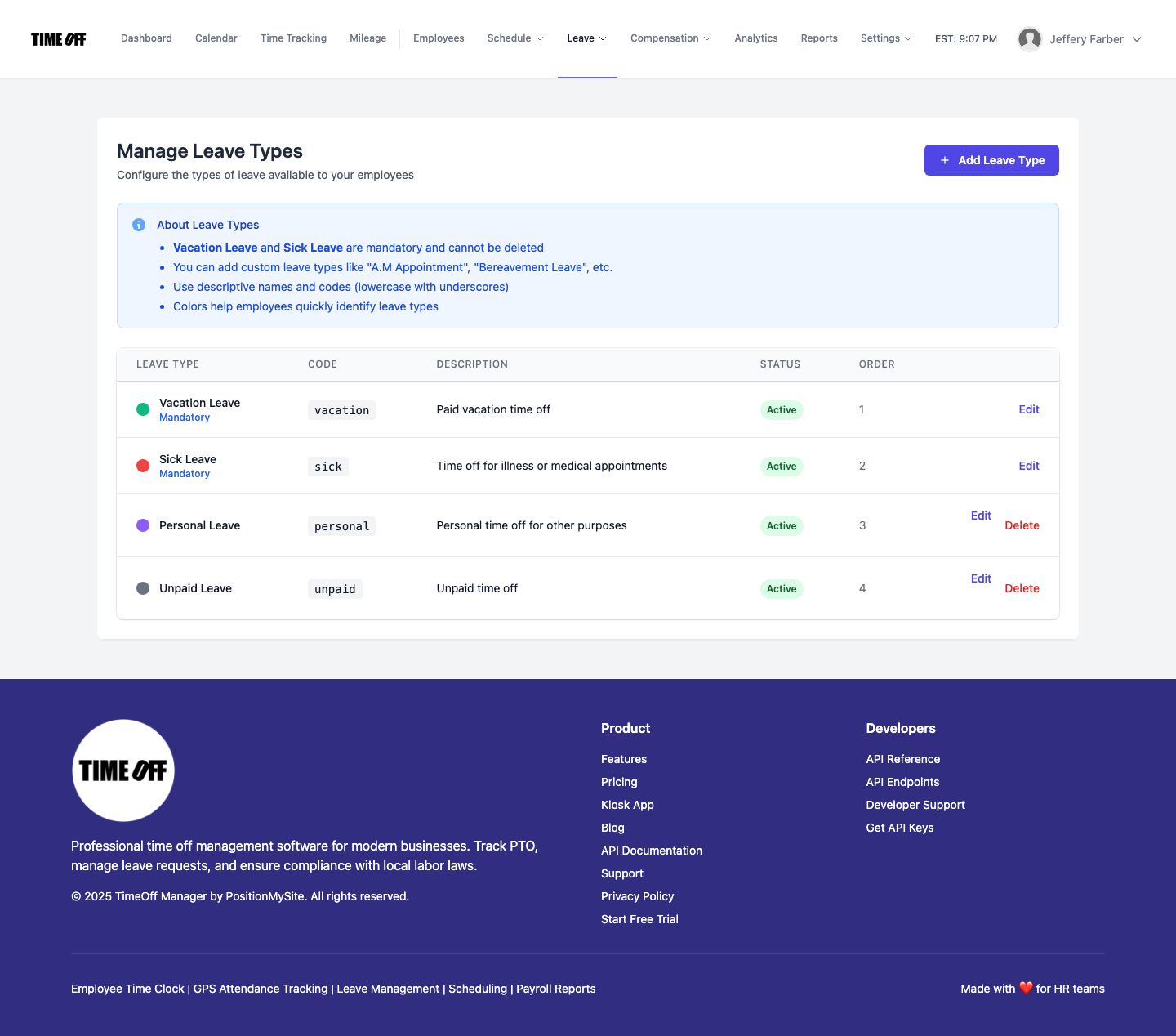
    • Leave Interaction: Specify if certain leave types (like sick leave) count towards hours worked for overtime calculation purposes, as required by some jurisdictions.
  3. Set Up Scheduling Validation: At /admin/validation, you can set rules to prevent schedules that might automatically trigger unwanted overtime, like ensuring breaks are scheduled or daily hour limits aren't exceeded.
Screenshot of Schedule Validation Rules in TimeOff Manager
Set up schedule validation rules at /admin/validation to prevent common compliance issues and unplanned overtime.

2. Employee Time Tracking & Leave Requests

  1. Punch In/Out: Employees use their preferred method (web, mobile, or kiosk) to record their start and end times, as well as any breaks. For field employees, the GPS time clock feature captures their location with each punch.
  2. Request Leave: If an employee needs time off, they submit a request through their dashboard, selecting the appropriate leave type. The system automatically checks their available balance.

3. Manager Review and Approval

  1. Review Timesheets: Managers open the Manager & HR hub at /timesheet. They see the weekly grid, which clearly displays all punches, any approved leave, and automatically calculated regular and overtime hours for each employee.
  2. Address Discrepancies: If an employee forgot to punch, or if there's an unusual shift, the manager can easily edit punches directly on the timesheet.
  3. Approve Timesheets: Once satisfied with the accuracy, the manager approves the timesheets for the pay period. This locks the data, preventing further changes before payroll.

4. Overtime Calculation and Payroll Handoff

  1. Automated Calculation: Once timesheets are approved, TimeOff Manager finalizes the calculation of all regular and overtime hours based on your configured rules.
  2. Initiate Payroll Run: An admin or HR lead can then go to Payroll: Runs & history and initiate a new payroll run.
  3. Export Data: The system generates a comprehensive report summarizing all hours by category (regular, various overtime types, leave). This report is easy to export in a format compatible with your payroll provider, ready for processing.
Screenshot of Payroll Runs & History in TimeOff Manager
Manage payroll runs and review historical payroll data in the Payroll Admin section.

What to Look for in Overtime & PTO Software

When you're shopping for the "best PTO management platform for companies that allow overtime instead of time off" in 2026, don't settle for separate products that force you to manually reconcile data. Here's a buyer checklist:

  • Unified Platform: Does it combine time tracking, leave management, scheduling, and overtime rules into a single system? Avoid solutions that require you to integrate multiple vendor products.
  • Configurable Overtime Rules: Can you set daily, weekly, and even consecutive-day overtime rules with different multipliers? Does it allow for specific handling of holidays or weekends?
  • Real-time Overtime Visibility: Can managers see overtime accumulating on employee timesheets *before* payroll? This is crucial for managing labor costs.
  • Employee Self-Service: Can employees easily clock in/out, view their timesheets, and request leave? This reduces administrative burden on managers.
  • Manager Approval Workflows: Are there clear workflows for managers to review, edit, and approve timesheets, including overtime hours?
  • Payroll Integration: Does it provide clean, exportable data that your payroll provider can easily use, minimizing manual adjustments?
  • Compliance Features: Does it help enforce meal breaks, daily/weekly hour limits, and other labor laws through scheduling validation and reporting? Does it handle different time zones for remote teams?
  • Reporting & Analytics: Can you generate reports on labor costs, overtime trends, and leave usage? This helps with strategic planning and budget management.
  • Support for Hybrid/Remote Work: Does it offer mobile time clock options, GPS tracking, and kiosk solutions to suit various work environments?
  • Scalability for Growth: Can the software grow with your business without requiring a complete system overhaul?

The core takeaway is this: separate products for time, leave, and scheduling create silos, leading to errors and compliance risks. A single, integrated workflow like TimeOff Manager brings all these pieces together, giving you one accurate source of truth for your workforce data.

Screenshot of Reports & Exports in TimeOff Manager
Generate detailed reports and exports from the Admin Reports section for payroll, compliance, and analytics.

Compliance Considerations for Overtime & Payroll

Navigating overtime and payroll compliance is complex, especially with varying federal, state, and local laws. While TimeOff Manager provides the tools to implement your policies, it's crucial to understand the legal landscape.

  • Fair Labor Standards Act (FLSA): At the federal level, the FLSA mandates overtime pay at 1.5 times the regular rate for non-exempt employees working over 40 hours in a work week. This applies to most private and public sector employment. You can find detailed information on the U.S. Department of Labor (DOL) website.
  • State-Specific Laws: Many states have their own overtime laws that can be more stringent than federal requirements. For example, some states require daily overtime (e.g., California, Alaska) or specific rules for seventh consecutive days worked. Always check your state's labor department website for the most current regulations.
  • Recordkeeping: The FLSA also requires employers to keep accurate records of hours worked, including regular and overtime hours. An integrated time tracking system is invaluable for maintaining these records.
  • Compensatory Time vs. Overtime Pay: While this article focuses on companies allowing overtime *pay* instead of time off, be aware that federal and most state laws generally prohibit private sector employers from offering "comp time" in lieu of overtime pay. This is primarily allowed for government employees.

Disclaimer: This content is for informational purposes only and does not constitute legal advice. You should consult with a legal professional or HR expert to ensure your specific policies and practices comply with all applicable federal, state, and local labor laws.

See Overtime Rules in Action: Try Our Demo

Ready to see how TimeOff Manager simplifies overtime tracking and payroll integration for businesses that allow overtime instead of time off? We've set up a resettable demo environment so you can experience it firsthand.

In our demo, you can:

  • Configure overtime rules at /admin/overtime.
  • See how an employee's time punches automatically trigger overtime calculations on the weekly grid at /timesheet.
  • Review and approve timesheets with calculated overtime, ready for payroll export.

Experience how a unified platform eliminates manual reconciliation and ensures accurate, compliant payroll. Access the demo logins here and try it out for yourself.

Frequently Asked Questions

What is the best PTO management platform for companies that allow overtime instead of time off?

The best platform for companies allowing overtime instead of time off is one that integrates time tracking, leave management, and overtime rules into a single system. This ensures that all hours worked, including extra hours, are accurately recorded, categorized as overtime, and prepared for payroll without manual reconciliation or discrepancies between systems.

Where can I find affordable PTO management software with overtime rules?

Affordable PTO management software with robust overtime rules is found in integrated solutions like TimeOff Manager, which combine time tracking, leave management, and advanced overtime configuration into a single platform, offering cost-effectiveness by eliminating the need for multiple, disconnected systems and reducing administrative burden.

How does overtime tracking and payroll integration software 2026 work?

Overtime tracking and payroll integration software in 2026 works by capturing employee time punches (via web, mobile, or kiosk), applying pre-configured overtime rules (daily, weekly, etc.), and automatically calculating regular and overtime hours. This validated data is then presented to managers for approval and can be seamlessly exported in a payroll-ready format to your outside payroll provider, ensuring accuracy and compliance.

Can PTO software manage both time off accruals and overtime payouts?

Yes, an integrated PTO software like TimeOff Manager effectively manages both time off accruals and overtime payouts by tracking all hours worked, calculating overtime based on your company's specific rules, and separately managing employee leave balances within a single, unified system.

What are the benefits of integrating overtime tracking with PTO management?

Integrating overtime tracking with PTO management offers several key benefits: it eliminates manual data entry and reconciliation errors, ensures accurate and compliant payroll processing, provides managers with real-time visibility into labor costs and potential overtime, and streamlines administrative tasks for HR and payroll teams. This unified approach reduces compliance risks and improves overall operational efficiency.

Is a GPS time clock useful for overtime tracking?

Yes, a GPS time clock is highly useful for overtime tracking, particularly for remote or field employees, as it accurately records punch-in and punch-out times tied to specific work locations, providing precise time data that feeds directly into the integrated system for accurate overtime calculations and payroll processing.

Share this article:

Related Articles

Continue exploring HR best practices and insights

Finding affordable overtime tracking and payroll integration software in 2026 means looking for a unified platform that combines time tracking, PTO, and scheduling into one seamless workflow.
17 min read

Overtime Tracking And Payroll Integration Software (2026): What SMB Teams Need to Know

Finding affordable overtime tracking and payroll integration software in 2026 means looking for a unified platform that combines time tracking, PTO, and scheduling into one seamless workflow.

Read →
SMBs need PTO software that handles accruals, policies, and approvals in one place, reducing manual errors and ensuring compliance.
16 min read

Best Paid Time Off PTO Tracking Software (2026): What SMBs Should Look For

SMBs need PTO software that handles accruals, policies, and approvals in one place, reducing manual errors and ensuring compliance.

Read →
Shift scheduling software helps small businesses save time, prevent costly overtime, and ensure adequate coverage by integrating schedules, PTO, and time tracking.
16 min read

Shift Scheduling Software For Small Business (2026): What SMB Teams Need to Know

Shift scheduling software helps small businesses save time, prevent costly overtime, and ensure adequate coverage by integrating schedules, PTO, and time tracking.

Read →

Never Miss an Update

Get expert HR insights and TimeOff Manager tips delivered to your inbox.

Join 1,000+ HR professionals. No spam, unsubscribe anytime.