Multi-Company Workspaces: Isolated Policies Per Organization (2026)
Owners who run multiple brands need isolated data—not one shared spreadsheet. TimeOff Manager Multi-Company Support gives each organization its own workspace with Company Settings, custom policies, roster, and clocks. Register additional companies as needed.

Owners who run multiple brands need isolated data—not one shared spreadsheet. TimeOff Manager Multi-Company Support gives each organization its own workspace with Company Settings, custom policies, roster, and clocks. Register additional companies as needed.
Two brands, one shared spreadsheet. Brand A’s overtime rules bleed into Brand B. Rosters collide. Clocks and leave policies get overwritten because nothing is isolated. That is how multi-company ops fail for US and Canada owners who run more than one organization—and why stuffing two companies into one workbook never scales.
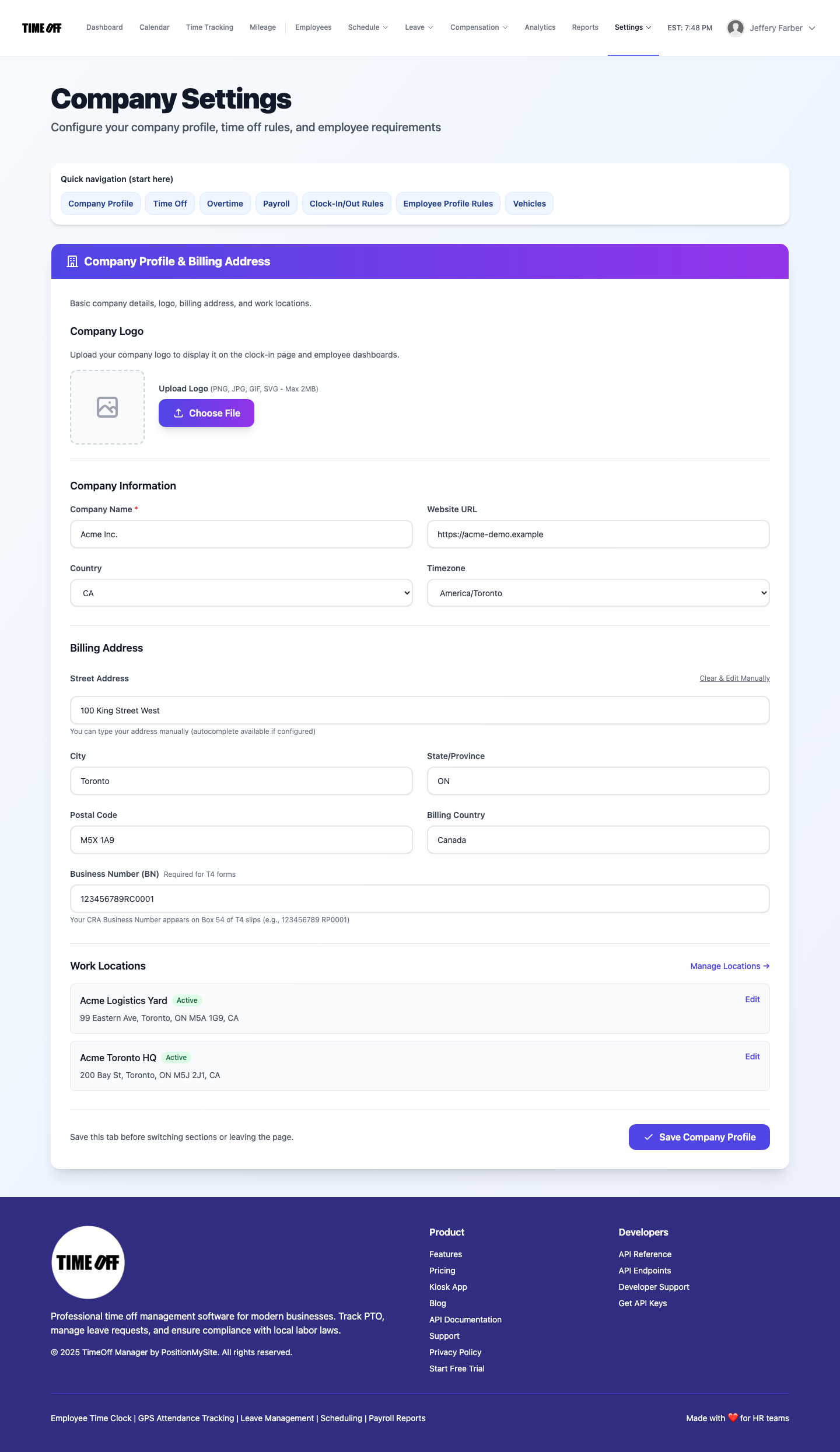
TimeOff Manager Multi-Company Support lets you manage multiple companies with isolated data and custom policies for each organization. Each company is its own workspace/tenant. A company admin works inside their organization’s Company Settings at /company/settings—Company Profile, leave rules, clocks, roster, and work locations stay scoped to that company. Register additional companies when you need another isolated workspace.
Why isolated company workspaces matter
Shared spreadsheets and single-tenant “one big company” setups force owners to reuse policies, PINs, and leave rules across brands that should stay separate. Audits get messy. Managers approve leave against the wrong roster. Field clocks pick up the wrong work locations.
- Each organization gets its own workspace—data stays isolated
- Custom policies per company (leave, overtime, clock rules, profile requirements)
- Company Profile: legal/display name, website, country, timezone, logo, billing address, work locations
- Company admin configures their organization at
/company/settings
Recent signup guides covered Staff Messages, the manager Approval Center, and Work Activities. This post is the multi-company workspace path—different job, same platform.
What Multi-Company Support is (and is not)
What it is — Pricing markets it clearly: manage multiple companies with isolated data and custom policies for each organization. Each company is a tenant with its own Company Settings, roster, clocks, and policies. Owners who run multiple orgs register additional companies as needed and keep Brand A separate from Brand B.
What it is not — Not stuffing two brands into one shared spreadsheet. Not inventing a single “company switcher” screenshot as the product story—the accurate frame is one isolated Company Settings workspace per organization. Not Staff Messages (one-way announcements). Not Approval Center (leave / punches / mileage). Not Work Activities (job codes on a punch). One person, one PIN on the kiosk—never share PINs.
Inside Company Settings (per organization)
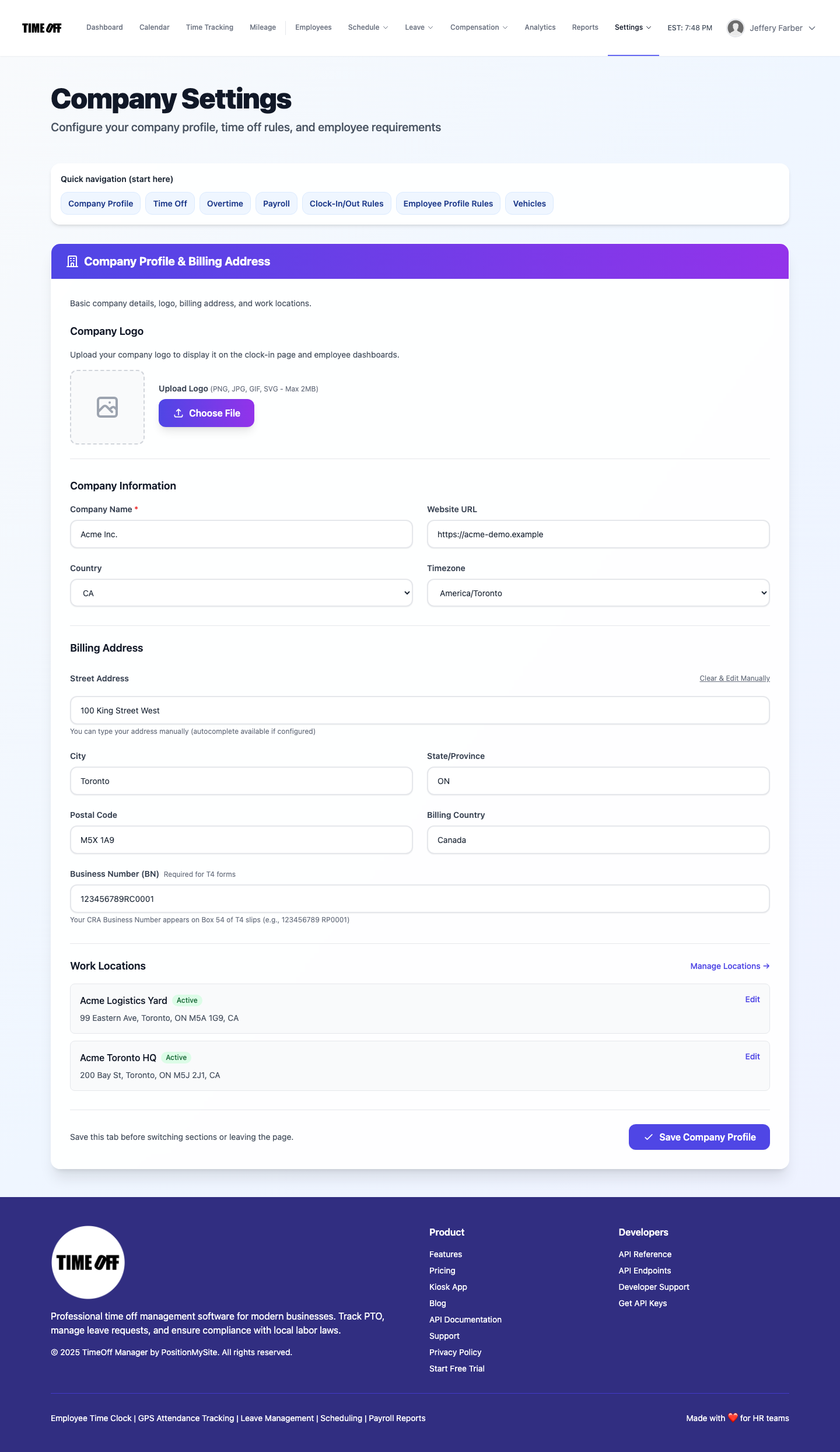
Open /company/settings as a company admin. The Company Profile tab is where you set identity for that workspace:
- Upload a logo (shown on clock-in pages and dashboards)
- Set company name, website, country, and timezone
- Enter billing address and business number where required
- Maintain the work locations list for that company
- Save Company Profile—other tabs refine time off, overtime, payroll, clock-in rules, employee profile rules, and vehicles for the same organization
Use it when you own a logistics brand and a retail brand, run franchises under separate legal entities, or need Canadian vs US policy sets that must not collide.
How owners run multiple organizations
Register each company as its own workspace (trial at /register/company). Company admins configure only their organization. Rosters, clocks, leave balances, and policies stay inside that tenant. Contrast: one spreadsheet tab named “Brand B” still shares formulas, access, and accidental overwrites with Brand A.
On mobile, TimeOff Manager Pro uses the same work email account as the website for that company context. Kiosk remains the door-tablet PIN app—do not install Pro on the shared tablet. One person, one PIN.
Who uses Multi-Company Support
- Owners / operators — run multiple legal entities or brands with isolated data
- Company admins — configure Company Profile, policies, locations, and clocks for their org at
/company/settings - Managers / staff — work inside the company workspace they belong to (roster, leave, punches scoped correctly)
Distinct from Staff Messages, Approval Center, and Work Activities
- Staff Messages — one-way announcements with optional acknowledge at
/messages - Approval Center — mixed pending leave, punches, and mileage approvals
- Work Activities — optional job codes on an open punch for cost allocation
- Multi-Company Support — isolated company workspaces with per-org Company Settings and policies
Full product walkthrough: Company settings overview.
How to use it (real product path)
- Register a company workspace at /register/company (14-day free trial)
- Sign in as company admin and open Company Settings (
/company/settings) - On Company Profile, set name, website, country, timezone, logo, billing address, and work locations
- Configure other tabs (time off, overtime, clock rules, etc.) for that organization only
- When you need another brand or legal entity, register an additional company—keep data and policies separate
- Keep kiosk PINs personal: one person, one PIN—never share PINs across brands or tablets
Who this is for
- Owners running two or more brands who refuse shared-spreadsheet chaos
- US and Canada operators who need isolated policies, rosters, and clocks per organization
- Franchise / multi-entity teams already on TimeOff Manager clock-in and leave who need a second workspace
- Admins who want Company Profile, work locations, and policy tabs scoped to one tenant
Start a 14-day trial (then Starter, Growth, or Scale)
Stand up an isolated company workspace—Company Profile, policies, roster, and clocks that stay separate from your other organizations.
You get a 14-day free trial, then choose Starter, Growth, or Scale based on seats and features. Register at https://timeoffmanager.us/register/company.
Related: Help: Company settings · Staff Messages · Approval Center · Work Activities