Approval Center: One Inbox for Leave, Missed Clock-Ins & Mileage (2026)
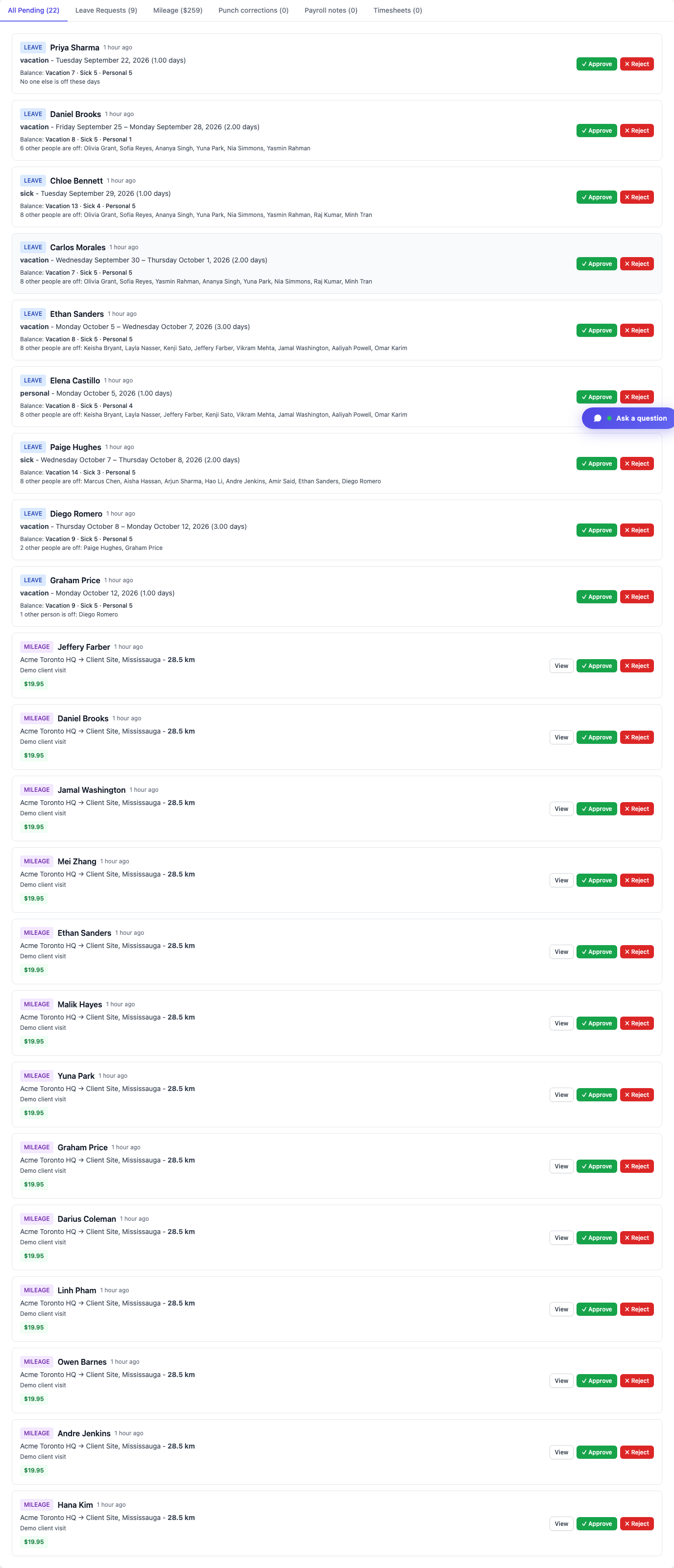
Managers and HR clear leave, missed clock-ins, mileage, and day notes in one dashboard inbox at /dashboard#approval-center—tabs filter by type; approve or reject in place. Same mixed queue in TimeOff Manager Pro (More → Approvals). Pure employees use My requests / My pending.

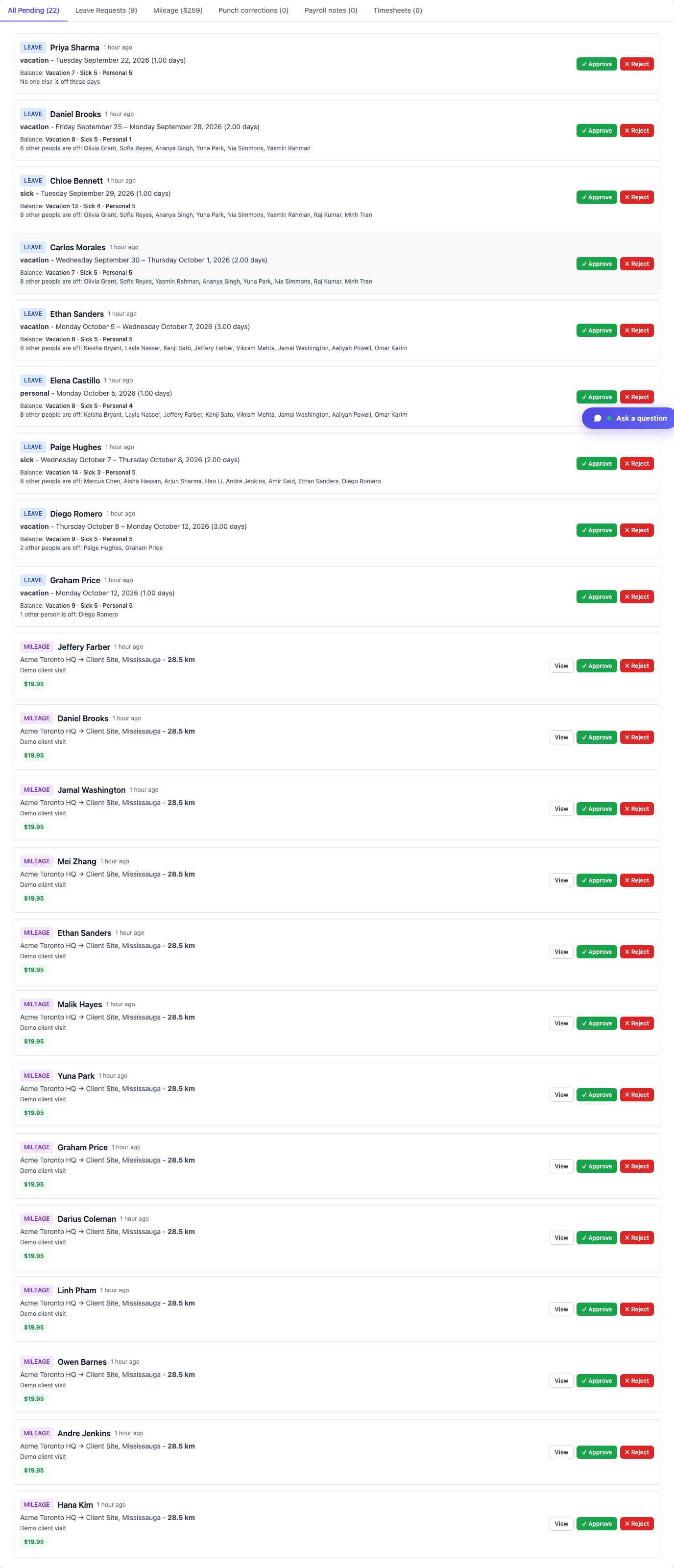
Managers and HR clear leave, missed clock-ins, mileage, and day notes in one dashboard inbox at /dashboard#approval-center—tabs filter by type; approve or reject in place. Same mixed queue in TimeOff Manager Pro (More → Approvals). Pure employees use My requests / My pending.
Leave in email. Missed clock-ins in a group chat. Mileage in a spreadsheet. Day notes buried in a timesheet comment. That is how manager mornings disappear—and how payroll inherits half-finished decisions.
TimeOff Manager’s dashboard Approval Center at /dashboard#approval-center is one inbox for leave, missed clock-ins, mileage, and day notes / ± hours, sorted soonest first. Tabs filter by type. Approve or reject in place. The same mixed queue is More → Approvals in the TimeOff Manager Pro app.
Why a mixed manager inbox matters
Field and hourly ops do not live in one request type. A site lead might need to clear a vacation, a forgot-punch from yesterday’s rush, a mileage trip to a client site, and a payroll day note—before the next shift starts. Separate inboxes mean context switching and missed items.
- Yellow Pending Approvals card after sign-in jumps straight to Approval Center (not the leave-only queue)
- Tabs: All Pending, Leave, Mileage, Missed clock-in corrections, Payroll notes, and more
- Balance and conflict hints on leave cards; route and amount on mileage
- Green Approve / red Reject without leaving the page
This post is about the manager/HR mixed inbox. Yesterday’s signup guide covered the employee Forgot to clock in submit path—different job, same platform.
What lands in Approval Center
Leave — vacation, sick, personal, and other leave types with balances and “who else is off” context.
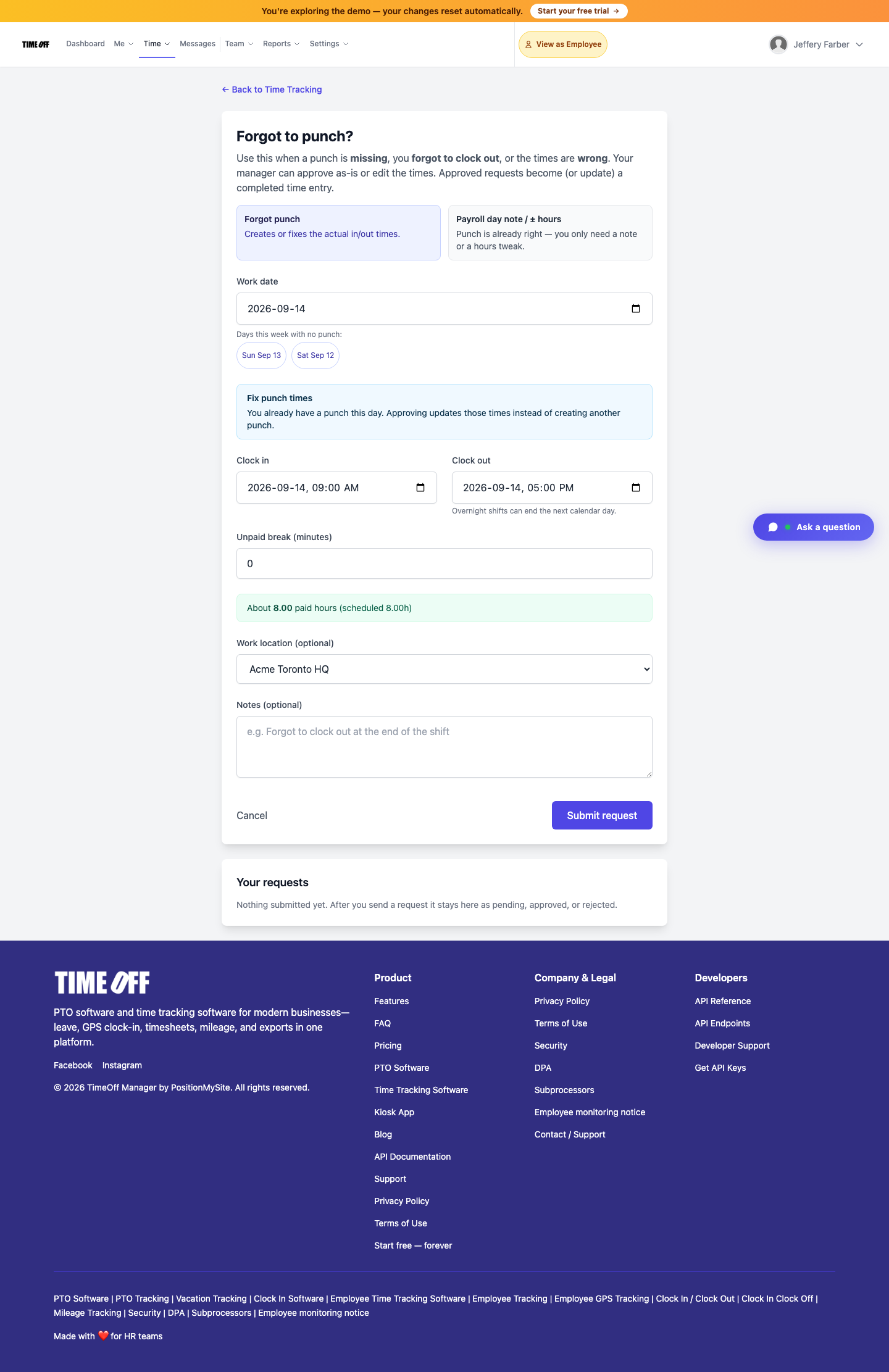
Missed clock-ins — Forgot to clock in reconstructions when clock times were missing or wrong. Employees submit; managers approve (or edit) here.
Mileage — trip routes and reimbursement amounts waiting for a yes/no.
Day notes / ± hours — Payroll day notes when clock-ins are already right and you only need a note or a small hours tweak. Employee path: /timesheet/payroll-adjustment. Admin review also lives at /admin/payroll-adjustments. Both can surface in Approval Center.
Leave-only queue still exists
Need a dedicated leave list with full PTO context? /admin/requests remains the leave-only queue. Year roll-up stays at /admin/summary. Approval Center does not replace those—it is the mixed dashboard inbox for everything pending, soonest first.

Who uses Approval Center (and who does not)
- Managers — usually their direct reports
- HR and company admins — wider queue
- Pure employees — never Approval Center. They submit and watch My requests / My pending
On mobile, the same mixed inbox is More → Approvals in TimeOff Manager Pro (work email, same account as the website). Leave “needs you” remains a leave shortcut.
Distinct from kiosk, live map, and leave-only workflows
- Kiosk PIN clock-in is for on-time clock-ins at a door tablet—one person, one PIN. Never share PINs.
- Live staff map shows who is inbound or on site when live location is on.
- Leave-only at
/admin/requestsis still available when you want PTO-only focus.
Approval Center is the place you clear the mixed backlog—not a replacement for clocking in on time or tracking who is on site.
How to open it (real product path)
- Sign in as a manager, HR, or company admin
- Click the yellow Pending Approvals card—or go to
/dashboard#approval-center - Use tabs to filter by leave, mileage, missed clock-in corrections, or payroll notes
- Approve or reject in place (or open View on mileage for detail)
- On Pro: More → Approvals for the same mixed inbox
Full product walkthrough: Approvals inbox & leave queue.
Clearing the queue without losing context
Open All Pending when you want the soonest items first—or switch to Leave / Mileage / Missed clock-in corrections / Payroll notes when you are batching one type. Leave cards show balances and who else is off; mileage shows route and dollar amount; missed clock-in corrections and payroll notes stay out of the leave-only queue so they are not buried under vacation noise.
Forgot to clock in reconstructs missing or wrong clock times. Payroll day notes annotate hours when clock-ins are already right. Both can land here so managers do not bounce between /admin/requests, chat threads, and a side spreadsheet before payroll export.
Who this is for
- Ops and site managers clearing leave + clock-ins + mileage before the next crew starts
- HR that wants one pending queue instead of four tools
- Companies already on TimeOff Manager clock-in and leave who still bounce between email and spreadsheets for approvals
- US and Canada field / hourly teams where request types mix every week
Start your 1 year free trial (then Starter, Growth, or Scale)
See Approval Center on your own company workspace—dashboard and TimeOff Manager Pro.
You get a 1 year free trial and pay $0 for 12 months. A card starts the year. Nothing is charged until then. Cancel before your anniversary and you owe nothing; otherwise choose Starter, Growth, or Scale based on seats and features. Register at https://timeoffmanager.us/register/company.
FAQ
What shows up in the Approval Center?
One inbox for leave, missed clock-ins, mileage, and day notes / ± hours, sorted soonest first. Tabs filter by type so you can batch similar items.
Where do employees submit missed clock-ins?
Employees use Forgot to clock in (path /timesheet/forgot-punch). Managers clear those requests in the Approval Center—different job, same platform.
Is Approval Center the same as the leave-only queue?
No. Approval Center is the mixed inbox at /dashboard#approval-center. The leave-only queue at /admin/requests is for leave alone.
Does approving here replace clocking in on time?
No. Kiosk PIN and GPS clock-in are for on-time clock-ins. Approval Center clears the mixed backlog after the fact.
Can Pro users see the same queue on mobile?
Yes. TimeOff Manager Pro shows the same mixed Approvals queue (More → Approvals). Pure employees use My requests / My pending.
Related: Help: Approvals inbox · Forgot to clock in · Payroll day notes